




Quick answer: the best social media automation tool for each need
There is no single best social media automation tool, so pick by need. Buffer is cheap per channel at $5, though Publer costs less per social account. Hootsuite or Sprout Social suit enterprise teams with approvals and social listening. Later plans Instagram and TikTok visually, SocialPilot suits agencies on a budget, and Zoho Social sits in the Zoho suite. Metricool pairs analytics with scheduling on a free plan, and Publer has the widest free plan. Agorapulse covers community management and a shared inbox. Make or Zapier automate visually between social networks and other apps, and Latenode builds custom cross-posting and AI-caption workflows.
Prices below carry the billing period and unit each vendor lists. If posts will come from a sheet, a CRM or code, check the connector table near the end first: Sprout Social, Later and Zoho Social have no native Zapier app.
What social media automation tools do in 2026
The core jobs repeat across vendors: a queue that publishes at set times, cross-posting with per-network variants, content recycling, approval steps before anything goes live, a shared inbox for comments and messages, analytics and reports, and AI help with captions and hashtags. Our guide to business process automation tools compares workflow, iPaaS and BPM platforms.
Vendors fall into three groups. Schedulers and management suites own the calendar and the shared inbox, while analytics-first tools like Metricool lead with reporting and add publishing. Workflow platforms like Make and Zapier connect the social APIs to a CRM, a spreadsheet or an AI model, and leave the posting logic to you.
Meters differ more than features do: vendors charge per channel, profile, social set, brand, user, scheduled post or AI credit, so every price below names the unit it uses.
Social media automation tools at a glance
| Tool | Best for | Meter | Entry price |
|---|---|---|---|
| Buffer | Cheap per-channel plans | Channels | Free, $5 per channel |
| Hootsuite | Big teams, listening | Users | $99 per user |
| Sprout Social | Enterprise analytics | Seats | $79 per seat |
| Later | Instagram, TikTok plans | Social sets | $18.75 a month |
| SocialPilot | Agencies on a budget | Accounts, users | $17 a month |
| Zoho Social | Zoho suite users | Brands | Free, $10 a month |
| Metricool | Analytics plus posting | Brands | Free, $20 a month |
| Publer | Widest free plan | Social accounts | Free, $4 per account |
| Agorapulse | Shared inbox | Users, profiles | $79 per user |
| Make | Visual scenarios | Credits | Free, $9 a month |
| Zapier | Widest app coverage | Tasks | Free, $19.99 a month |
| Latenode | Custom cross-posting | CPU seconds | Free, $0.00012 per sec |
Each section adds the billing period, minimum unit and currency. Latenode is the automation platform that publishes this blog.
Which networks each tool publishes to
The table tracks nine networks: Facebook, Instagram, LinkedIn, X, TikTok, YouTube, Pinterest, Threads and Google Business Profile. Make, Zapier and Latenode reach whatever their app catalogs connect, so the table covers the nine schedulers.
| Tool | Of the nine | Notes |
|---|---|---|
| Buffer | All nine | Also Bluesky, Mastodon and Substack |
| Hootsuite | All nine | Google Business Profile through its Google My Business app; also WhatsApp |
| Sprout Social | All nine | Google Business takes What's New and event posts only; also Bluesky, Reddit and Snapchat |
| Later | Seven | No X or Google Business Profile; adds Snapchat |
| SocialPilot | All nine | Also Bluesky |
| Zoho Social | All nine from Standard | Free covers 6 channels: Facebook, X, Instagram, a LinkedIn profile and page, and Google Business Profile |
| Metricool | All nine | Free leaves out LinkedIn and X, and X needs a paid add-on |
| Publer | All nine | X only on paid plans; also Bluesky, Mastodon and Telegram |
| Agorapulse | All nine | Also Bluesky |
1. Buffer: best for cheap per-channel scheduling
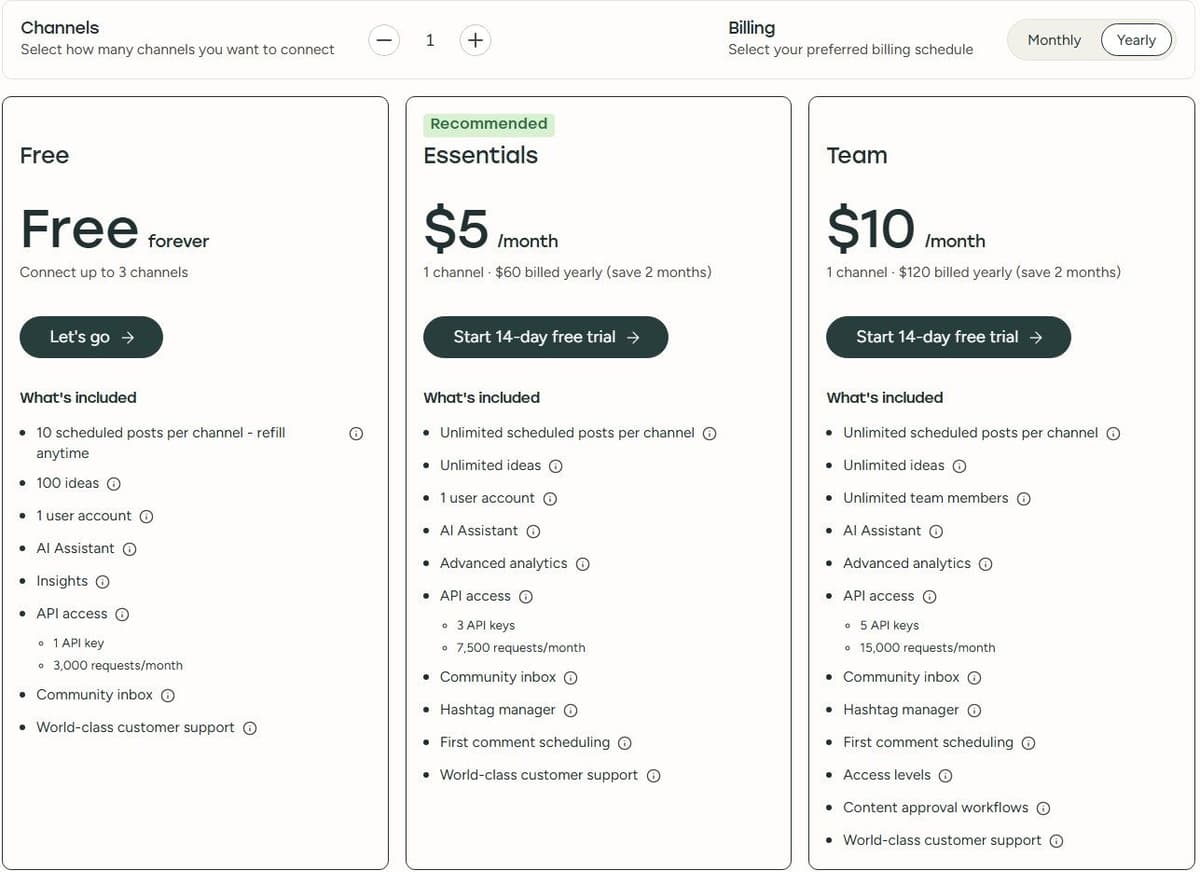
Buffer meters by channel, one channel being one connected social account, minimum one channel. The Free plan is free forever with 3 channels, 10 scheduled posts per channel, 1 user and the AI Assistant, with a slot freed when a post publishes.
"Free forever ... Connect up to 3 channels ... 10 scheduled posts per channel - refill anytime ... 100 ideas ... 1 user account ... AI Assistant ... API access ... 1 API key 3,000 requests/month"
Source: buffer.com
Essentials is $5 per channel per month, printed as $60 billed yearly per channel, and adds unlimited scheduled posts per channel and advanced analytics after a 14-day free trial. Team costs $10 per channel per month, shown as $120 billed yearly, and adds unlimited team members, content approval workflows and access levels. Unlimited scheduling sits under a fair use cap of 5,000 posts per channel.
Buffer's FAQ calls annual billing 20 percent off, while the cards on the same page call that yearly deal two months free, closer to 17 percent: treat it as two months free. Pricing was last updated in November 2025, and the per-channel prices above are the yearly-billing rates.
2. Hootsuite: best for larger teams with listening and approvals
Hootsuite bills per user seat, minimum one seat. Standard is $99 per user per month on annual billing for up to 10 social media accounts. Professional, at $199 per user per month on annual billing, brings unlimited social accounts, inbox automation and custom reports. Advanced costs $399 per user per month on annual billing and adds content review and approval, message routing and team performance measurement. Every plan has a free 14-day trial, taxes excluded.
Hootsuite's FAQ repeats $99, $199 and $399 for those plans and says the trial needs no credit card. It also confirms monthly billing exists and costs more per user, but names no amount.
3. Sprout Social: best for enterprise analytics and care
Sprout Social bills per seat. Essentials is $79 per seat per month on annual billing, or $99 per seat billed monthly, and connects up to 5 social profiles. Standard is $199 per seat per month on annual billing, as the pricing page states, with 5 social profiles, the consolidated inbox, keyword and location monitoring and the Trellis AI agent. Professional, at $299 per seat per month on annual billing, adds unlimited social profiles, message tagging, competitor and paid insights, and Enhance Post by AI Assist. Advanced costs $399 per seat per month on annual billing and adds Enhance Reply by AI Assist, sentiment in the Smart Inbox, the Sprout API and helpdesk integrations. Enterprise is quoted as Custom.
No month-to-month rate appears for Standard, Professional or Advanced. The only monthly figure belongs to Essentials, which charges 25 percent more per seat when billed monthly. The trial runs 30 days with no credit card on annual billing.
4. Later: best for Instagram and TikTok visual planning
Later meters by social set and by profile. A social set is one profile of each supported network, and posts count per social profile per month, counted when scheduled rather than published. Every figure here is a yearly-billing rate, after a 14-day trial.
Starter is $18.75 a month billed yearly for 1 social set of 8 profiles, 1 user, 30 scheduled posts per profile and 5 AI credits. Growth costs $37.50 a month billed yearly for 2 social sets of 16 profiles, 2 users, 180 posts per profile, 50 AI credits, the social inbox and approvals. Scale is $82.50 a month billed yearly for 6 social sets of 48 profiles, 4 users, unlimited posts and 100 AI credits.
On Growth and Scale an extra social set is $11.25 a month, an extra user $3.75 and 100 AI credits $3.75, all yearly-billing rates. One credit gives three ideas or one caption. Later's FAQ prices that seat at $5, so name the billing cycle either way.
5. SocialPilot: best for agencies on a budget
SocialPilot counts social media accounts and users. Prices sit before taxes and save 15 percent on annual billing. SocialPilot's FAQ says payment is taken in US dollars, and the plan lineup can differ by region, so confirm the plan names and prices on socialpilot.co before buying. Essentials is $17 a month billed annually, or $20 billed monthly, for 5 social media accounts, 1 user and 500 AI credits. Standard runs $34 billed annually, or $40 monthly, for 10 accounts, 3 users and 1000 AI credits, and adds the social inbox and team collaboration. Premium is $85 billed annually, or $100 monthly, for 20 accounts, 6 users and 5000 AI credits, with client approval and white label reports. Ultimate costs $170 billed annually, or $200 monthly, for 40 accounts, unlimited users and unlimited AI credits. Enterprise, which adds API access and single sign-on, is quoted by sales.
An extra social account is $4 a month and an additional user $5 a month. There is no free plan, only a free 14-day trial without a credit card.
6. Zoho Social: best inside the Zoho suite
Zoho Social meters by Brand, one Brand being one set of all the social channels a plan covers. Plan prices below are billed annually, taxes extra.
Free is $0 for 1 Brand of 6 social channels, 1 member and 5 AI credits. Standard is $10 a month billed annually for 1 Brand and 40 AI credits. Its card prints two channel counts in one label, 13 and 14, so confirm before buying. Professional is $30 a month billed annually, with extra Brands at $14.50 and extra members at $10 each per month, capped at 5 add-on Brands. Premium costs $40 a month billed annually for 1 Brand, 3 members and 80 AI credits, with extra Brands at $19.50. Its channel label also prints two counts, 15 and 16.
Agency is $230 a month for 10 clients, Agency Plus $330 for 20, and five more clients $76 a month, all billed annually. The 15-day trial needs no credit card and drops to the free plan. The page carries a Monthly and a Yearly toggle, with Yearly marked as a 33 percent saving, and the plan prices above are the Yearly rates. The add-on rows print both: an extra Brand is $17 a month or $14.50 billed annually on Professional, $23 or $19.50 on Premium, an extra member $12 or $10, and five more clients $92 or $76.
7. Metricool: best analytics plus scheduling with a free plan
Metricool meters by brand, where a brand is a business, brand or customer with one profile per social network or ad platform. Prices exclude VAT.
The Free plan is $0 a month for 1 brand, 20 scheduled posts a month, 5 competitor profiles and 30 days of analytics, with LinkedIn and Twitter/X unavailable. Starter starts at $20 a month on annual billing for 5 brands, with 10 brands at $36; billed monthly, $25 and $45. Advanced runs from $53 for 15 brands, $85 for 25 and $159 for 50 on annual billing; billed monthly, $67, $107 and $210. The annual tab saves up to 24 percent.
Paid publishing is unlimited under the fair use policy, and Twitter/X needs a paid add-on. The comparison table prints AI allowances of 5, 20 and 35 credits per brand per month across four plan columns, so they cannot be tied to named plans.
8. Publer: best free plan for small accounts
Publer prices by social accounts plus additional members, chosen on sliders, and gives every tenth account and member free. The owner does not count toward the member limit.
Free is free forever with 1 user, 1 workspace, 3 social accounts excluding Twitter/X, 10 scheduled posts per account, 25 drafts and 24 hours of post history. Professional is $4 per social account per month billed yearly, or $5 billed monthly. It adds unlimited scheduling, drafts and workspaces plus Twitter/X after a free 7-day trial. Business is $8 per social account per month billed yearly, or $10 billed monthly, and adds unlimited AI prompts, analytics, competitor analysis and API access after a 14-day trial.
Both rates assume the slider defaults, one social account and no extra members, so the figure climbs as you drag. Yearly billing takes 20 percent off, VAT is added, and Publer publishes no credit number for those AI prompts.
9. Agorapulse: best for community management and a shared inbox
Agorapulse bills per user, a user being a team member, and counts profiles, a profile being a connected social account. Standard, Professional and Advanced each include 10 social profiles, Custom unlimited, and extra profiles cost $10 or $15 a month each, again unlabelled. Ad accounts and analytics do not count.
Standard is $79 per user per month paying annually against $99 paying monthly, the $240 a year the card promises. It covers unlimited scheduling, one inbox and basic reports. Professional shows $119 and $149, saves $360 a year and adds link in bio, product tagging and ad comment moderation. Advanced shows $149 and $199, saves $600 a year and adds labels, saved replies and automated moderation.
The trial runs 30 days with no credit card, and Agorapulse says users can stay on a free plan afterwards. That plan appears only in a FAQ answer: the pricing page has no free-plan card and no limits.
10. Make: best visual automation between social networks and other apps
Make counts credits, its renamed operations, with plans and prices unchanged. For non-AI apps and third-party AI apps such as OpenAI, Anthropic Claude and Gemini, one operation equals one credit. Modules that use Make's own AI Provider also include token usage. A scenario that reads a sheet row, writes a caption and posts to three networks spends a credit per module run.
The Free plan is $0 a month with up to 1,000 credits a month, the visual builder, 3,500+ apps, routers and filters, and a 15-minute minimum interval between runs. Free credits expire at the end of the term. Core is $9 a month for 10,000 credits with yearly billing, or $10.59 with monthly billing. It adds unlimited active scenarios, scheduling down to the minute, higher data transfer limits and the Make API. Bigger bundles cost more: on yearly billing 20,000 credits are $16 on Core, $29 on Pro and $53 on Teams, and 300,000 credits $182.16, $268.54 and $510.22.
11. Zapier: best app coverage for social triggers and actions
Zapier counts tasks: each successful action step in a Zap is one task. Trigger steps, including polling checks for new data, do not count. Neither do Filter or Paths steps, steps that error or never run, or Tables, Forms, Formatter and Delay steps.
The Free plan is free forever at $0 a month with 100 tasks a month and unlimited Zap workflows. Zapier's pricing page lists two-step Zap workflows on the Free plan, so a free Zap is one trigger and one action connecting two apps. Polling triggers check every 15 minutes.
Zapier prices Professional on a task-tier table with separate annual and monthly columns. Its smallest paid tier, 750 tasks a month, costs $19.99 a month on annual billing or $29.99 a month billed monthly, as of September 17, 2026, and the page's own toggle calls the yearly option a 33 percent saving. It adds multi-step Zaps, unlimited premium apps and webhooks. Larger task tiers cost more, so set the selector to the volume you actually need before treating $19.99 as your bill.
12. Latenode: for custom cross-posting and AI-caption workflows
Latenode is a workflow platform, not a scheduler, so it has no content calendar or shared inbox. You build the posting logic in a visual drag-and-drop builder. Its pricing page lists an AI Copilot, an AI agent builder, 335+ LLM models under one subscription, webhook triggers, a built-in database, custom JavaScript nodes and a headless browser for sites without an API. Ask Latenode whether calling those models draws the PnP tokens described below, and keep model usage as a separate budget line until you know. Our guide to no-code automation tools compares visual builders and their meters.
"Usage-based: pay for workflow runtime in CPU seconds (runs x average seconds), not per operation and not per step. Workflow steps do not multiply the bill. First 10,000 CPU seconds are free every month on both plans."
Source: latenode.com
Billing runs on CPU seconds, runs multiplied by the average seconds a run takes, with no per-operation fees, so extra steps carry no separate charge, though a longer workflow uses more CPU seconds and so costs more. The first 10,000 CPU seconds each month are free on both plans. Free costs $0 a month forever with no credit card and covers 5 active workflows, 1 execution worker, a 3-minute limit per run and 3 days of execution history. Pay as you go has no base fee. It charges $0.00012 per CPU second from 10,001 to 100,000, $0.00011 from 100,001 to 200,000 and $0.00010 from 200,001 to 300,000. Nodes that call paid external providers draw PnP tokens, where 1 token equals $1, charged by actual provider usage.

How to automate social media in 5 steps
This flow takes a post from a spreadsheet row to a scheduler's queue, with a person approving it before it goes live. Buffer is the example because both Zapier and Make have a native Buffer app; the connector table further down shows which other schedulers work the same way.
- Set the source. Keep one row per post in Google Sheets with the text, link, image URL, target channels and a status column, and start the workflow when a row is marked ready. Zapier's polling triggers check every 15 minutes on Free and cost no tasks, while Make's scheduled triggers spend a credit on every check.
- Shape the post. Map the columns into the post fields, and add an AI caption step only if a person reads the result. On Zapier that extra step takes the Zap past the two steps Free allows, so it needs Professional, from $19.99 a month billed annually for 750 tasks.
- Send it to the queue. Zapier's Buffer app has an Add to Queue action that queues a post or sends it immediately to any Buffer channel, and Make's Buffer app creates a status update. Publer's Zapier action can publish, schedule or save a draft, and SocialPilot's adds a text or image post to its queue.
- Approve before it publishes. Buffer's Team plan, $10 per channel a month billed yearly, includes content approval workflows, and Buffer's Zapier app can create an Idea instead of a queued post. Agorapulse's Zapier app creates drafts, Publer's fires a trigger when a post is pending approval, and SocialPilot's can approve a post or send it back for correction.
- Watch for failures. Write the post ID back to the row and alert someone when a post fails: Metricool's Zapier app has a New Failed Post trigger, Publer's a Post Failed trigger, and Agorapulse's fires instantly when a post is published or fails.
Cost the flow on the workflow platform's meter. On Zapier, a sheet trigger plus Add to Queue uses one task per post, so Free's 100 tasks a month cover 100 posts while the Zap stays at two steps. On Make, each run spends a credit per module, and Free gives 1,000 credits a month and two active scenarios, but a sheet check every 15 minutes alone spends about 2,880 credits in a 30-day month, so the flow needs Core, $9 a month billed yearly for 10,000 credits, unless the check runs far less often. If you build flows like this for clients, our guide to starting an AI automation agency covers pricing and handoff.
What not to automate
Automate the queue, not the judgment. Replies to complaints, anything about safety, refunds or legal questions, and direct messages that need a decision should reach a person. Inbox tools help with triage rather than answers: Agorapulse adds automated moderation rules on Advanced, Hootsuite Professional automates inbox replies and workflows, and Sprout Social Advanced adds sentiment in the Smart Inbox.
Plan a stop switch for a crisis or a breaking-news day. Buffer's Zapier app includes a Pause Queue action, so an alert can halt a channel's scheduled posts until someone checks them. Read each network's automation rules too: X does not allow duplicative or substantially similar posts on one account or across accounts you operate, and it bars automated replies sent on keyword searches alone.
How to choose a social media automation tool
Start with two numbers: how many social accounts to connect, and how many people must touch them. Then check the meter. Buffer bills per channel, Hootsuite and Agorapulse per user, Sprout Social per seat, Later per social set and profile. Metricool and Zoho Social bill per brand, Publer and SocialPilot per social account, and workflow platforms per credit, task or second of runtime.
Free plans and trials solve different problems. Free plans on Buffer, Publer, Metricool, Zoho Social, Make, Zapier and Latenode run a small setup forever under a post, channel, credit or runtime cap. Trials test a paid workflow: 14 days on Buffer, Hootsuite, Later and SocialPilot, 15 on Zoho Social, 30 on Sprout Social and Agorapulse.
Pay for approval workflows and a shared inbox only if the team will use them: they push you up a tier almost everywhere. Watch analytics depth too: custom reports and competitive benchmarking sit above the entry plan. Where an extra seat costs more than the job it does, a workflow platform metered by runtime or tasks can carry the posting. Test with your own accounts before signing an annual plan.
If clients only need to review and approve posts, price the approval step rather than a full seat for each client. Buffer's Team plan, $10 per channel a month billed yearly, includes unlimited team members and content approval workflows, and SocialPilot adds client approval on Premium, $85 a month billed annually with 6 users and 20 accounts. On tools billed per user, such as Hootsuite and Agorapulse, ask whether a client who only approves needs a paid seat before you add every client. One user on r/SocialMediaMarketing described the need: "My clients really only need to log in, review the content, and approve it."
Which tools work together and which replace each other
Schedulers replace each other. Buffer, Hootsuite, Sprout Social, Later, SocialPilot, Zoho Social, Publer and Agorapulse own the same calendar, queue and inbox, so running two means paying twice for one job. Pick one and move your channels in.
Analytics can sit beside any of them. Metricool leads with reporting and adds publishing, so a team can keep it for reports while another tool posts, at the cost of a second bill.
Workflow platforms sit next to a scheduler rather than replacing it. Make, Zapier and Latenode can feed a scheduler: they take a row from a sheet or a new post and push it into the queue, or post straight through the social APIs. Latenode covers that layer with a visual builder, AI Copilot, 335+ LLM models under one subscription, webhook triggers, a built-in database and custom JavaScript nodes, billed in CPU seconds with no per-operation fees. It has no calendar or inbox.
When posts are generated by code, the scheduler's API is the hand-off, not a person pasting into the calendar. Buffer includes API access on every plan: 1 API key and 3,000 requests a month on Free, 3 keys and 7,500 requests on Essentials, and 5 keys and 15,000 requests on Team. Publer lists API access on Business, and Sprout Social puts the Sprout API on Advanced at $399 per seat a month on annual billing. One user on r/b2bmarketing described the gap: "We generate a lot of posts programmatically and somehow the last step is still someone copying everything into a social scheduling tool."
APIs and Zapier or Make apps by tool
Before you connect a sheet, a CRM or code to a scheduler, check which way in it offers: its own API, a native Zapier app or a Make app.
| Tool | Own API | Zapier | Make |
|---|---|---|---|
| Buffer | Every plan, from 1 key and 3,000 requests a month | Add to Queue, Pause Queue, Create Idea | Verified app: Create a status update |
| Hootsuite | REST API for a registered App Directory app | Schedule Message | Verified app, 29 modules |
| Sprout Social | Sprout API on Advanced, including publishing posts | No native app | Community app only |
| Later | No posting API on its plans | No native app | No app |
| SocialPilot | Enterprise plan | Every paid plan: add a post to the queue, approve a post | No app |
| Zoho Social | REST API for posts, drafts and approvals | No native app | No app |
| Metricool | Advanced plan, which also opens the Zapier and Make apps | New Failed Post, Add Post to Autolist | Vendor-verified app: Schedule a Post |
| Publer | Business plan | Create Post: publish, schedule or save a draft | No app |
| Agorapulse | Reporting API on Custom only | Advanced and Custom: Create Draft, instant triggers | No app |
Trigger speed matters once approvals are involved. On Zapier, the Buffer, Hootsuite, SocialPilot, Metricool and Publer triggers poll, every 15 minutes on Free, while Agorapulse's fire instantly. For a tool with no native app, Zapier points to webhooks, Custom Actions or Code by Zapier, and Webhooks by Zapier is a Premium app that needs Professional.




