



Quick verdict: Make.com vs Pabbly Connect
Make can cost less for a workflow that fits its free or low-priced credit tiers. Pabbly can offer a larger external-action allowance for a fixed subscription. Neither is universally cheaper "per unit," because credits and tasks count different work. Make's Router and Filter are free, so they must not be added as paid steps when estimating the difference.
Choose from the full monthly bill for a workflow you can actually build on both platforms. Then compare the editor, required actions, recovery behavior and team features.
Editorial note: Latenode publishes this article and is one of the products discussed. The comparison uses public product documentation and pricing pages. Worked examples are calculations under stated assumptions, not results from a hands-on benchmark. Recommendations describe which requirements a product may fit; they are not a measured ranking of performance or reliability.
Make.com vs Pabbly Connect at a glance
Short version first.
| Feature | Make.com | Pabbly Connect |
|---|---|---|
| Free plan | $0, 1,000 credits/mo | $0, 100 tasks/mo |
| Entry paid plan (10k/mo) | $9/mo billed annually | $16/mo billed annually |
| Billing unit | Per operation; AI varies | Task per app action |
| Not billed | Router and Filter; other documented exemptions apply | Triggers, internal steps |
| Lifetime deal | Not listed | From $349 one time |
| Apps, own count | 3,500+ apps | 2,000+ integrations |
| AI features | AI agents, Maia, MCP | AI assistant, MCP |
| Code steps | Python, JS (paid plans) | JavaScript, Python |
| Team members | Unlimited; Teams roles | Not on monthly plans |
Make vs Pabbly Connect vs Zapier
If Zapier is also on your list, here is how its published figures line up with the other two.
| Item | Make.com | Pabbly Connect | Zapier |
|---|---|---|---|
| Free plan | 1,000 credits/mo | 100 tasks/mo, 2 workflows | 100 tasks/mo, two-step Zaps |
| Entry plan, yearly | Core $9/mo, 10,000 credits | Standard $16/mo, 10,000 tasks | Professional $19.99/mo, 750 tasks |
| What is billed | Most module operations | Actions on external apps | Billable actions; triggers free |
| One-time plan | None listed | $349 to $1,298 | None listed |
| Apps, own count | 3,500+ | 2,000+ | 9,000+ |
For Zapier against each of them in depth, see Pabbly Connect vs Zapier and Make vs Zapier.
Pricing: credits versus tasks
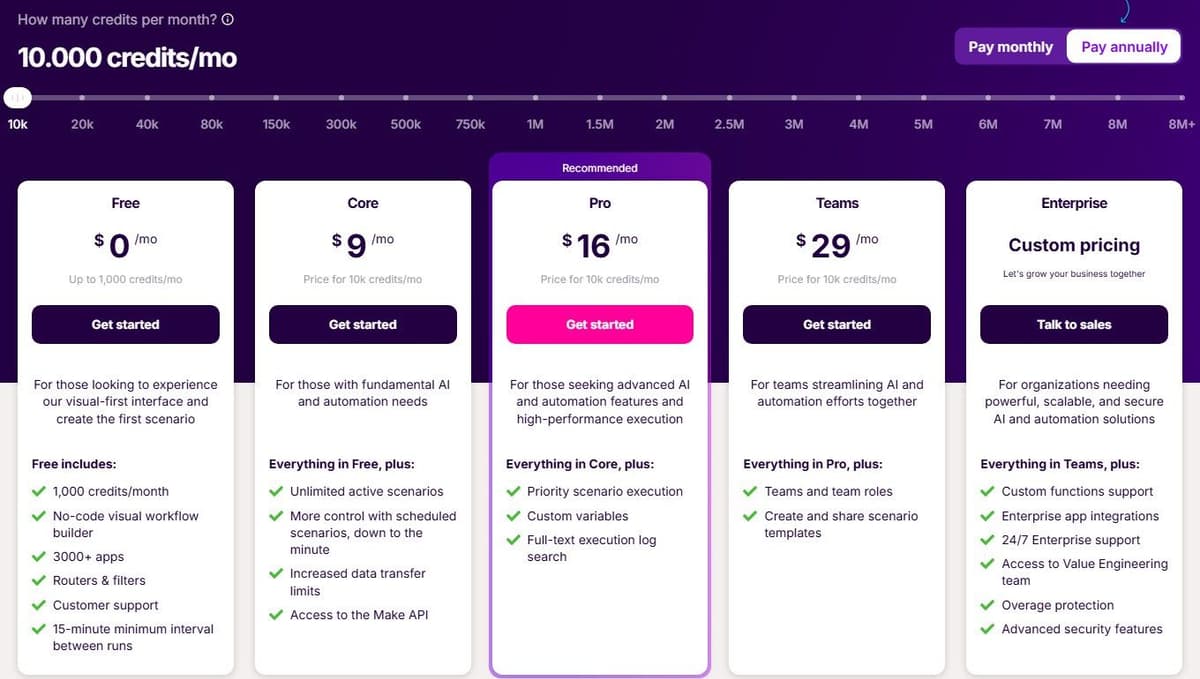
Make.com's Free plan is $0 a month: up to 1,000 credits a month, access to 3,500+ apps and a 15-minute minimum interval between scheduled runs. Those free credits expire at the end of the term. With yearly billing selected, the pricing page lists Core at $9 a month, Pro at $16 a month and Teams at $29 a month. Each carries 10,000 credits a month, and Core is where scheduling drops to the minute. Those are annual-billing figures. If you plan to pay month to month, check the vendor's pricing page for that rate. See Make.com pricing for every plan and credit tier. If Make itself is the tool you want to replace, see Make.com alternatives.
"Each action your scenario performs consumes a certain number of credits - most actions consume 1 credit, while some advanced features leveraging Make's AI Provider may use more."
Source: make.com
Run out before the next billing cycle and you can buy extra credits in bundles of 1,000 or 10,000 at a fixed price defined in your subscription. The Enterprise tier adds overage protection and advanced security features, and no Enterprise price sits next to the self-serve plans.
Pabbly Connect also starts at $0 a month: 100 tasks a month, no credit card required, capped at 2 workflows of up to 2 steps. The Standard plan carries 10,000 tasks a month at $16 a month billed annually, against a regular price of $19 a month. The same page shows deeper two-year and three-year discounts. The Unlimited plan gives unlimited tasks every month with all features at a regular price of $79 a month, and the page shows multi-year discounts down to $59 a month. For other options, see Pabbly Connect alternatives.
Pabbly Connect also sells one-time lifetime plans. Standard Lifetime is $349 for 3,000 tasks a month with feature restrictions. Ultimate Lifetime is $799 for 10,000 tasks a month with all features. Ultimate Plus Lifetime costs $1,298 for 20,000 tasks a month. Support is not included with Standard Lifetime or Ultimate Lifetime, and Ultimate Plus comes with one year of it. Team members are not available on monthly plans, which matters the moment a second person builds. See Pabbly Connect vs Zapier for a direct comparison.
Put the two entry plans side by side and the gap looks decisive: 10,000 credits for $9 a month billed annually against 10,000 tasks for $16 a month billed annually. The trap: the units are not the same thing. A Make.com credit is consumed by each ordinary module operation that runs. A Pabbly Connect task is counted only when an action is performed on an external app. One run of one workflow can spend several credits and a single task, which is why the cheaper sticker does not settle the bill.
What counts against the bill
Make's Router and Filter do not consume credits. Most ordinary non-AI module operations do, including trigger checks and actions that process incoming bundles. Branching can increase usage when additional actions actually run; adding a Router alone does not. AI features and Make Code have separate charging rules, so count the modules that execute rather than every item drawn on the canvas.
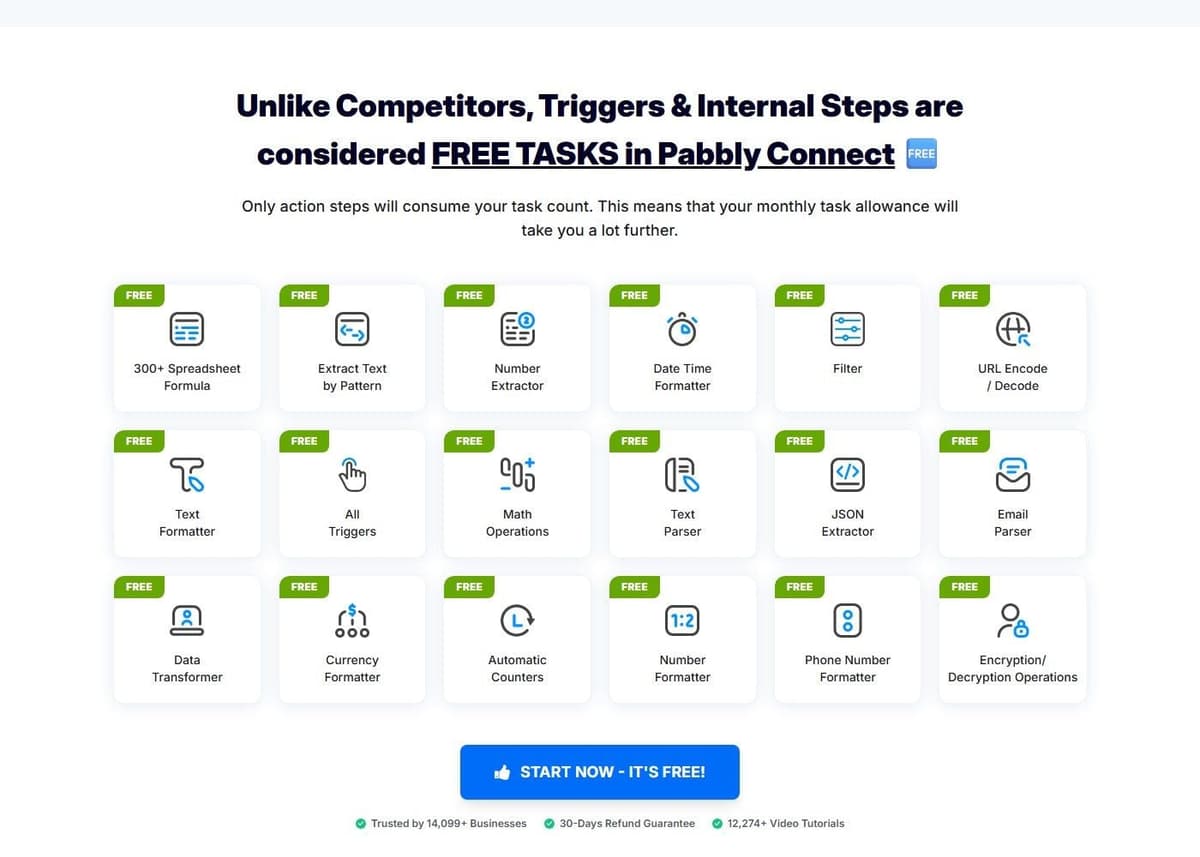
Pabbly Connect counts a task only when an action is performed on an external app. Triggers and checks for new data are not counted, and neither is the internal plumbing. Filter, Router, Text Formatter, Number Formatter, Schedule, Iterator, Date and Time formatter, Email Parser, JSON Extractor and Array Functions all run without touching the task balance.
What the same workflow costs
Consider one incoming event that creates a CRM record and sends a Slack notification. Each run produces one input item and completes both actions. The calculation excludes AI, code, retries, extra polling, searches and third-party app subscriptions. A filter that allows every item through adds no charge on either platform.
Under those assumptions, Make uses three credits per run: one trigger operation and two action operations. Pabbly uses two tasks. The table selects a plan with enough included capacity, with no overage purchases.
| Runs per month | Make credits | Make plan | Pabbly tasks | Pabbly plan |
|---|---|---|---|---|
| 50 | 150 | Free, $0 | 100 | Standard 10,000, $16 |
| 300 | 900 | Free, $0 | 600 | Standard 10,000, $16 |
| 1,000 | 3,000 | Core 10,000, $9 | 2,000 | Standard 10,000, $16 |
Paid prices are in USD with one-year billing: $108/year for Make Core and $16 a month billed annually ($194 a year at checkout) for Pabbly Standard. The figures exclude tax and assume the required connectors are available on the selected plans. Pabbly Free is excluded because its workflows are limited to 2 steps and this example needs a trigger plus two actions. Free-plan limits still apply on Make.
The cheaper option here holds for this workflow and these plans only. More actions, polling, AI or a different billing commitment can change the result.
What each builder can do
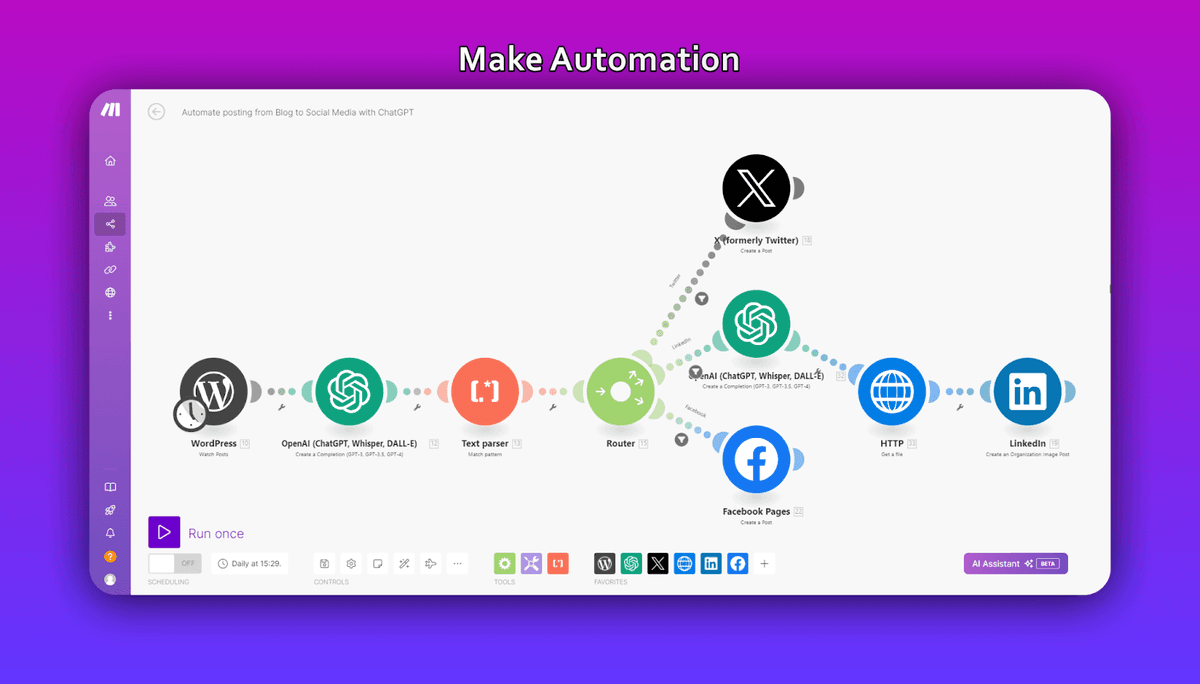
Make.com builds scenarios on a visual canvas, and most scenarios can hold an unlimited number of modules. Long chains do not hit a step ceiling. Zapier's comparison page credits Make.com's power-user reputation to unlimited routers, iterators and aggregators, which is a competitor's framing rather than a benchmark. The builder does match the description: branch with a router, walk a list with an iterator, collapse the results back with an aggregator. On paid plans the code app takes custom Python and JavaScript, and Enterprise plans add custom functions applied inline. Scenario Run Replay re-runs a workflow against historical data. Make.com's April 2026 comparison post listed If-else and Merge modules as in open beta.
Pabbly Connect builds multi-step workflows with the same branching vocabulary in a plainer package: routers, filters, iterators and formatters. Every one of them is an internal step that spends no tasks. It lists JavaScript and Python code modules, so custom logic is not gated away from the cheaper tool. Human-in-the-loop approvals sit on the same feature list, and that is the piece most buyers forget to check when they compare builders on branching alone. What is not published is a module ceiling per workflow beyond the free plan's 2 steps. So check the vendor's pricing page if you are planning very long chains.
App catalog and integrations
Make.com puts its catalog at 3,500+ apps by its own count, and the Free plan already includes access to all of them. Pabbly Connect claims 2,000+ integrations by its own count.
Catalog size is a starting point, not proof that an integration supports your workflow. Check the exact trigger, action, fields and authentication method you need. Also check who maintains the integration and where to report failures; do not assume every listed connector is maintained directly by the platform vendor.
AI, agents and MCP
Make AI Agents are available on all plans with Make's AI Provider. Connecting your own AI provider requires a paid Make plan. With a custom connection, Make charges for operations and the AI provider bills token usage separately. Agents are built, run and debugged inside the Scenario Builder. Uploading files gives them context, which skips assembling a retrieval workflow by hand. By Make.com's own count, agents orchestrate processes across 3,500+ apps. Maia, described by Make.com as a co-worker for AI and automation that turns plain language into automation and agents, is included in all plans. Make MCP Server points the other way, turning scenarios into callable tools for ChatGPT, Claude, Cursor and other MCP-compatible agents across 3,000+ apps and 30,000+ actions.
Pabbly Connect lists an AI assistant and MCP servers among its features. What it does not publish is which models sit behind the assistant, or whether AI steps carry charges of their own. So check the vendor's pricing page before you budget an AI-heavy build. On paper the two AI rows look similar. The difference: Make.com documents where agents are built and how they are exposed over MCP, while Pabbly Connect's page only names the features.
Speed, limits and teams
Scheduling separates the free tiers. On Make.com's Free plan scheduled scenarios run no more often than every 15 minutes. Core drops that to a minute, which the help center gives as the lowest regular setting. Webhooks sidestep the schedule: all plans include multi-step workflows and instant webhook execution.
Pabbly Connect's angle is unlimited operations: checks for new data are not counted as tasks, so a workflow can watch without spending the balance. The free plan is deliberately small, 2 workflows of up to 2 steps against 100 tasks a month. A minimum polling interval for triggers is not published beside those limits. So check the vendor's pricing page if trigger latency matters.
Seats are the other split. Pabbly Connect does not offer team members on monthly plans, so a multi-builder shop must commit for longer. On security, Pabbly states it is SOC 2 Type 2 and ISO 27001:2022 certified, which is the vendor's own statement rather than a published audit report. Make.com lists GDPR, SOC 2 Type II and ISO 27001 compliance, AES-256 encryption at rest and TLS 1.2 and 1.3 in transit. Make.com's pricing page also shows AWS hosting in the EU and North America. But that is one row on a pricing table and does not establish that every plan tier gets the same hosting.
Who should pick Make.com, and who should pick Pabbly Connect
For the stated two-action workflow at 1,000 events a month, the included-capacity comparison favors Make Core over Pabbly Standard. That is a result of this workload and annual pricing, not a general verdict on the platforms. Recalculate when adding polling, loops, extra actions, AI or a different subscription commitment.
- Branching-heavy scenarios: Make.com. Routers, iterators and aggregators sit on a canvas that holds an unlimited number of modules in most scenarios, and paid plans add Python and JavaScript. It is a builder you grow into rather than out of.
- High volume on a budget: Pabbly Connect. Formatters, parsers and iterators do not count as Pabbly tasks, and Router and Filter are free on both platforms. The Unlimited plan removes the ceiling at a regular $79 a month, with multi-year discounts down to $59 a month.
- Lifetime-deal buyers: Pabbly Connect is the only one of the two with a one-time option, from $349 for 3,000 tasks a month with feature restrictions up to $1,298 for 20,000 tasks a month. Read the restriction list on the cheapest tier before you buy.
- Agencies: count seats first. Pabbly Connect does not offer team members on monthly plans, so a multi-builder shop needs the longer commitment. Make lists unlimited users on every plan, and team roles start on Teams at $29 a month billed annually for 10,000 credits.
- Teams with access and compliance requirements: Make.com Enterprise adds SSO via OAuth2 or SAML2, role-based access controls, audit logs, a guaranteed 99.5% uptime SLA and 24/7 priority support with 2-hour response SLAs.
A third billing model sits outside this comparison. Latenode charges for workflow runtime in CPU seconds rather than per operation or per step, so adding steps to a workflow does not multiply the bill. The first 10,000 CPU seconds each month are free on both of its plans. Because the meter is run duration, its cost is not directly comparable to credits or to tasks. It favors workflows whose runs finish quickly.





