



Quick answer: the best Pabbly Connect alternative for each need
Zapier has the widest app catalog. Make is the pick for a visual builder. Integrately sells ready-made automations at a low entry tier, and Albato bills transactions without gating its app catalog by plan. Zoho Flow suits Zoho shops. Activepieces is the open-source, self-hosted option. Pipedream fits developers who want code steps and already use it: its Workflows product takes no new signups and shuts down on March 31, 2027. Latenode bills workflow runtime in CPU seconds instead of charging per step.
Compare the meter as well as the price. That is where the money actually goes. Pabbly Connect counts a task only when an action runs on an external app, so filters, routers and formatters cost nothing. The eight tools below count billable actions, credits, transactions, steps after a trigger or runtime seconds instead. Those units are not interchangeable. Read the meter first, then the sticker price.
Editorial note: Latenode publishes this article and is one of the products discussed. The comparison uses public product documentation and pricing pages. Worked examples are calculations under stated assumptions, not results from a hands-on benchmark. Recommendations describe which requirements a product may fit; they are not a measured ranking of performance or reliability.
Why teams look for Pabbly Connect alternatives in 2026
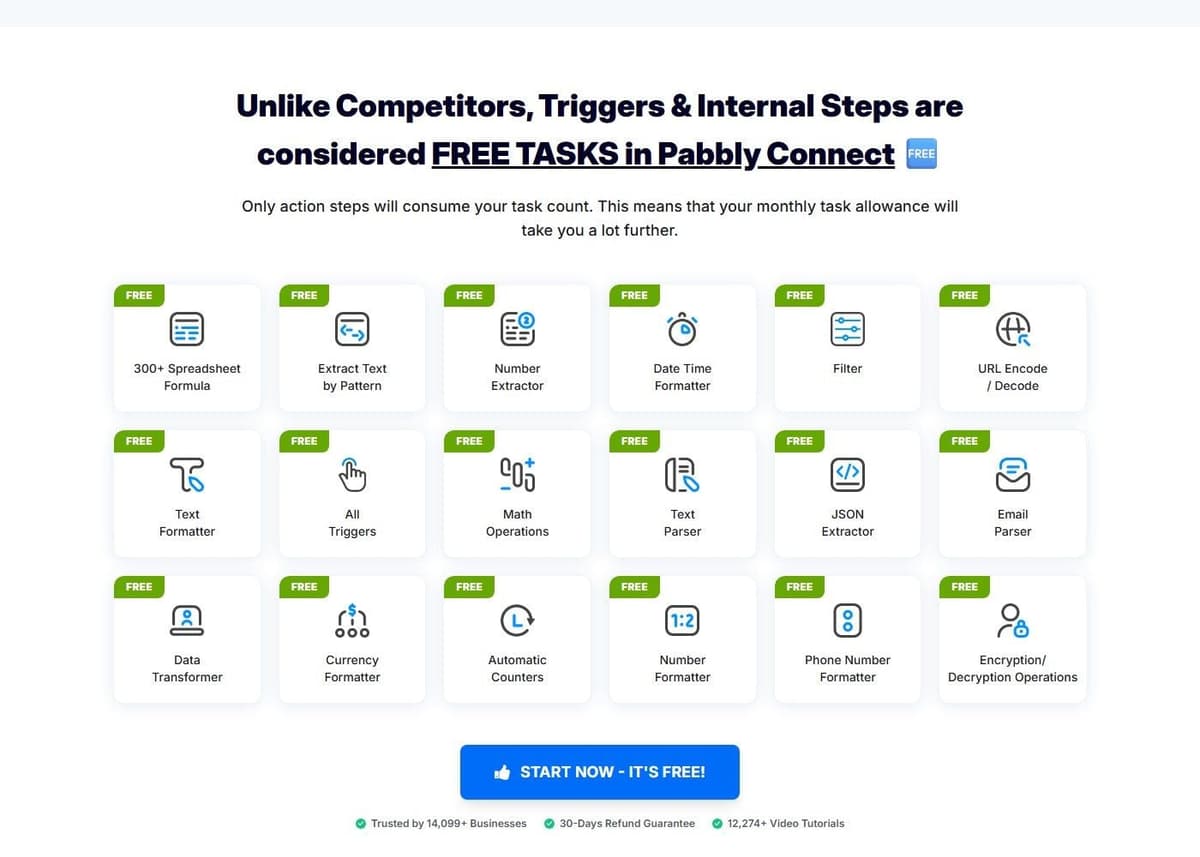
Pabbly Connect is cheap, and its free plan is usable for one small job rather than being a demo. It gives 100 tasks a month with no credit card, up to 2 workflows with up to 2 steps, and unlimited operations. A check for new data is not counted as a task. Internal steps are free too: Filter, Router, Text Formatter, Number Formatter, Schedule, Iterator, Date/Time formatter, Email Parser, JSON Extractor and Array Functions never touch the counter. A task is charged only when an action runs on an external app. The Pabbly Connect vs Zapier comparison covers pricing and task counting head to head.
"In a workflow, if a action is being performed on an external app, it will be considered as a task."
Source: pabbly.com
The paid plans stay cheap, and they meter differently. Standard covers 10,000 tasks a month at $16 a month billed annually, against a regular price of $19 a month, and longer multi-year commitments are discounted further. Unlimited is a separate plan with unlimited tasks and access to all features, at a regular price of $79 a month and multi-year pricing down to $59 a month. Pabbly also sells one-time lifetime plans at $349, $799 and $1,298, for 3,000, 10,000 and 20,000 tasks a month. The feature list includes JavaScript and Python code modules, MCP servers, human-in-the-loop approvals and an AI assistant. Pabbly reports SOC 2 Type 2 and ISO 27001:2022 certification, 2,000+ integrations and 14,099+ businesses as customers. All of that is its own statement rather than an audited or third-party figure. See Make vs Pabbly Connect for a direct comparison.
Reasons to leave Pabbly include a missing action, an unsuitable operating workflow or a billing commitment that no longer fits. Rising task volume is not, by itself, a reason to switch from Pabbly Unlimited: that plan does not use the same task ceiling as Standard. Identify the limitation in your current plan before comparing alternatives by entry price.
Pabbly's lifetime deal or a subscription
If you own or are weighing one of Pabbly's one-time plans, price it against a subscription before you compare alternatives. Standard Lifetime is $349 once for 3,000 tasks a month, with feature restrictions: 10 workflows, each limited to one trigger and one action. Ultimate Lifetime is $799 once for 10,000 tasks a month with all features. Ultimate Plus is $1,298 once for 20,000 tasks a month.
Three conditions come attached. Support is not included with Standard Lifetime and Ultimate Lifetime; Ultimate Plus includes a one-year support license, and support after that year costs a third of the original price. A one-time plan cannot be upgraded to another one-time plan. And its monthly task allowance stays fixed, so Pabbly points a business that outgrows it to its recurring plans.
The break-even is long. The Standard subscription gives the same 10,000 tasks a month as Ultimate Lifetime for $16 a month billed annually, or $194 a year at checkout. At that rate, $799 buys a little over four years of Standard ($799 divided by $194 is about 4.1). The lifetime plan comes out ahead only if you expect to stay on Pabbly longer than that, at a steady volume, without needing support.
None of the alternatives in this guide lists a lifetime or one-time plan on its pricing page as of October 2026; they bill monthly, annually or by usage. The closest thing to no recurring fee is Activepieces Community Edition, which is free to self-host while you pay for hosting and operations.
Pabbly Connect alternatives at a glance
Eight tools, in the order they are covered below. Cells are deliberately short. The detail sits in the sections that follow.
| Tool | Best for | Pricing model | Free tier |
|---|---|---|---|
| Zapier | Widest app catalog | Tasks, per action | 100 tasks a month |
| Latenode | Runtime billing | CPU seconds | 10,000 CPU seconds |
| Make | Visual scenario builder | Per operation; AI varies | 1,000 credits a month |
| Integrately | Ready-made automations | Tasks, per step | 100 tasks, single step |
| Albato | Unlimited apps | Transactions per step | 100 transactions |
| Zoho Flow | Zoho-based stacks | Tasks, priced by region | 100 tasks a month |
| Activepieces | Open source, self-host | Credits; CE unmetered | CE, or 1,000 credits/mo |
| Pipedream | Code-first workflows; closes Mar 31, 2027 | Credits per compute time | Closed to new signups |
CE in the table means Activepieces Community Edition, the free self-hosted edition without a credit meter.
Common Pabbly jobs, step by step
Take three typical jobs: writing a form entry to Google Sheets, picking up a new WooCommerce order and adding the buyer to a Mailchimp list. Six of the alternatives list each of these steps in their app directories.
| Tool | Google Sheets action | WooCommerce trigger | Mailchimp action |
|---|---|---|---|
| Zapier | Create Spreadsheet Row | Order | Add/Update Subscriber |
| Make | Add a Row | Watch Orders | Add/Update a Subscriber |
| Integrately | Create spreadsheet row | Order is created | Create/update subscriber |
| Albato | Create/update a row | Order created | Add subscriber to list |
| Zoho Flow | Create row | Order created | Add or update subscriber |
| Activepieces | Add Row | Order Created | Add or Update Subscriber |
A listed step does not settle the plan. Zapier's WooCommerce connection requires a paid extension, and its Order trigger covers orders that are created, updated or deleted, so set its trigger rule to new orders. A flow that writes to both Sheets and Mailchimp has two actions, which rules out Zapier Free, Integrately Free and Pabbly's free plan. Albato Free allows 2 steps per automation, so check whether its count includes the trigger. Pipedream is left out here because Workflows takes no new signups.
1. Zapier: best app catalog
Zapier has the broadest connector library here: more than 9,000 app integrations by its own count. If your stack includes something niche, look here first, then check the maintainer and support route for each required integration. Zaps can also carry a Code step in Python or JavaScript, so an odd data transformation does not push you off the platform. For a wider shortlist, see Zapier alternatives.
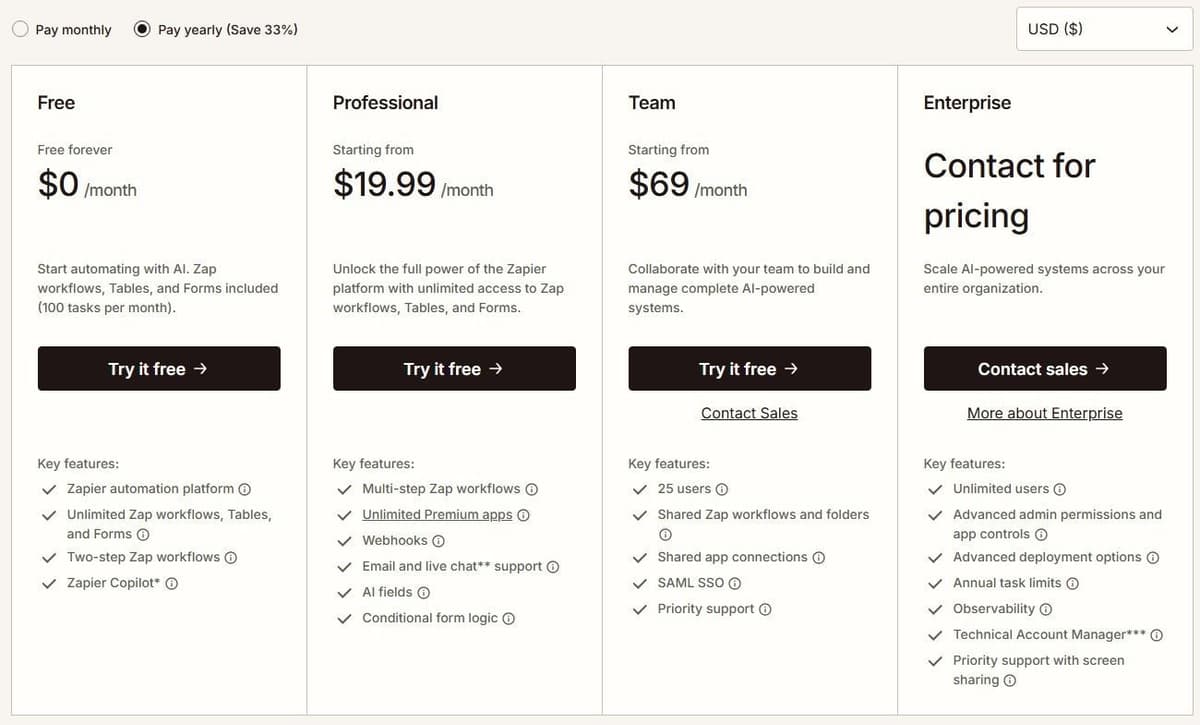
Free is $0 a month with 100 tasks a month, Zap workflows, Tables and Forms. Professional is $19.99 a month billed annually with 750 tasks a month, or $29.99 a month billed monthly. Zapier advertises a 33% discount for paying yearly. Enterprise pricing is not published and goes through sales.
Zapier charges tasks for successful billable actions, not every step in a Zap. Triggers, Filter, Paths, Formatter, Delay and Looping do not consume tasks. Actions inside a loop can still be billable. AI, extended Code runtime and MCP use their own rates. Zapier Agents has a separate activity allowance, so its usage should not be added to a Zap's task count.
Billable Zap actions, AI steps, Code steps and MCP calls use the account's task allowance at their applicable rates. Zapier SDK actions are free during the current beta. Using the SDK inside Code by Zapier does not remove the Code step's own task or runtime charges. One MCP tool call consumes two tasks. Busy accounts climb tiers quickly, so check the included allowance against your own volume.
2. Latenode: for runtime billing with code and AI
Latenode is a hosted low-code platform with a visual drag-and-drop builder, so there is nothing to self-host. What differs is the meter. It bills workflow runtime in CPU seconds, calculated as runs multiplied by average seconds, not per operation and not per step. Adding steps does not multiply the bill.
Free is $0 a month with no credit card: 10,000 CPU seconds, 5 active workflows, one execution worker, 3 minutes per run, 3 days of history and 10-minute polling. All apps, AI agents, RAG storage, headless browser and database are included. Pay as you go has no base fee and includes the same 10,000 CPU seconds, then charges $0.00012 per CPU second from 10,001 to 100,000, with lower rates higher up. It lifts the caps to unlimited active scenarios, 5 parallel workers, 10 minutes per run and 30-day history. Custom JavaScript steps, AI Copilot, an AI agent builder, a headless browser and 335+ LLM models come under one subscription.
One limitation: a bill that follows run duration is not directly comparable to tasks, credits or transactions. A slow workflow costs more than a fast one.

3. Make: best visual builder
Make is built around its canvas. A scenario is a chain of modules you see end to end, which makes branching logic easier to follow. It supports 3,500+ app integrations by its own count. The Make MCP Server turns scenarios into callable tools for ChatGPT, Claude, Cursor and other MCP-compatible agents across those apps and 30,000+ actions. Every plan includes multi-step workflows and instant webhook execution. For tools that compete with Make itself, see our Make.com alternatives guide.
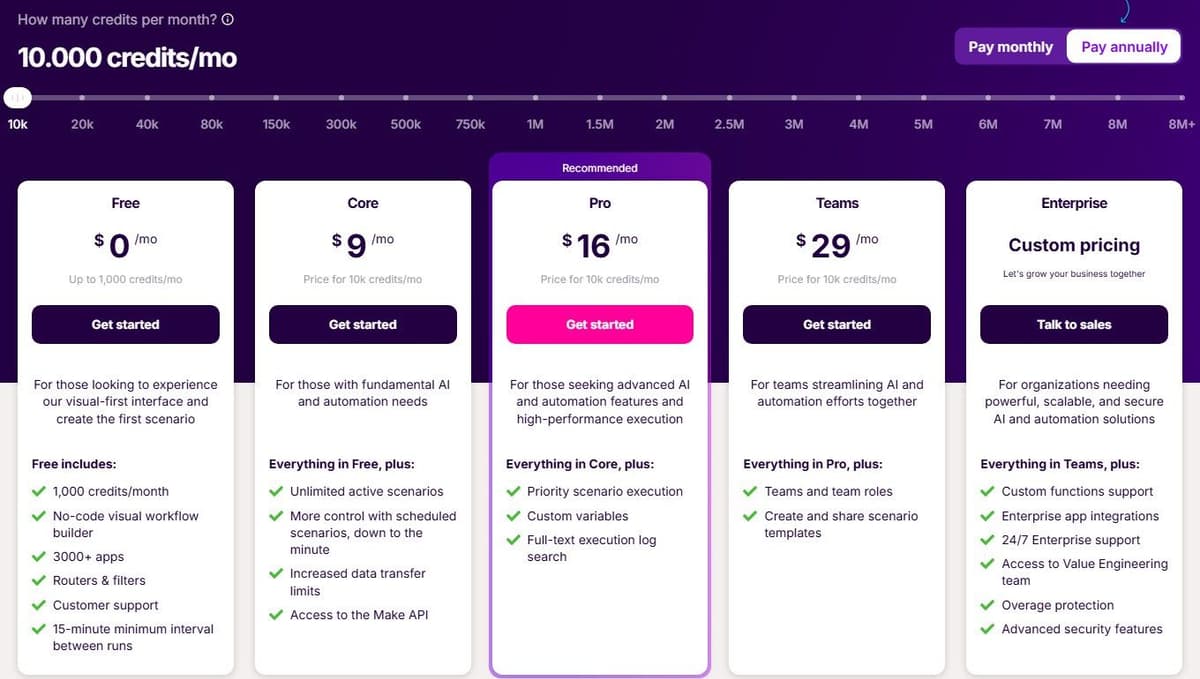
Free is $0 a month with up to 1,000 credits a month, but scheduled scenarios there run no more often than every 15 minutes. Core is the first tier that schedules down to the minute. Billed annually, Core is $9 a month, Pro is $16 and Teams is $29, each with 10,000 credits a month. The Make Code app runs custom Python and JavaScript on paid plans at 2 credits per second of code execution, and Enterprise adds Custom Functions applied inline.
Make's Router and Filter do not consume credits. Most ordinary non-AI module operations do, including trigger checks and actions that process incoming bundles. Branching can increase usage when additional actions actually run; adding a Router alone does not. AI features and Make Code have separate charging rules, so count the modules that execute rather than every item drawn on the canvas.
4. Integrately: best cheap task tiers with ready automations
Integrately sells speed of setup: 20 million+ ready automations across 1,500+ apps and 42,000+ customers, by its own count. For a common pairing you pick a prebuilt automation, connect two accounts and it runs. That suits operators who want the result rather than the build.
"Every successful execution of action, condition / branching, modify data (inline in an action or independent step), search (inline in an action or independent step) is counted as a task. Triggers are free. Failed actions are also NOT counted."
Source: integrately.com
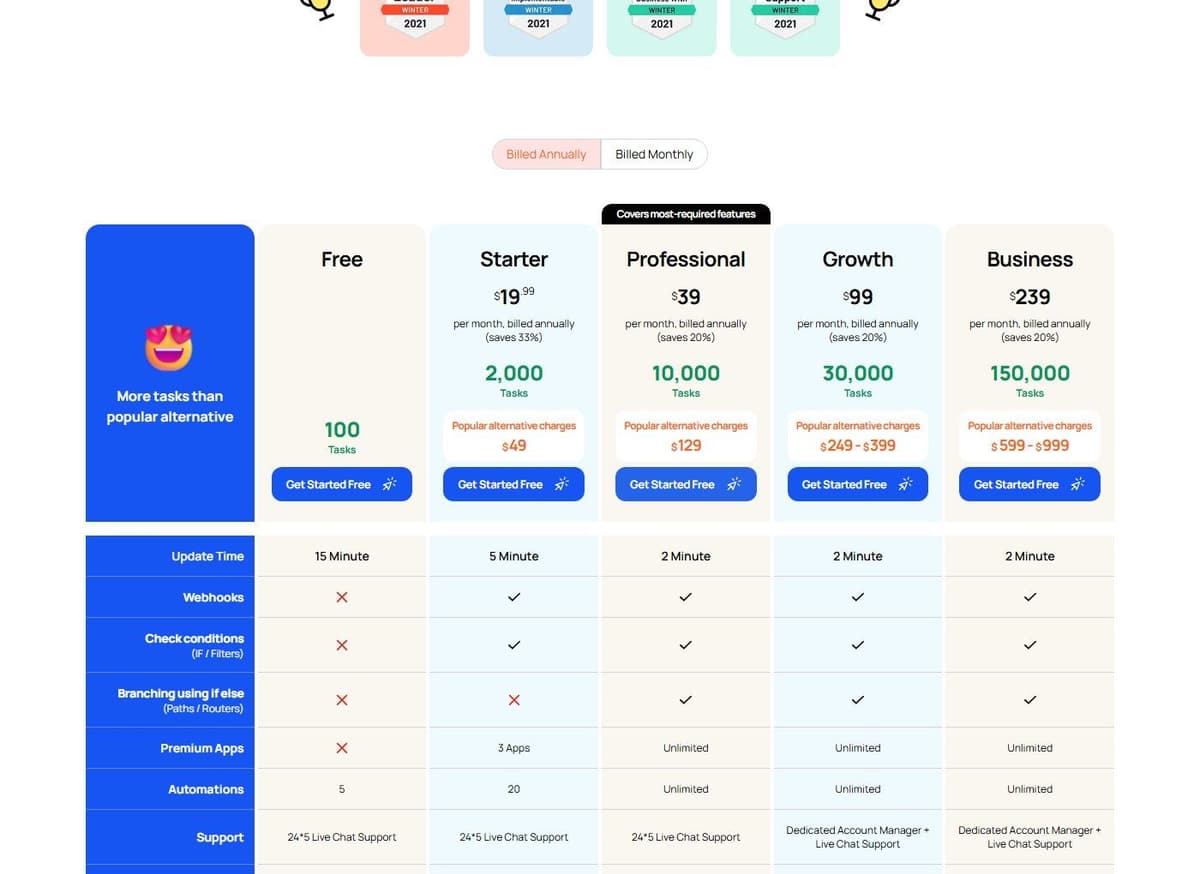
Free includes 100 tasks with single-step automations and a 15-minute update time. Webhooks, filters (check conditions) and branching are not part of it. Starter is $19.99 a month billed annually for 2,000 tasks and adds multi-step automations, webhooks, filters and a 5-minute update time. But it is capped at 3 premium apps, 20 automations and 1 user, and branching with paths or routers is still not included. There is a 14-day free trial. On the meter, every successful action, condition, modify-data or search step counts as a task. Triggers are free and failed actions are not counted.
The limitation is those Starter caps. Three premium apps, 20 automations and a single seat is a tight box for an agency. The only way out of it is a higher tier.
5. Albato: best transaction-based billing with unlimited apps
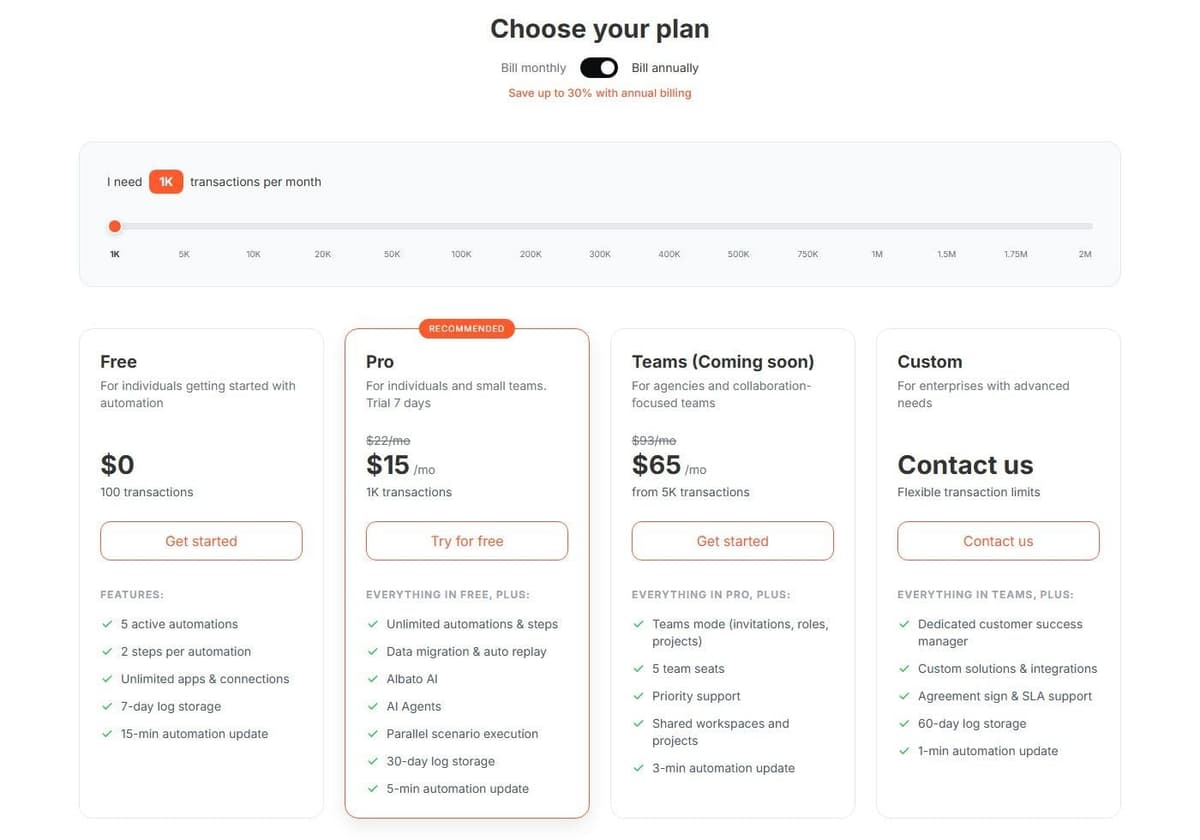
Albato connects 1,000+ apps and does not gate the catalog by plan. Even the free tier gets unlimited apps and connections. That matters when your stack is wide but each integration runs rarely. Free is $0 with 100 transactions a month, 5 active automations, 2 steps per automation, 7-day log storage and a 15-minute automation update time.
Pro is $15 a month billed annually, or $22 a month billed monthly, for 1,000 transactions. It removes the structural caps: unlimited automations and steps, data migration and auto replay, Albato AI, AI Agents, parallel scenario execution, 30-day log storage and a 5-minute update time. Extra transactions cost $0.0330 each, and transaction packages run up to 2M a month. A Teams plan is marked coming soon at $65 a month billed annually from 5,000 transactions with 5 seats, so treat that number as provisional. A Custom enterprise plan is quote-based. Albato advertises both a 7-day and a 14-day trial in different places, so confirm it before you plan around it.
The limitation is the unit. A transaction is counted for every automation step after the trigger. Long automations cost several transactions per run, even though triggers are free.
6. Zoho Flow: best for Zoho users
Zoho Flow makes the most sense inside a Zoho stack, where the other apps already sit in the same account and the integration work is mostly configuration. Zoho Flow describes itself as an AI-powered app integration and workflow automation platform. It follows the familiar Zoho pattern: a small permanent free tier, a generous trial and prices that change by region.
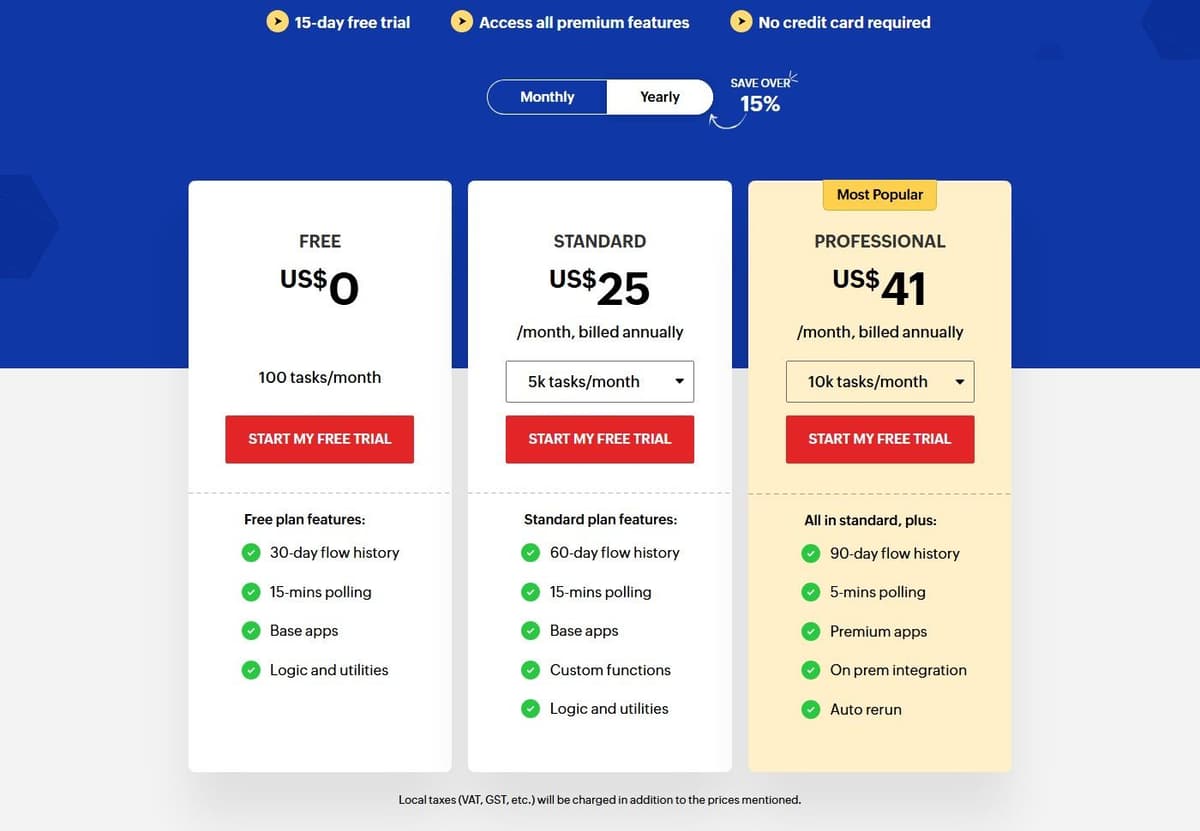
Free costs nothing. It includes 100 tasks a month, 30-day flow history, 15-minute polling, base apps and the logic and utilities set. A 15-day free trial opens all premium features with no credit card. Standard starts at 5,000 tasks a month and is priced by region and currency. In the United States it is $25 a month billed annually for 5,000 tasks. It then runs $31 for 10,000, $46 for 20,000, $80 for 50,000 and $105 for 100,000 tasks. Prices vary by region, so if you buy outside the United States, check the vendor's pricing page for your local figures.
Regional pricing is the limitation, and it makes budgets awkward to compare. Add a 15-minute polling interval on Free that rules out anything close to real time.
7. Activepieces: best open-source alternative
Activepieces is open source at the core. It offers 760+ integrations and can be embedded inside another product, so it can also serve as an automation layer under someone else's interface.
Activepieces Community Edition is a free, self-hosted option built on the MIT-licensed core. It has no credit meter or cap on runs and users. You pay for hosting and operations, and for any external services your flows use. Community Edition excludes features such as SSO, audit logs, projects and Git Sync. Its credit-metered plans cost the same on Activepieces' cloud or your own servers, and their credit allowances do not apply to the free Community Edition.
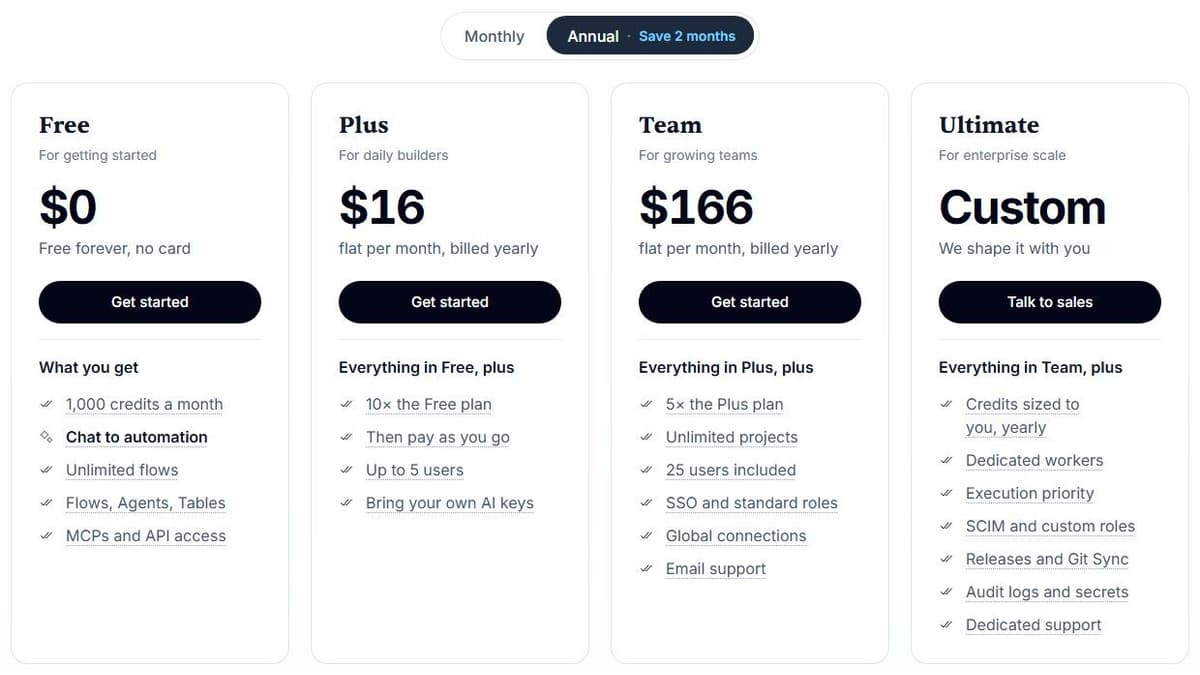
On the metered plans, Free gives up to 5 users 1,000 credits a month at $0. Plus is $16 a month billed annually with 10,000 credits a month for up to 5 users, Team is $166 a month with 50,000 credits for 25 users, and Ultimate is custom pricing. Overage on Plus and Team costs $0.007 per credit. Those plans include unlimited automations and every integration, and for ordinary steps one credit covers a whole run regardless of how many steps it contains.
The limitation is what AI does to that arithmetic. With Activepieces-supplied AI models, each AI step adds 2 credits for a fast model, 10 for a smart model or 20 for a frontier model; agentic actions add one credit each. On Plus and higher plans, using your own AI provider keys makes each AI step cost one Activepieces credit, with model usage billed separately by your provider. An agent-heavy flow drains a monthly allowance far quicker than a plain integration.
8. Pipedream: best for existing users who want code steps
Pipedream treats code as the default rather than the escape hatch. Workflow steps run Node.js, Python, Go or Bash next to 3,000+ app integrations. If your automation is really a small script that needs hosted execution and connected accounts, this is the shape that fits, for as long as Workflows keeps running.
Check the timeline before you build on it. Pipedream's documentation says Pipedream Workflows will shut down on March 31, 2027, and Pipedream is no longer accepting signups or subscriptions for Workflows; existing workflows keep running until that date. Pipedream Connect, which covers its Connect API, MCP Servers and API Proxy, is not affected.
Pipedream no longer sells Workflows plans. As of October 2026 its pricing page lists only Pipedream Connect plans: Free at $0 for building and testing in development, with no production environment; Startup at $99 a month billed annually, or $150 billed monthly, with 10,000 usage credits and 100 external users included, then $0.012 per credit and $2 per user a month; and Business at custom pricing on an annual contract. All Workflows data, including connected-account credentials and OAuth tokens, is deleted by April 30, 2027, so export what you need before then.
Pipedream Workflows already bills by compute: one credit covers up to 30 seconds at 256 MB for each workflow segment. A 35-second segment uses two credits; allocating 512 MB doubles the credit use for the same duration. Branches and pauses can create separately billed segments. Compare execution time, memory and segmentation, not simply "credits versus runtime." Pipedream Connect also has an external-user billing component, so a Workflows estimate does not price an embedded-auth deployment.
How to choose an automation platform
What the same workflow costs
Consider one incoming event that creates a CRM record and sends a Slack notification. Each run produces one input item and completes both actions. The calculation excludes AI, code, retries, extra polling, searches and third-party app subscriptions. A filter that allows every item through adds no charge on any of the three platforms.
Under those assumptions, Make uses three credits per run: one trigger operation and two action operations. Zapier and Pabbly each use two tasks. The table selects a plan with enough included capacity, with no overage purchases.
| Runs per month | Make credits / monthly plan | Zapier tasks / monthly plan | Pabbly tasks / monthly plan |
|---|---|---|---|
| 50 | 150 / Free, $0 | 100 / Professional 750, $19.99 | 100 / Standard 10,000, $16 |
| 300 | 900 / Free, $0 | 600 / Professional 750, $19.99 | 600 / Standard 10,000, $16 |
| 1,000 | 3,000 / Core 10,000, $9 | 2,000 / Professional 2,000, $49 | 2,000 / Standard 10,000, $16 |
Paid prices are in USD with one-year billing: $108/year for Make Core, $239.88/year for Zapier Professional 750, $588/year for Professional 2,000, and $194/year for Pabbly Standard at checkout. The figures exclude tax and assume the required connectors are available on the selected plans. Zapier Free is excluded because this example needs two actions after the trigger, making it a multi-step Zap. Pabbly Free is excluded for the same reason, because its workflows are limited to 2 steps. Free-plan limits still apply on Make.
The cheapest option here holds for this workflow and these plans only. More actions, polling, AI or a different billing commitment can change the result.
A lower advertised monthly price is not enough to establish a saving. Recalculate the same workflow under each product's task or transaction rules, including the monthly allowance and billing commitment. If the required integration, recovery behavior or team feature is missing, the cheaper tier is not a complete replacement.
Once the arithmetic is done, two questions decide the shortlist:
- Whether the apps you run on expose the exact trigger and action you need. Catalog size is a starting point: Zapier lists more than 9,000 app integrations, Make 3,500+, Pipedream 3,000+, Integrately 1,500+, Albato 1,000+ and Activepieces 760+.
- How team seats bill. Pabbly has no team members on monthly plans, Integrately Starter is one user, Activepieces Plus covers five, and Albato's five-seat Teams plan is still coming soon.
Seven of the eight run a permanent free tier open to new accounts; Pipedream's remaining Free plan is for Connect development only. Those allowances are counted in different units, so compare them against your own volume rather than against each other. Activepieces is the one you can run on your own hardware.




