



Quick verdict: Pabbly Connect vs Zapier
Pabbly Connect costs less per task at the entry level, and it counts a task only when an action runs on an external app. Zapier's meter also skips triggers, filters and several built-in steps, so compare the same external actions rather than assuming that every Zapier step costs a task. Zapier costs more per task but brings a far larger app catalog, faster polling on paid plans, Copilot on every plan and Agents. Pick Pabbly for volume on a budget, Zapier for coverage and AI.
Prices below carry their billing term, because both companies advertise a lower monthly number when you pay for a year up front.
Editorial note: Latenode publishes this article and is one of the products discussed. The comparison uses public product documentation and pricing pages. Worked examples are calculations under stated assumptions, not results from a hands-on benchmark. Recommendations describe which requirements a product may fit; they are not a measured ranking of performance or reliability.
Pabbly Connect vs Zapier at a glance
Short version: Pabbly Connect lists a lower price per task, and Zapier leads on catalog size, polling speed and AI tooling. Both meters exclude triggers and several internal steps, so the difference in billed work is smaller than the task prices suggest. Read the cells as starting points rather than plan summaries. Every line is expanded below, with its billing term and its caveats. Not published in a cell means the vendor gives no figure. Our guide to Pabbly Connect alternatives compares free plans and cheaper task tiers. If Make is on your list too, our Make vs Pabbly Connect comparison sets its credits against Pabbly's tasks.
| Feature | Pabbly Connect | Zapier |
|---|---|---|
| Free plan | 100 tasks, 2-step flows | 100 tasks/mo, 2 steps |
| Entry paid plan, tasks | $16/mo yearly, 10,000 | $19.99/mo yearly, 750 |
| What counts as a task | External app actions | Billable actions only |
| Lifetime deal | $349 to $1,298 one-time | None |
| App catalog (own count) | 2,000+ integrations | 9,000+ apps |
| AI features | AI assistant, MCP | Copilot, Agents, MCP |
| Polling speed | Not published | 15 min free to 1 min |
| Branching | Routers, any depth (own claim) | Paths from Professional: 3 nested, 10 branches |
| Team members | Yearly, lifetime only | 25 on Team plan |
| Code steps | JavaScript, Python | Python, JavaScript |
Where the two vendors' comparison pages disagree
Each vendor's comparison page makes claims about the other that the rival's own pricing and help pages contradict.
| Topic | Claim on the rival's comparison page | What the vendor's own pages say |
|---|---|---|
| Pabbly lifetime plans | Zapier: $249 to $699 one-time | Pabbly: $349, $799 or $1,298 one-time |
| Pabbly entry plan | Zapier: from $16 a month for 12,000 tasks | Pabbly: Standard, 10,000 tasks for $16 a month billed annually; its pricing FAQ still cites plans from 12,000 tasks |
| Filters and Paths | Pabbly: Zapier counts filters and routers as tasks, and Paths need a $74 a month plan | Zapier: Filter, Paths and Formatter use no tasks, and Filters and Paths come with Professional, from $19.99 a month billed annually |
| Schedule trigger | Pabbly: Zapier's minimum is 10 minutes, Pabbly's is 1 minute | Zapier: the Schedule app's shortest option is every hour; Pabbly: scheduling down to every minute |
| Polling | Zapier: Pabbly polls about 10 times slower than Zapier's 1 minute | Zapier: 15 minutes on Free, 2 on Professional, 1 on Team; Pabbly: no interval published |
| Team members | Zapier: Pabbly allows unlimited team members | Pabbly: unlimited, but not on monthly plans |
| MCP | Zapier: only on Pabbly's top Ultimate plan | Pabbly: on Unlimited, Ultimate Lifetime and Ultimate Plus, not on Standard or Standard Lifetime |
When the two disagree, the vendor's own pricing page and checkout decide what you pay.
Pricing head to head
Pabbly Connect's free plan gives you 100 tasks a month with no credit card required, capped at 2 workflows of up to 2 steps each. It includes unlimited operations, Pabbly's term for checks for new data that are never billed. Unlimited free internal tasks come with it too. The Zapier free plan limits are covered in a separate guide.
The paid ladder starts with Standard: 10,000 tasks every month, listed at $16 a month billed annually against a regular price of $19 a month, with deeper two-year and three-year discounts shown on the same page. Above it sits Unlimited, which removes the monthly task ceiling and includes all features, at a regular price of $79 a month, with multi-year discounts down to $59 a month. Team members are not available on monthly plans at all. That pushes any team that needs seats onto annual billing.
Then there are the lifetime deals. They explain why many people look at Pabbly at all. Standard Lifetime is $349 one-time for 3,000 tasks a month and comes with feature restrictions. Ultimate Lifetime is $799 one-time for 10,000 tasks a month with all features. Ultimate Plus Lifetime is $1,298 one-time for 20,000 tasks a month. The allowance renews monthly, so a lifetime plan is a recurring quota you paid for once.
All three were still on sale in October 2026. Support is not included with Standard Lifetime or Ultimate Lifetime; Ultimate Plus includes one year of it, and renewing support costs a third of the original price. For the break-even, Zapier Professional with 10,000 tasks a month costs $129 a month billed annually, so Ultimate Lifetime's $799 equals about six months of it. Against Pabbly's own Standard subscription, charged $194 a year at checkout for the same 10,000 tasks, $799 covers about 4.1 years.
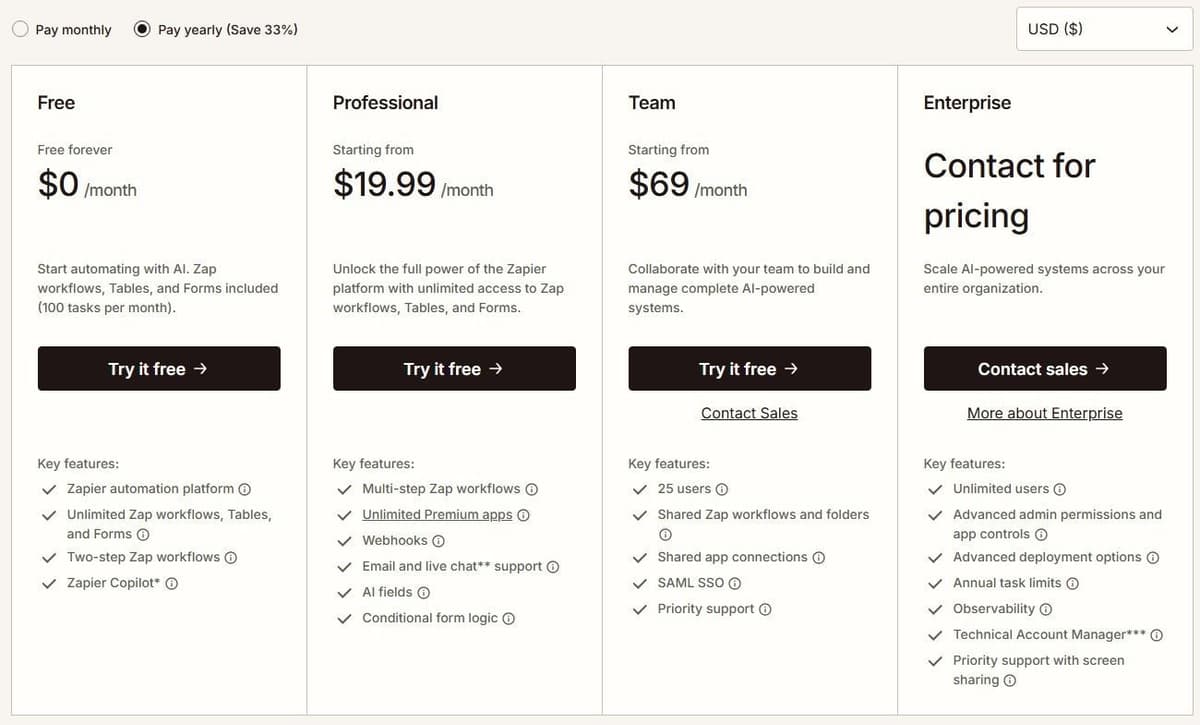
Zapier's Free plan is $0 a month with 100 tasks a month, unlimited Zap workflows, Tables and Forms, and two-step Zaps. Its cheapest paid plan is Professional at $19.99 a month billed annually, or $29.99 a month billed monthly, starting at 750 tasks a month. Zapier advertises a 33 percent discount for paying yearly. The Starter plan was retired on April 2, 2024, which left Professional as the entry point. If Zapier is not the right fit, our guide to Zapier alternatives compares other platforms.
Team adds 25 users. The Enterprise card lists unlimited users, and Enterprise is listed as contact for pricing on Zapier's own pricing page rather than published. Every new account gets a free 14-day Professional trial with no credit card. The task slider on paid plans runs up to 2 million tasks a month, and live chat support starts at the 2,000-task tier.
Side by side at the entry level, that is 10,000 tasks for $16 a month billed annually against 750 tasks for $19.99 a month billed annually. Nonprofits get 15 percent off any paid plan, excluding pay-per-task charges.
Pay-per-task pricing depends on the plan and billing cycle. Use the rate shown in the account's Billing settings rather than applying one multiplier to every customer. With pay-per-task turned on, total usage can reach three times the included task allowance before Zaps stop. For an upgrade decision, compare the larger plan's price with the current plan plus the expected excess tasks at that account-specific rate.
A quota can also run out early without any new business. One user on r/zapier put it this way: "it's only the 4th of the month and the quota is already screaming." Zapier does not count action steps that error or halt, so look first for successful actions that run more often than planned, such as an action inside a loop. If you would rather have Zaps stop than pay for overage, Zapier's help center says pay-per-task billing can be turned off, and Zaps then stop at the plan's task limit.
What the same workflow costs
Consider one incoming event that creates a CRM record and sends a Slack notification. Each run produces one input item and completes both actions. The calculation excludes AI, code, retries, extra polling, searches and third-party app subscriptions. A filter that allows every item through adds no charge on either platform.
Under those assumptions, Zapier and Pabbly each use two tasks per run. The table selects a plan with enough included capacity, with no overage purchases.
| Runs per month | Zapier tasks | Zapier plan and price | Pabbly tasks | Pabbly plan and price |
|---|---|---|---|---|
| 50 | 100 | Professional 750, $19.99 | 100 | Standard 10,000, $16 |
| 300 | 600 | Professional 750, $19.99 | 600 | Standard 10,000, $16 |
| 1,000 | 2,000 | Professional 2,000, $49 | 2,000 | Standard 10,000, $16 |
Paid prices are in USD with one-year billing: $239.88/year for Zapier Professional 750, $588/year for Professional 2,000, and $194/year for Pabbly Standard, the amount charged at checkout. The figures exclude tax and assume the required connectors are available on the selected plans. Zapier Free is excluded because this example needs two actions after the trigger, making it a multi-step Zap. Pabbly Free is excluded for the same reason, because its workflows are limited to 2 steps.
The cheaper option here holds for this workflow and these plans only. More actions, polling, AI or a different billing commitment can change the result.
Pabbly Connect pricing and Zapier pricing in one table
Pabbly pricing is a short ladder with lifetime options; Zapier pricing is a task slider with two billing bases. As of September 2026, citing only the figures each pricing page shows, the entry points compare like this.
| Plan | Pabbly Connect | Zapier |
|---|---|---|
| Free | 100 tasks, 2 workflows, 2 steps | 100 tasks, two-step Zaps |
| First paid, yearly | Standard $16 a month, 10,000 tasks | Professional $19.99, 750 tasks |
| First paid, monthly | Standard $19 regular price | Professional $29.99, 750 tasks |
| Next tiers | Unlimited $79 regular, $59 multi-year | $39 at 1,500 and $49 at 2,000 tasks |
| Team tier | Team members on annual plans only | Team $69 yearly, $103.50 monthly |
| One-time | $349, $799 or $1,298 lifetime | none |
Zapier's overage rule matters for the comparison: with pay-per-task enabled, Zapier's help center states that usage is capped at three times the plan's task limit, which on the 750-task Professional plan means a ceiling of 2,250 tasks a month.
What counts as a task on each platform
Here the two platforms really diverge, more than the sticker price does.
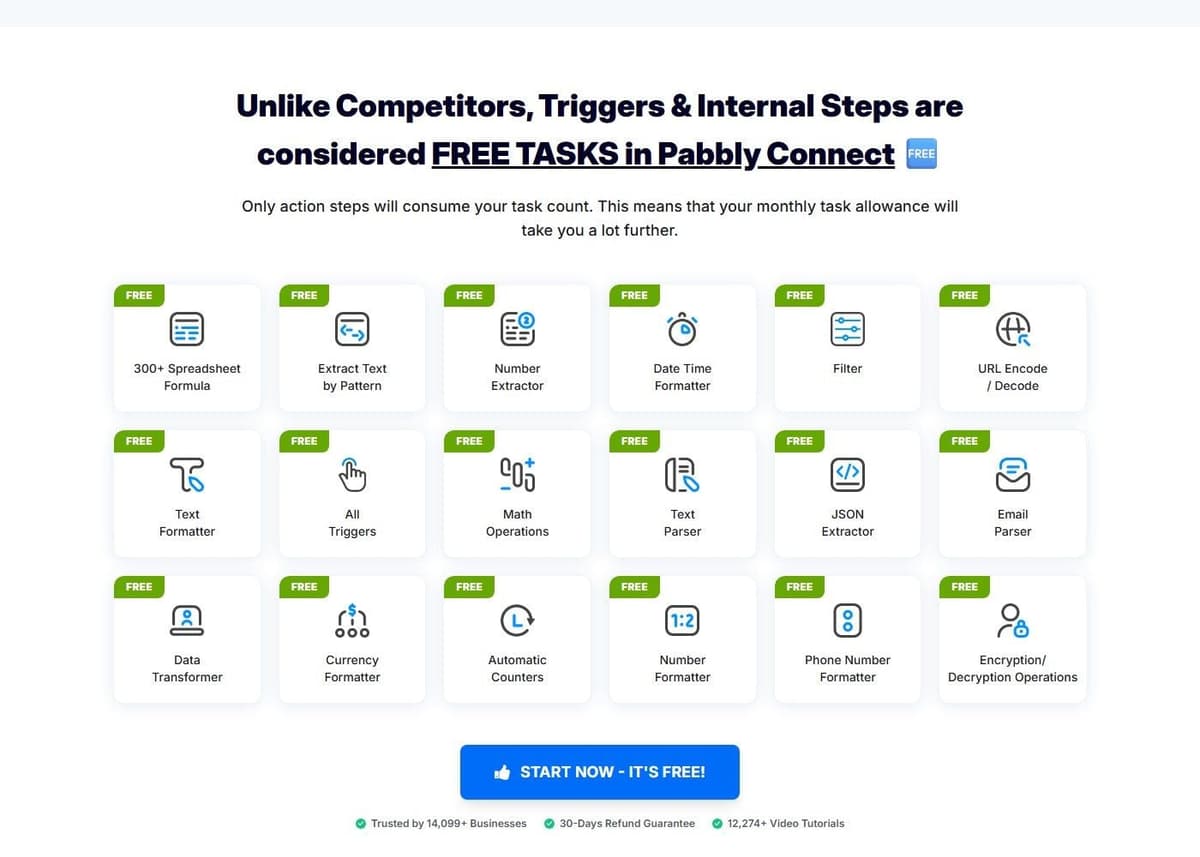
Pabbly Connect counts a task only when an action runs on an external app. Triggers do not count. Checks for new data do not count. Neither do the internal steps that make a workflow readable:
- Filter and Router
- Text Formatter and Number Formatter
- Schedule and Date/Time formatter
- Iterator and Array Functions
- Email Parser and JSON Extractor
Say a workflow catches a record, reformats three fields, routes on a condition and then writes to one external app. It is billed as a single task, because only the write leaves the platform.
Zapier charges tasks for successful billable actions, not every step in a Zap. Triggers, Filter, Paths, Formatter, Delay and Looping do not consume tasks. Actions inside a loop can still be billable. AI, extended Code runtime and MCP use their own rates. Zapier Agents has a separate activity allowance, so its usage should not be added to a Zap's task count.
Both platforms exclude important internal steps. Pabbly's free formatting and routing are useful, but they should not be compared with an assumption that every Zapier step costs one task. Start with the same external actions, then add only the platform-specific charges that actually apply.
App catalog and integrations
Pabbly Connect claims 2,000+ integrations by its own count. Zapier lists more than 9,000 apps by its own count. It also frames that catalog as larger than any other automation tool's, which is Zapier's own comparison claim rather than an independent finding.
Catalog size is a starting point, not proof that an integration supports your workflow. Check the exact trigger, action, fields and authentication method you need. Also check who maintains the integration and where to report failures; do not assume every listed connector is maintained directly by the platform vendor.
A four-to-one gap sounds decisive, and usually is not. Catalog size only matters if the specific apps you use fall inside the gap. For most small teams the stack is a CRM, an email tool, a payment processor, a spreadsheet and one or two internal systems, which both platforms cover. The catalog argument turns real when you depend on something long-tail: a regional payment gateway, a niche booking system, an industry-specific CRM.
When an app is missing on either side, the fallbacks have the same shape: webhooks, HTTP requests and code. Zapier lists webhooks among the Professional plan's key features. Pabbly Connect exposes code modules and MCP servers that can cover the same ground. Which plan opens which fallback varies, so check the vendor's pricing page before you count on one.
AI, code and MCP
Zapier Copilot, the AI building assistant, is available on every plan, with a daily message cap on Free that resets at 12:00 AM UTC. Zapier Agents Free includes 400 activities per month. An activity is not a complete agent run: one run can consume several activities. This allowance is separate from Zap task usage. Agents Pro is $400 billed annually, equivalent to $33.33 a month, for up to 1,500 activities a month. Chatbots Pro is $160 billed annually, equivalent to $13.33 a month, and supports up to 5 chatbots.
Code steps run Python or JavaScript inside a Zap. MCP is supported. Each MCP tool call costs two tasks from your quota. Since June 15, 2026, AI by Zapier steps are priced by model tier instead of a flat per-step rate. That model-based pricing is available on Professional, Team and Enterprise, though tool calls are not available on Enterprise accounts. As a guardrail, an AI step that reaches 75 tasks in a single run pauses the Zap for manual approval.
Pabbly Connect covers the same categories with less published detail: JavaScript and Python code modules, MCP servers, human-in-the-loop approvals and an AI assistant. Its page attaches no separate quotas, per-step prices or model tiers to any of them. If an AI capability is the reason you are considering the switch, check the vendor's pricing page and test the feature on the free plan before you commit money to it.
Speed, reliability and limits
Polling speed is the cleanest paid-plan difference on Zapier: 15 minutes on Free, 2 minutes on Professional, and 1 minute on Team and Enterprise. Paid plans let you set a custom interval per Zap. But if a workflow must react in seconds, a webhook trigger is the answer, not faster polling.
"Zapier's polling triggers can check for new data as often as every minute, but those checks aren't tasks. A task only happens when an action step actually runs."
Source: zapier.com
Zapier also publishes structural limits, and they matter before you design something ambitious. A Zap can hold up to 100 steps, with a maximum of 3 nested Path steps and up to 10 branches inside the same path group.
Pabbly Connect's angle is different. Its unlimited operations rule means checks for new data are not billed, so a workflow that watches a busy source does not burn quota just by looking for work. The free plan's ceiling is structural instead: 2 workflows with up to 2 steps, enough to test a single automation. Pabbly does not publish polling intervals the way Zapier does, so test the trigger you need before you assume a speed.
Security and team features
Pabbly Connect states that it is SOC 2 Type 2 and ISO 27001:2022 certified. That is Pabbly's own statement on its site rather than a published audit report. So if certification carries weight with your procurement team, ask for the report itself. The same page claims 2,000+ integrations and 14,099+ businesses as customers, both Pabbly's own figures. On seats, team members are not available on monthly plans, so a team that needs shared access is choosing between the yearly plans and the lifetime tiers. For the exact seat allowance, check the vendor's pricing page.
Zapier splits this by plan. The Team card lists 25 users, with shared Zap workflows, folders and SAML SSO. The Enterprise card lists unlimited users. Enterprise arrived in Zapier's 2024 pricing overhaul, built to scale automation across more teammates and departments with additional governance, and its pricing is a contract conversation rather than a published number. The seat math starts from the cards, so teams above 25 users should confirm seat terms with sales.
Who should pick Pabbly Connect, and who should stay on Zapier
Pick Pabbly Connect if you run high task volume on a small budget. The entry comparison is not close: 10,000 tasks a month for $16 a month billed annually against 750 tasks a month for $19.99 a month billed annually. Pabbly's meter counts only actions on external apps, and Zapier's meter skips triggers, filters and several built-in steps, so compare the same external actions before you price the move.
Pick Pabbly Connect if you would rather stop paying monthly. Lifetime plans run from $349 one-time for 3,000 tasks a month with feature restrictions to $1,298 one-time for 20,000 tasks a month, and every published Zapier plan is a subscription. Size the monthly ceiling against a year of real usage first, because it is fixed once the plan is yours.
Stay on Zapier if a long-tail app carries your workflows. 9,000+ apps by Zapier's own count against 2,000+ by Pabbly's own count only matters when your tool sits in the gap, and when it does, no price advantage rescues you. Stay on Zapier, too, if Copilot and Agents are part of how you build, if you need one-minute polling, or if you want live chat support from the 2,000-task tier. Teams above 25 users should confirm seat terms, because the Team card lists 25 users while Zapier's FAQ lists unlimited users on Team and Enterprise.
One more billing model deserves a look before you choose a side. Latenode charges for workflow runtime in CPU seconds, runs times average seconds, rather than per operation or step, so extra steps do not multiply the bill. The first 10,000 CPU seconds are free every month on both of its plans. The free plan runs 5 active workflows with a 3-minute limit per run, and the pay-as-you-go plan has no base fee and charges $0.00012 per CPU second in the 10,001 to 100,000 bracket. Because cost tracks how long a run takes, it does not map cleanly onto a task count. So model it against your own workflows.
Move one workflow without creating duplicate records
Start with a workflow whose inputs, outputs and owner are known. Map every trigger, action and field, then test the replacement against sample data in a sandbox or a separate destination. During parallel comparison, let only one platform write to production. Use the source event ID as an idempotency key and check how the destination handles repeated requests. Compare outputs, failures, latency and usage before switching the trigger. Keep the original workflow disabled but recoverable until the replacement has completed a normal business cycle.





