



Quick answer: is Zapier free in 2026?
Yes. Zapier's Free plan is free forever at $0 a month: 100 tasks a month, two-step Zaps, Tables and Forms, and Copilot with a daily message cap. New accounts also get a 14-day Professional trial, and you do not need a card. Paid plans start from $19.99 a month billed yearly for the smallest 750-task Professional tier, and monthly billing costs more.
What the Zapier Free plan includes
The Free plan does not run on a timer. Zap workflows, Zapier Tables and Zapier Forms are all included, with no limit on how many you create. It is a single-user plan, and the listed help channel is the Zapier Community. For a wider shortlist, see Zapier alternatives.
"The Free plan gives you 100 tasks per month to use between Zap workflows and MCP server actions"
Source: help.zapier.com
| Item | Free plan | Note |
|---|---|---|
| Price | $0 a month, free forever | One user per account |
| Tasks a month | 100 tasks a month | Shared with Zapier MCP tool calls |
| Steps per Zap | Two steps: one trigger, one action | Multi-step Zaps need Professional |
| Polling interval | 15 minutes | 2 minutes on Professional, 1 on Team |
| Apps and premium apps | No premium apps, no webhooks | Paid plan or trial only |
| Tables and Forms | 2,500 records, 10 form pages | These Zap steps use no tasks |
| Copilot (in beta) | Daily message limit | Resets 12:00 AM UTC, size unpublished |
| Agents activities | 400 activities a month | 10 per run, tests count |
| Chatbots | Free tier, 2 chatbots | 7 days of conversation history |
| Trial | 14-day Professional trial | 1,000 tasks, first 30 steps |
Zap steps for Zapier Tables and Forms use no tasks. Copilot (in beta) is available on every plan, and on the Free plan it has a daily message limit that resets at 12:00 AM UTC. Zapier warns you near 80% of the maximum but never publishes the number itself.
What the Free plan leaves out
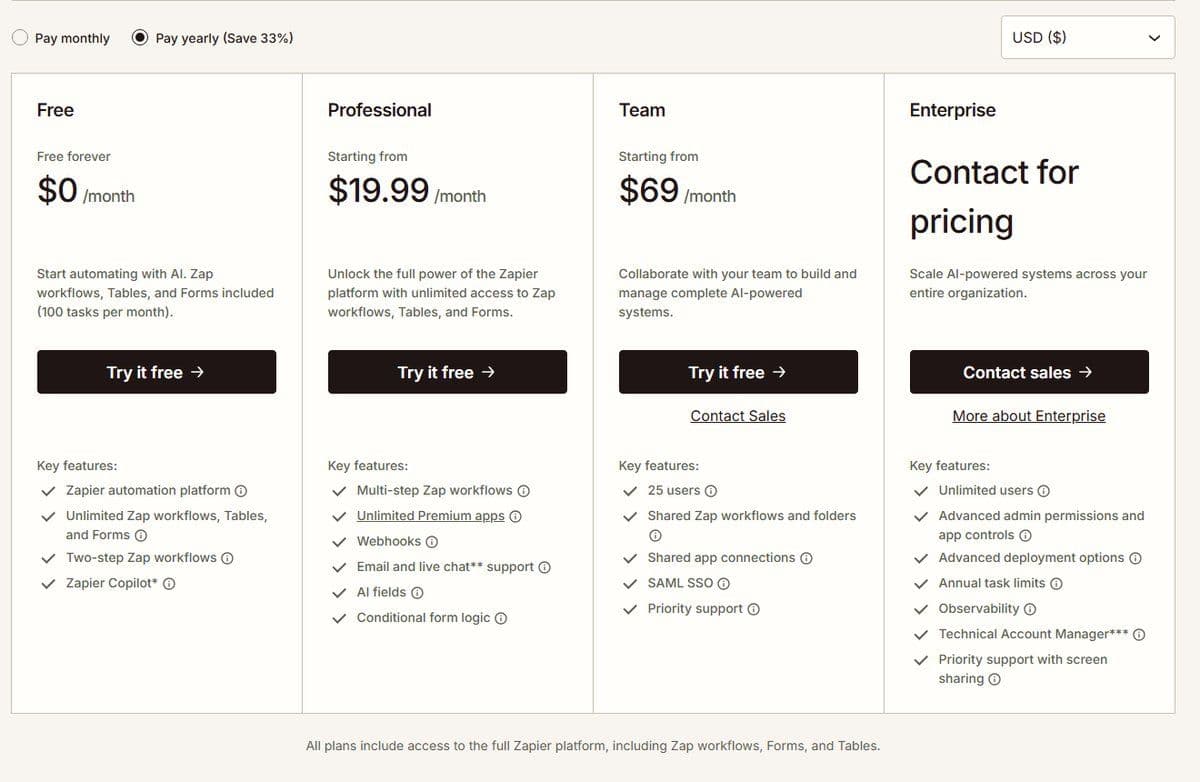
Zapier's plan comparison shows the ceiling most clearly, and these items sit outside Free.
- Multi-step Zap workflows, meaning more than one action in a Zap, need a paid plan; Professional adds them.
- Premium apps are available only on paid plans or during a free trial, and the comparison table gives Free no unlimited premium apps and no connections via webhooks.
- Webhooks by Zapier is itself tagged a Premium app in Zapier's app directory, and premium apps run only on a paid plan or during a free trial.
- Filters and Paths, Formatter and global variables are not on Free; they are available from Professional up.
- Faster polling: Free checks every 15 minutes, Professional every 2, Team and Enterprise every 1; paid plans customize the interval per Zap down to 1 minute.
- AI Fields and AI data enrichment in Zapier Tables are paid-plan features, and Zapier's plan comparison marks AI by Zapier unavailable on Free as well.
- Forms on Free have no dynamic filtering, no conditional form logic and nothing in the row Zapier labels Branding. Autoreplay and customized error settings are off too.
- Support: Free has no email support and no live chat. Both start at Professional, live chat only from the 2,000-task tier up, and priority support at Team.
Zapier free plan limits at a glance
Put together, the Zapier free plan limits look like this. Tasks: 100 a month, one shared pool that Zap workflows, AI steps, code, MCP and the SDK all draw on, and each successful MCP tool call spends two of them. Steps: two per Zap, one trigger and one action, according to Zapier's pricing page. Polling: every 15 minutes. Apps: no premium apps outside a trial. Copilot: on Free with a daily message limit that resets at midnight UTC. Zapier Agents: the free version includes 400 activities a month with a limit of 10 activities per run, and tests count toward the quota. Zapier Chatbots: as of September 2026 the free tier builds up to 2 chatbots. When the 100 tasks are gone, new Zap runs are held rather than lost and can be replayed from Zap History once tasks are available again. How tool calls are billed is covered in our guide to Zapier MCP pricing.
How long can you use Zapier for free
Indefinitely. The pricing page shows the Free plan as free forever at $0 a month, and nothing expires. The confusion comes from the first two weeks, which work nothing like Free.
Zapier automatically enrolls every new account in a free 14-day trial of the Professional plan, with no credit card required. It is a Pro trial, Pro being the name Zapier's help center gives the Professional plan, and it opens up the features of Zapier's individual plans, so multi-step Zaps and premium apps work. The trial has its own meter: a 1,000-task limit, and only the first 30 steps of a Zap will run.
It does not auto-upgrade. When the 14 days end the account downgrades to the Free plan, and paid features stop. So there are two separate things here: a 14-day window on a paid plan, and a free plan with no time limit.
What counts as a task on the Free plan
Zapier counts a task when a Zap successfully moves data or completes an action, and each successful action counts separately. Triggers never use tasks, and a Zap's first step is always a trigger. Polling for new data never uses a task.
"Held runs are paused and can be replayed from your Zap History once you have available tasks."
Source: help.zapier.com
According to Zapier's pricing page, which lists two-step Zap workflows on the Free plan, a Zap here is one trigger and one action connecting two apps. A successful run therefore costs one task, and 100 tasks means 100 completed runs a month. Filter and Paths steps sit outside the meter, and are not on Free anyway.
The pool is shared. Zap workflows, AI steps, Code by Zapier at 1 task per standard run, the Zapier MCP server and the SDK all draw on the same 100 tasks. An MCP tool call costs 2 tasks.
When the tasks run out, the runs are not lost, and there is no way to buy more: Zapier's plan comparison marks pay-per-task billing unavailable on Free, so you wait for the reset or upgrade. According to Zapier's pricing FAQ, Zapier pauses Zap workflows as soon as the task limit is reached, until the next usage period starts. The help center describes those runs as held, and held runs can be replayed from Zap History once tasks are available.
When Free stops being enough and what the next plan costs
Four things push people off Free, usually in this order: a third step, the first premium app or webhook, more than 100 tasks in a month, and the day a 15-minute delay stops being acceptable. A fifth is a second person, because Free and Pro allow one user only.
As of September 2026, the first paid step is Professional from $19.99 a month billed yearly. That is the yearly-billing price (Pay yearly, Save 33%) of the smallest 750-task tier. Monthly billing costs more: $29.99 a month. Professional adds multi-step Zaps, unlimited premium apps, webhooks, email support, AI fields and conditional form logic; live chat starts only at the 2,000-task tier.
Above that, price tracks volume: the task-tier selector runs from 100 tasks a month on Free through 750, 1.5K and 5K up to 2M tasks a month and a custom limit, with yearly labeled Save 33%. The step up is Team, as of September 2026 from $69 a month. That is the yearly-billing price of the entry tier, which the plan card lists as including 25 users, and monthly billing again costs more. Above Team sits Enterprise, which Zapier sells by quote: its card says Contact for pricing. Our full Zapier pricing breakdown has the plan-by-plan numbers.
Free plans on Zapier alternatives compared
Free tier against free tier is the useful comparison, and no two of these tools count the same unit.
| Free plan | Meter | Monthly allowance | Workflows or steps | Key limit | Upgrade price |
|---|---|---|---|---|---|
| Zapier Free | Tasks: successful actions | 100 tasks a month | Unlimited Zaps, 2 steps each | 15-minute polling, one user | From $19.99 a month billed yearly |
| Make Free | Credits: one per module action | 1,000 credits a month | 2 active scenarios, routers and filters included | 15-minute minimum run interval | Core $9 a month, check the toggle |
| Pabbly Connect Free | Tasks: actions in outside apps | 100 tasks a month | 2 workflows, up to 2 steps | Operations are not tasks | Paid plans not covered here |
| Activepieces Free | Credits | 1,000 credits a month, up to 5 users | Unlimited flows | At the cap, Free waits for the refresh | Plus $16 a month billed annually |
| Latenode Free | CPU seconds of run time | 10,000 CPU seconds a month | 5 active workflows, 3 min per run | 3 days of history, 10-min polling | No base fee, then $0.00012 a CPU second |
Make's Free plan costs $0 a month with up to 1,000 credits a month as of September 2026, with no time limit on the Free plan. Core, its cheapest paid plan, is $9 a month for 10,000 credits as of September 2026. Make's page carries a Pay monthly and Pay annually toggle, with annual labeled Save 15% or more, so check which one is selected before you buy.
Pabbly Connect's free plan gives 100 tasks a month with no credit card required, and allows up to 2 workflows with up to 2 steps. It also allows unlimited operations, which are checks for new data and do not count as tasks. Activepieces Free is $0 with 1,000 credits a month for up to 5 users, and Plus is $16 a month billed annually. Our Pabbly Connect vs Zapier comparison covers the paid tiers on both sides.
Activepieces Community Edition is a free self-hosted edition: the MIT-licensed core with unlimited flows and users and no credit meter, but without projects, single sign-on, audit logs or Git Sync. You pay only for the server it runs on.
The units do not line up. A Zapier task is one successful action, so three actions cost three tasks per run. A Make credit is one module action, near enough the same idea. Pabbly counts an operation as a check for new data rather than an action, and does not count it as a task at all. Latenode's Free plan costs $0 a month forever with no credit card required and includes 10,000 CPU seconds every month. It bills workflow runtime in CPU seconds rather than per operation or per step, so extra steps do not multiply the bill. That makes it not directly comparable to a task count.

Zapier Agents, Chatbots and MCP on the Free plan
These three sit beside the task allowance rather than inside it.
Zapier Agents has a forever-free tier, priced separately, that runs automated behaviors up to 400 times a month. Zapier counts usage in activities: one per agent trigger, knowledge-source answer, action, web browse or scrape, web search or Chrome-extension message. On Free your tests count too. Free allows 10 activities per run against 40 on Agents Pro. None of it touches the Zapier task allowance.
Zapier Chatbots is priced separately too. As of September 2026 its free tier is free forever and builds 2 chatbots with instructions custom to the business, 7 days of conversation history and the GPT-4o mini and GPT-3.5 models.
Zapier MCP is the exception. It is available on all Zapier plans with no separate billing, and it spends 2 tasks from the same allowance as your Zaps for every successful tool call, at a fixed rate. Batched actions count separately, so adding 5 spreadsheet rows is 5 tool calls, that is 10 tasks. Failed calls and setup do not count. At the task limit, MCP calls stop until the allowance resets or you upgrade the plan. Zapier's MCP documentation names no Free-specific cap: the task allowance is the only usage limit.




