



Quick answer: Zapier vs Power Automate
Power Automate is the better pick for companies that live in Microsoft 365 and need desktop RPA. It is licensed per user or per bot. Zapier is the better pick for teams that connect many SaaS apps outside Microsoft, and it charges by tasks per month. Flows that stay inside Outlook, SharePoint and Teams point to Microsoft. Flows that cross many third-party tools point to Zapier.
Zapier and Power Automate at a glance
The main difference is the meter. Zapier sells monthly task volume, and Microsoft sells licenses for people and bots.
Zapier describes its product as no-code automation across thousands of apps. Microsoft Power Automate, renamed from Microsoft Flow in November 2019, is the low-code automation service in Microsoft Power Platform, next to Copilot Studio for agents, Power Apps for apps, Power BI for analytics and Power Pages for websites.
| Feature | Zapier | Power Automate |
|---|---|---|
| Free option | $0, 100 tasks a month | Free license, work or school |
| Paid entry price | $19.99/mo billed annually | $15.00/user/mo, paid yearly |
| What you pay for | Monthly tasks, from 750 | Users and bots |
| App connectors | 9,000+ apps (Zapier's count) | Over 1,500 (Microsoft notice) |
| Desktop RPA | None, per Zapier | Attended and unattended |
| AI assistant | Copilot (Beta), Agents | Copilot in Power Automate |
| Admin controls | SSO on Team, SCIM Enterprise | Environments, data policies |
| Best for | Many non-Microsoft SaaS apps | Microsoft 365 and desktop RPA |
Power Automate figures are the prices on Microsoft's US pricing page in October 2026. Microsoft says the prices on its pricing page are for marketing purposes and may differ by currency, country, region and organization. It adds that the actual price is shown at checkout.
Pros and cons at a glance
- Zapier pros: over 9,000 apps by its own count, a free plan with 100 tasks a month, and Agents and Zapier MCP on every plan.
- Zapier cons: no desktop RPA, webhooks and multi-step Zaps only from Professional, app restrictions only on Enterprise, and no support for PHI under HIPAA.
- Power Automate pros: a Free license for work or school accounts, attended and unattended desktop flows, data policies that let IT block connectors, and coverage under Microsoft's HIPAA BAA.
- Power Automate cons: per-user and per-bot licenses ($15.00 per user per month for Premium and $150.00 per bot per month for Process, both paid yearly), licensing rules that depend on who triggers each flow, and desktop flows that need repair when a screen changes.
Pricing: tasks against licenses
Zapier: you pay for tasks
"When you create a new Zapier account, you're instantly enrolled in a free 14-day trial of the Zapier Professional plan. No credit card is required."
Source: zapier.com
- Free: $0 a month, free forever, with 100 tasks per month, unlimited two-step Zaps, Tables, Forms, Copilot (Beta), one seat and 15-minute polling, but no premium apps or webhooks.
- Professional: from $19.99 per month billed annually at the 750-task entry tier, or $29.99 per month billed monthly, with multi-step Zaps, unlimited premium apps, webhooks, AI fields, one seat and 2-minute polling.
- Team: from $69 per month billed annually at the 2,000-task entry tier, or $103.50 per month billed monthly, with shared Zaps and connections, SAML SSO and 1-minute polling. The plan card lists 25 users. The FAQ on the same pricing page says Team and Enterprise get unlimited users, so confirm with Zapier.
- Enterprise: contact-for-pricing, with annual task limits and unlimited users.
Yearly payment is labeled Save 33%. Every new account gets a 14-day Professional trial with no credit card. Our Zapier pricing guide breaks down each plan and task tier.
Zapier's own pages disagree on what a task is. The pricing page says every step in a Zap and every external connector call uses tasks, at rates that vary. The same page's FAQ and Zapier's help center say triggers, polling checks, filters, paths, failed steps and built-in tools such as Formatter, Tables and Forms do not count. Check Zapier's current usage-rate page before sizing a plan.
On paid plans, pay-per-task billing keeps Zaps running past the limit at a higher per-task rate, capped at three times the plan's limit according to Zapier's help center. If you switch it off, Zaps pause until the next usage period.
Power Automate: you pay for licenses
Any work or school account in a Microsoft Entra tenant can use a permanent Free license. It covers unshared cloud flows with standard connectors only, plus local attended desktop flows, according to Microsoft's license-types page. The Free column of Microsoft's deep-dive table, though, marks attended RPA as not included, so confirm before relying on it.
Personal accounts get conflicting answers. Microsoft's deep-dive page says @outlook.com and @gmail.com users can still use the Free license. A deprecation notice says personal Microsoft accounts lost portal and cloud-flow support after a deprecation that ran from May 27 to July 26, 2025. Their cloud flows were deleted, the notice adds, leaving only Power Automate for desktop. Confirm before relying on one.
Microsoft's licensing FAQ says select Office 365 licenses, including E1, E3, E5, Business Basic, Business Standard and Business Premium, include limited rights for personal productivity. Those rights cover cloud flows with standard connectors only, with a Dataverse for Teams exception according to Microsoft's licensing FAQ, no custom connectors, no attended RPA and 6,000 actions per day. Zapier's comparison page claims E5-bundled licensing already covers Premium features. Microsoft's licensing tables do not support that, so confirm with Microsoft before purchase.
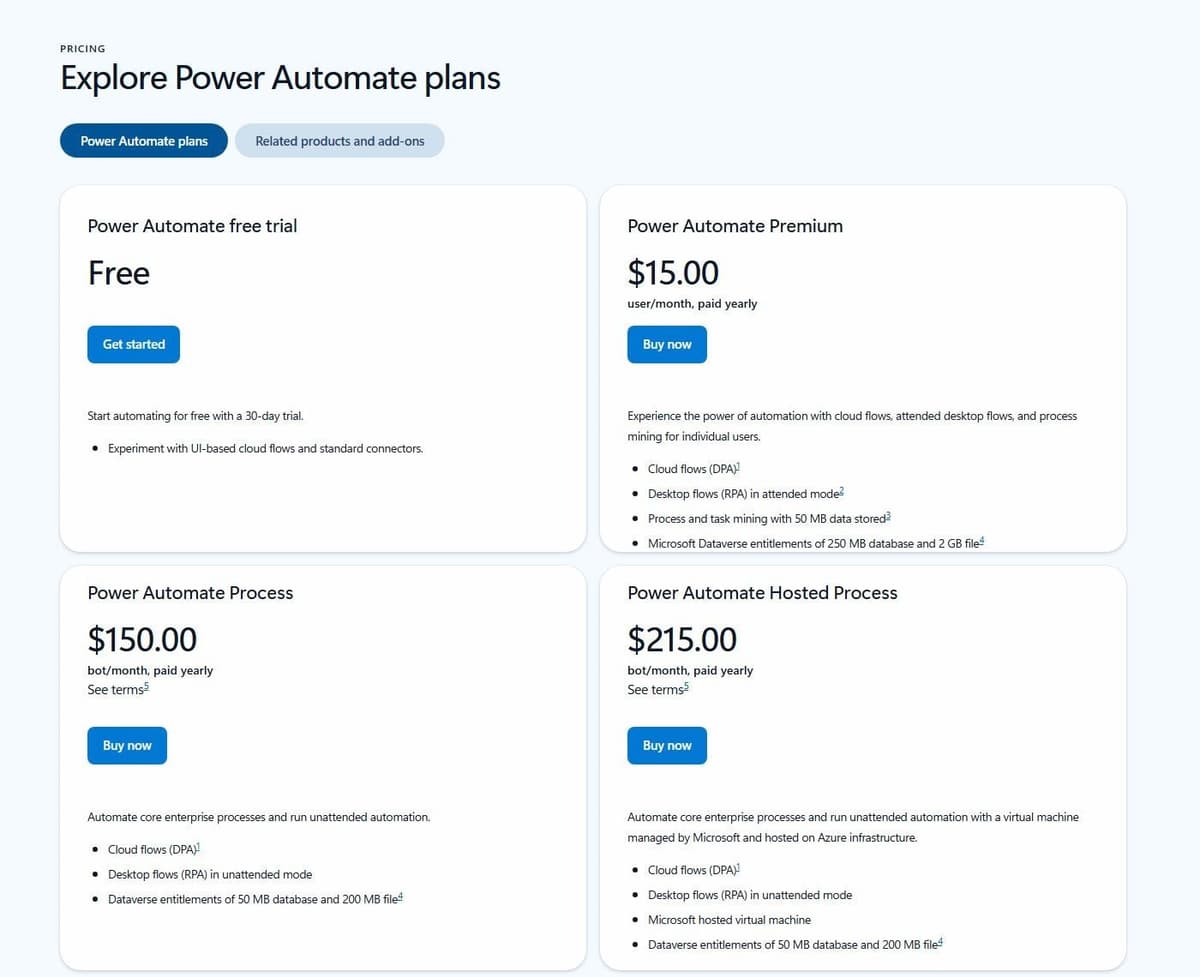
Premium costs $15.00 per user per month, paid yearly, as listed on Microsoft's US pricing page in October 2026. That is a marketing price, with the actual price shown at checkout. It adds premium and custom connectors, attended desktop flows and 40,000 actions per day. An automated or scheduled flow with a premium connector needs Premium only for its owner. If other users trigger it, for example by adding a SharePoint item, and get value from it, such as an email, Microsoft's licensing FAQ says they need Premium too. Instant flows work differently: every user who runs one with premium connectors needs Premium. People who only answer approval requests do not need Premium.
Process costs $150.00 per bot per month. Hosted Process, which adds a Microsoft-hosted virtual machine, costs $215.00 per bot per month. Both are paid yearly as listed on the same US page in October 2026, and again these are marketing prices with the actual price shown at checkout. A Process license runs unattended desktop flows on a machine registered by a Premium user. Assigned to a cloud flow instead, it gives that flow premium connectors and 250,000 actions per day.
Microsoft dropped the per-flow plan and the unattended RPA add-on from its price list on February 1, 2024. Existing per-flow licenses still work but cannot be bought again, and the Process license replaces both.
Microsoft counts every trigger and action execution, succeeded or failed, against a 24-hour limit. Going over usually delays runs. A flow that stays above the transition-period limits for 14 consecutive days is suspended.
Trials are another conflict. Microsoft's pricing page advertises a 30-day free trial with standard connectors only. Its licensing docs describe a 90-day self-service Trial license with Premium capabilities, plus separate 30-day admin-managed trials that can be extended once. Confirm which one applies.
Worked example: a five-person team
Assumptions: five people, annual billing, US pricing-page prices, at least one premium app or connector on each platform, existing Microsoft 365 business licenses and under 2,000 Zapier tasks a month.
- Zapier Team: $69 per month billed annually at the 2,000-task tier, or $828 a year for all five (25 users on the plan card, unlimited per Zapier's FAQ).
- Zapier Professional, if one person builds and owns every Zap: $49 per month billed annually at the 2,000-task tier, or $588 a year, with one seat.
- Power Automate, everyone running instant flows with premium connectors: five Premium licenses at $15.00 per user per month, paid yearly, or $900 a year at Microsoft's US marketing prices before checkout.
- Power Automate, premium connectors only in scheduled flows that one person owns: one Premium license at $15.00 per user per month, paid yearly, or $180 a year at the same marketing prices before checkout.
- One unattended bot on top of either Power Automate option: $150.00 per bot per month, paid yearly, or $1,800 a year at US marketing prices before checkout.
The Microsoft total depends on how flows run, so map who triggers each flow first.
One more Power Automate pricing rule affects that count. Microsoft treats multiplexing as a license violation, and a single Premium license on a service account that many users share counts as multiplexing, so the flow is not compliant.
Connectors: Zapier apps against standard and premium connectors
Zapier connects to over 9,000 apps by its own count. Its directory headline says "Over 10,000+ connections", while the counter on the same page shows 9,000+ integrations. Apps such as Salesforce and Facebook Lead Ads carry a Premium label and need a paid plan. From Professional upward, Webhooks by Zapier handles what Zapier calls custom integrations with any app.
Microsoft's connector reference states no total, and Microsoft's own figures differ: its Power Automate product page says more than 1,000 API connectors in one section and more than 1,400 in its FAQ, while a September 2026 deprecation notice says "over 1,500 connectors". Zapier's comparison page, published September 16, 2026, also puts Power Automate at roughly 1,400. The Premium flag on each connector matters more, because it decides the license a flow needs.
| Connector type | Free license | Microsoft 365 | Premium | Process |
|---|---|---|---|---|
| Standard | Included | Included | Included | Included |
| Premium | Not included | Dataverse for Teams only | Included | Included |
| Custom | Not included | Not included | Included | Included |
Microsoft 365 users get standard connectors only. Microsoft's licensing FAQ allows premium connectors in Dataverse for Teams environments, while its deep-dive page marks them not included, so confirm before purchase. Microsoft's licensing pages do not spell out whether the built-in HTTP action and the "When an HTTP request is received" trigger need Premium. Confirm with Microsoft before designing around them.
Which common connectors are premium
Microsoft's connector reference lists SharePoint, Microsoft Teams and Slack as standard in Power Automate, and Salesforce, ServiceNow, SAP ERP and Microsoft Dataverse as Premium. Flows that use the Premium ones fall under the licensing rules above.
For an app with no prebuilt connector, a custom connector wraps its REST API in its own triggers and actions, described with an OpenAPI definition or a Postman collection, or built from scratch in the custom connector portal. For the same gap, Zapier offers Webhooks by Zapier, Code steps in Python or JavaScript, and private integrations built on its developer platform.
Building automations: the editors compared
A Zap is a trigger followed by one or more actions. Free stops at two steps, and paid plans add multi-step Zaps. According to Zapier's help center, Paths allow up to 3 nested Path steps and 10 branches per path group, and a Zap can hold 100 steps. Code steps add Python or JavaScript. Copilot is on every plan and labeled Beta. Zapier publishes no number for the Free plan's daily message limit.
Zapier also publishes a library of ready-to-use workflow templates, grouped by use case such as lead management, applicant tracking and employee onboarding, which you can copy and adjust instead of building a Zap from scratch.
Power Automate cloud flows use what Microsoft calls a full-featured flow designer, with hundreds of templates and Copilot-assisted creation. Desktop flows are built in the Power Automate for desktop Windows app, from drag-and-drop actions or by recording. Zapier's editor suits business users wiring SaaS apps together. Microsoft's suits Microsoft 365 makers and IT teams that also need UI automation.
For logic the designer handles poorly, each tool has a way out. A Zapier Code step costs 1 task per run with standard runtime, according to Zapier's help center. In Power Automate, a flow can call an Azure Logic Apps workflow, which Microsoft says covers little-to-no-code scenarios through advanced, codeful workflows, so heavy logic can move there while the flow keeps its trigger; check Azure's Logic Apps pricing first.
Conditional logic, loops and approvals
Power Automate has three cloud flow types: automated flows start on an event such as a new email, instant flows start from a button, and scheduled flows run on a timetable. A Condition action splits a run into yes and no branches, Apply to each loops through a list such as SharePoint items, and more complex checks use Workflow Definition Language expressions, the same functions Azure Logic Apps uses.
Approvals come through a standard connector that supports everyone-must-approve, first-to-respond, custom-response and sequential requests. Approvers with a Power Automate license, or an Office 365 or Dynamics 365 license with built-in Power Automate capabilities, can answer from Outlook, a Teams adaptive card or the Power Automate action center.
Zapier handles logic with built-in steps. Filter lets a Zap continue only when one set of conditions is met, and Paths splits it into branches. Both need Professional, Team or Enterprise.
Desktop automation and RPA
Microsoft pitches robotic process automation (RPA) for applications that lack a prebuilt connector and have no API for a custom connector. Power Automate for desktop mimics a user's mouse movements and keyboard entries. It can drive terminal emulators, web and desktop apps, Excel files and folders through UI elements, images or coordinates.
"Assigned to a machine, a bot can execute one unattended desktop flow run at a time. Multiple bots are required to execute concurrent desktop flow runs on a machine."
Source: microsoft.com
Attended runs happen under human supervision and use the attended bot that comes with Premium. In an unattended run, the bot signs in to the machine, runs the flow and signs out with no one watching. These runs need the per-bot Process license, or Hosted Process for a Microsoft-hosted virtual machine. Each bot runs one unattended flow at a time, and a Premium user still has to register the machine.
Budget upkeep along with the bot license. Because a desktop flow works through what is on screen, a changed login window or a missing Excel add-in can stop a flow that ran for months, and someone has to repair it. One user on r/PowerAutomate hit exactly that: "My flow is unable to login into a virtual machine (vm) anymore after the interface was changed to a windows security window." Wherever a connector or an API exists, use it, and keep desktop flows for the systems that have neither.
Zaps start from instant triggers that apps send to Zapier by webhook, from Webhooks by Zapier on paid plans, or from polling triggers. Zapier checks polling triggers every 15 minutes on Free, 2 on Professional and 1 on Team and Enterprise. Zapier says it does not offer RPA, task mining or process mining, according to its comparison page published September 16, 2026. If a core system has no API and no connector, that decides it for Power Automate.
AI features: Zapier Agents and Copilot against Copilot in Power Automate
Zapier Agents, Chatbots, Canvas and Zapier MCP are on every plan, including Free. Agents use activities, which are separate from Zap tasks: 400 a month on Free and 1,500 on Agents Pro, with per-run limits of 10 and 40. Agents Pro costs $400 per year billed annually, shown as $33.33 a month, for up to 1,500 activities a month. Agents Enterprise is contact-for-pricing. Its card lists restricted apps support, but the Agents FAQ on the same page says Agents does not currently support Enterprise app and action restrictions, so confirm with Zapier sales.
AI by Zapier steps add AI model calls to a Zap, with providers such as OpenAI, Anthropic and Google Gemini, and they are paid-plan only. Since June 15, 2026, they draw tasks by model tier instead of a flat per-step rate. A step that reaches 75 tasks in one run pauses the Zap for approval. Each Zapier MCP tool call uses 2 tasks.
Copilot in Power Automate lets makers describe a cloud flow in natural language across a multi-step conversation. Microsoft labels the use of flows as plugins in Copilot for Microsoft 365 as preview. Several Copilot features in Power Automate for desktop, such as Record with Copilot, are also in preview, as labeled by Microsoft in August 2026. Microsoft's Copilot overview does not say which licenses include Copilot or whether it is metered, so ask Microsoft.
Treat a generated flow as a draft, whether it comes from either Copilot or from a coding agent such as Claude Code or Codex. Both vendors label parts of their assistants as Beta or preview, so open every step and expression before you switch a flow on, and test it on a real record rather than sample data. One user on r/zapier traced a wrong date this way: "turned out the ai silently injected a formatter by zapier step to parse a basic date string." With a coding agent, judge the output by whether the flow imports with its connections and dependencies intact, and confirm that your IT team allows the agent in your tenant.
Microsoft's license-types page (updated September 22, 2026) still lists 5,000 AI Builder credits a month on Premium, Process and Hosted Process. Microsoft's separate Power Platform licensing FAQ says the 5,000 credits per user license will be removed on November 1, 2026. Confirm current entitlements.
AI Builder, the Power Platform feature those credits pay for, offers prebuilt and custom AI models for flows and apps. Microsoft's own example is a cloud flow that automates document processing.
Governance, security and admin
Zapier has two-factor authentication on every plan and static IP from Professional. Audit log, owner access and SAML SSO start at Team, with 6 months of audit history on Team and 1 year on Enterprise. Enterprise also gets SCIM provisioning, domain capture, Super Admin, advanced admin permissions, app access controls, action restrictions, custom data retention and Log Streams. On its comparison page, Zapier says it is SOC 2 Type II, SOC 3, GDPR and CCPA certified.
Power Platform uses data policies, which Microsoft describes as guardrails against users unintentionally exposing organizational data. Admins sort connectors into Business, Non-business (the default) and Blocked groups. Connectors in different groups cannot share data, and blocked connectors cannot be used. Admins can also restrict single actions and classify desktop flow modules the same way. Changes usually apply within an hour, but can take up to 24 hours in extreme cases. Environment-level policies cannot override tenant-wide ones.
Copilot in Power Automate is on by default. In the UK, Australia, the US and India, an admin must contact support to turn it off, and only at tenant level. On documented features, Power Platform gives IT finer connector and action control. Zapier keeps app and action restrictions for Enterprise.
Ownership becomes the hard part once flows run into the dozens. In Power Automate, a Process license assigned to a business-critical cloud flow lets it use premium connectors regardless of the owner's or triggering user's license, and a flow group lets up to 25 solution-aware cloud flows share one Process license. On Zapier, Team adds shared folders next to shared Zaps and app connections. Whichever you run, keep a register of every flow with its owner and failure contact, as one user on r/MicrosoftFlow does with a SharePoint list: "SP list that includes description, team, owners, and error handling."
Compliance: HIPAA, FedRAMP and audit logs
Microsoft lists the Power Automate cloud service, standalone or inside an Office 365 or Dynamics 365 plan, among the services covered by its HIPAA Business Associate Agreement (BAA), which covered entities and business associates get by default through its data protection addendum. Power Automate is also in scope for Microsoft's ISO/IEC 27001 and SOC 2 offerings. FedRAMP High applies to the GCC environment of the separate Power Automate US Government plans.
Power Platform uses Microsoft Entra ID for identity, so admins can apply multifactor authentication and conditional access policies. Admins can also search flow events, such as created, edited and deleted flows, in the Microsoft Purview audit log. Zapier's data privacy FAQ says protected health information (PHI) under HIPAA is not supported on Zapier and that Zapier cannot sign business associate agreements.
Which one to pick, and how to move
- Microsoft 365 shop with Outlook, SharePoint and Teams flows: Power Automate, adding Premium only where premium or custom connectors or attended desktop flows appear.
- Many non-Microsoft SaaS apps: Zapier, with over 9,000 apps by its count.
- Desktop or legacy app automation: Power Automate with Process licenses, since Zapier says it does not offer RPA.
- Solo user on a free plan: Zapier Free for SaaS apps, or the Power Automate Free license for standard connectors on a work or school account.
- Regulated team needing DLP or a HIPAA BAA: Power Automate data policies and Microsoft's BAA, since Zapier keeps app restrictions for Enterprise and does not support PHI.
- Team that wants AI agents across apps: Zapier Agents, on every plan and metered in activities.
If neither tool fits, our guide to Power Automate alternatives compares cross-platform options. Make is another option outside Microsoft that bills in credits, with up to 1,000 credits a month on its $0 Free plan, and our Make vs Zapier comparison sets it against Zapier.
Moving from Zapier to Power Automate
Plan the move as a rebuild: each Zap becomes a cloud flow, and most Zapier building blocks have a counterpart.
| Zapier step | Power Automate equivalent |
|---|---|
| Trigger on an app event | Automated cloud flow |
| Schedule by Zapier | Scheduled cloud flow |
| Filter | Condition action |
| Paths | Condition or Switch |
| Formatter | Expressions |
| Looping | Apply to each |
| Webhooks by Zapier | HTTP request trigger |
| Storage | A SharePoint list |
| Code step | An Azure Logic Apps workflow that the flow calls |
A few of those swaps need care. Paths with more than two branches become nested Conditions or a Switch action. Storage by Zapier keeps small values between Zap runs, and a SharePoint list on the standard connector can hold the same data. Logic too heavy for the designer can move to an Azure Logic Apps workflow that the flow calls, which Azure bills separately.
Check the license of each flow before you rebuild it. A premium connector in an automated or scheduled flow needs Premium for the owner and for anyone else who triggers the flow and gets value from it; an instant flow with one needs Premium for every user who runs it. Before you rebuild a webhook Zap, confirm with Microsoft whether the HTTP request trigger that replaces it needs Premium. Then let only one platform write to production: run the new flow against test records while the Zap keeps working, and switch the Zap off before the flow goes live.
Where Latenode fits
Latenode is a third option: a visual builder with code and AI models in one place. It bills workflow runtime in CPU seconds, meaning runs times average seconds, instead of per operation or step. The first 10,000 CPU seconds each month are free on both plans. The Free plan is $0 a month forever with no credit card, 5 active workflows and a 3-minute limit per run. Pay as you go has no base fee. It charges $0.00012 per CPU second from 10,001 to 100,000 CPU seconds a month, and less in higher brackets. Nodes calling paid external providers add optional PnP tokens at $1 per token. The pricing page also lists an AI Agent builder and 335+ LLM models under one subscription, and Latenode's homepage lists custom JavaScript.
For teams that want a coding agent to do the building, Latenode also offers an MCP server: according to its documentation as of September 2026, an MCP-compatible agent such as Claude Code, Codex or Cursor can connect to a Latenode workspace and build scenarios, trigger runs and manage workflows. Latenode recommends installing its latenode-scenario-builder Skill alongside the server so the agent builds scenarios correctly.





