



Quick answer: the best Power Automate alternative for each need
Start by naming what you are replacing: a cloud flow that calls app APIs, a desktop flow that drives a Windows application, or a process that mixes both. Then check which Microsoft Power Automate license the current process runs under, because Free, a Premium user license and Process cover different things. The widest app catalog: Zapier. A visual builder: Make. Enterprise iPaaS with governance: Workato, Tray.ai or Boomi. Zoho shops: Zoho Flow. Open source and self-hosted: Activepieces or Windmill. Developers who want code: Pipedream, if you already use it, since its Workflows product takes no new signups and shuts down on March 31, 2027. Runtime billing with code and AI: Latenode.
Each of the ten entries below covers what the tool does, who it suits, what the meter counts and the one limitation worth knowing before you commit.
Editorial note: Latenode publishes this article and is one of the products discussed. The comparison uses public product documentation and pricing pages. Worked examples are calculations under stated assumptions, not results from a hands-on benchmark. Recommendations describe which requirements a product may fit; they are not a measured ranking of performance or reliability.
Why teams look for Power Automate alternatives in 2026
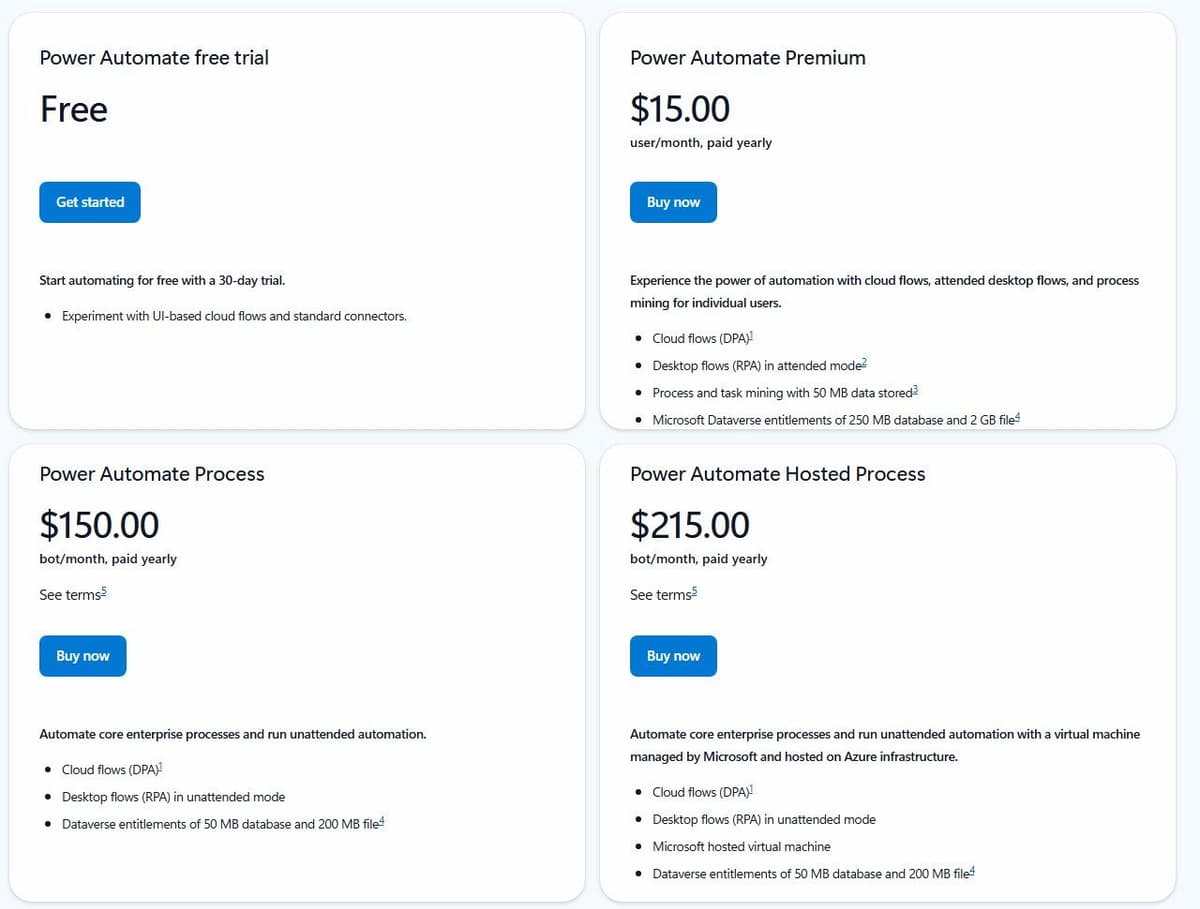
Power Automate has a permanent Free license for eligible work or school accounts in a Microsoft Entra tenant. It covers cloud flows with standard connectors without sharing, plus local attended desktop flows. Premium connectors and broader deployment requirements need additional licensing. Premium is a user license; Process can license a cloud flow for premium and custom connectors regardless of the owner or triggering user's license. Desktop automation has further licensing conditions. Free, a Premium trial and Process are different options.
"Start automating for free with a 30-day trial. Experiment with UI-based cloud flows and standard connectors."
Source: microsoft.com
Start with the meter, because that is where the friction sits. Power Automate Premium costs $15.00 per user per month paid yearly. It covers cloud flows, attended desktop flows (RPA) and process mining for individual users. Automation that runs without a person watching it moves to a separate line. Process costs $150.00 per bot per month paid yearly and runs unattended desktop flows. Hosted Process costs $215.00 per bot per month and adds a Microsoft-hosted virtual machine. Premium also carries Microsoft Dataverse entitlements of 250 MB of database and 2 GB of file storage. A 30-day free trial covers UI-based cloud flows and standard connectors.
Those lines explain most of the shopping. A team whose stack is not Microsoft-first pays for entitlements it uses lightly, and the platform is built around Microsoft's own products, which is an advantage when the company already runs on them and an overhead when it does not. Unattended desktop work sits on its own per-bot line, which is predictable but adds $150.00 a month for each additional robot. So the cost question is not one seat price against one subscription. It is which of your processes need premium connectors, sharing or a desktop session at all.
Check which connectors your flows use before you price anything. Microsoft's connector reference lists SharePoint, Microsoft Teams and Slack as Standard, while Salesforce, ServiceNow, SAP ERP and Microsoft Dataverse are Premium, so a flow that touches one of those needs a paid license, not the Free one. Sharing one Premium license through a service account does not get around that, because Microsoft treats it as multiplexing, a license violation. A user on r/PowerAutomate described the moment it bites: "it was clarified today that I do not have premium access for Power Automate."
First separate cloud flows from desktop automation
| Current automation | What a replacement must cover |
|---|---|
| Cloud flow using app APIs | Triggers, actions, field mapping, permissions and retries |
| Attended desktop flow | A local desktop session and the applications it drives |
| Unattended desktop process | Execution environment, scheduling, credentials, recovery |
| Mixed process | Both parts, plus the hand-off between them |
If your flows mostly route approvals and tasks between people, workflow management software such as Asana, Smartsheet or Jira may be the closer replacement. Most tools in this list are candidates for API workflows or orchestration. Do not assume they can automate an application that has no usable API. Keep the desktop component or evaluate a dedicated RPA product when that is the requirement.
UiPath is a dedicated RPA platform built for that job. Its Community plan is free forever and includes UiPath Studio. Basic starts at $25 a month, runs in UiPath's European region and allows up to 5 Basic, 5 Plus and 1 Pro user with 2 robots; unattended RPA is an add-on, and UiPath says Basic is evolving, with an updated plan coming soon. Standard and Enterprise are priced through sales, and Standard offers a 60-day free trial. Users and robots may need licenses of their own on any tier, so count both, as you would with Power Automate's per-bot Process license.
Another reason to switch can be the designer itself, for example when you need regular expressions or a way to write or review a flow as code. If that is yours, check how each alternative lets you leave the canvas. Zapier takes Python or JavaScript code steps, Make's Code app runs Python and JavaScript on paid plans, and Latenode takes custom JavaScript nodes. One user on r/PowerAutomate put it this way: "With the ability to code, I can use any AI to do the bulk of the heavy lift."
Power Automate alternatives at a glance
Ten platforms, in the order of the sections that follow. The billing detail behind each cell sits in the prose.
| Tool | Best for | Pricing model | Free tier |
|---|---|---|---|
| Zapier | Widest app catalog | Per task | 100 tasks a month |
| Make | Visual builder | Credits | 1,000 credits a month |
| Latenode | Runtime billing, AI | CPU seconds | 10,000 CPU seconds |
| Workato | Enterprise governance | Credits or quote | 50,000 credits, one grant |
| Tray.ai | Agent orchestration | Quote | Trial via sales |
| Boomi | Enterprise iPaaS | $99/mo plus usage | 30-day trial |
| Zoho Flow | Zoho-centric stacks | Per task, by region | 100 tasks a month |
| Activepieces | Open source, self-host | Credits; CE unmetered | CE, or 1,000 credits/mo |
| Windmill | Self-hosted scripts | Seats + compute units | Community Edition |
| Pipedream | Code-first workflows; closes Mar 31, 2027 | Credits per compute time | Closed to new users |
CE in the table means Activepieces Community Edition, the free self-hosted edition without a credit meter.
1. Zapier: best app catalog
Zapier is worth checking when the required application is uncommon. The catalog runs to more than 9,000 app integrations by its own count, but check who maintains each integration you need and where failures are reported. Zaps are multi-step workflows, and Tables and Forms ship alongside them. Other platforms are compared in our guide to Zapier alternatives. For the direct matchup, see Zapier vs Power Automate.
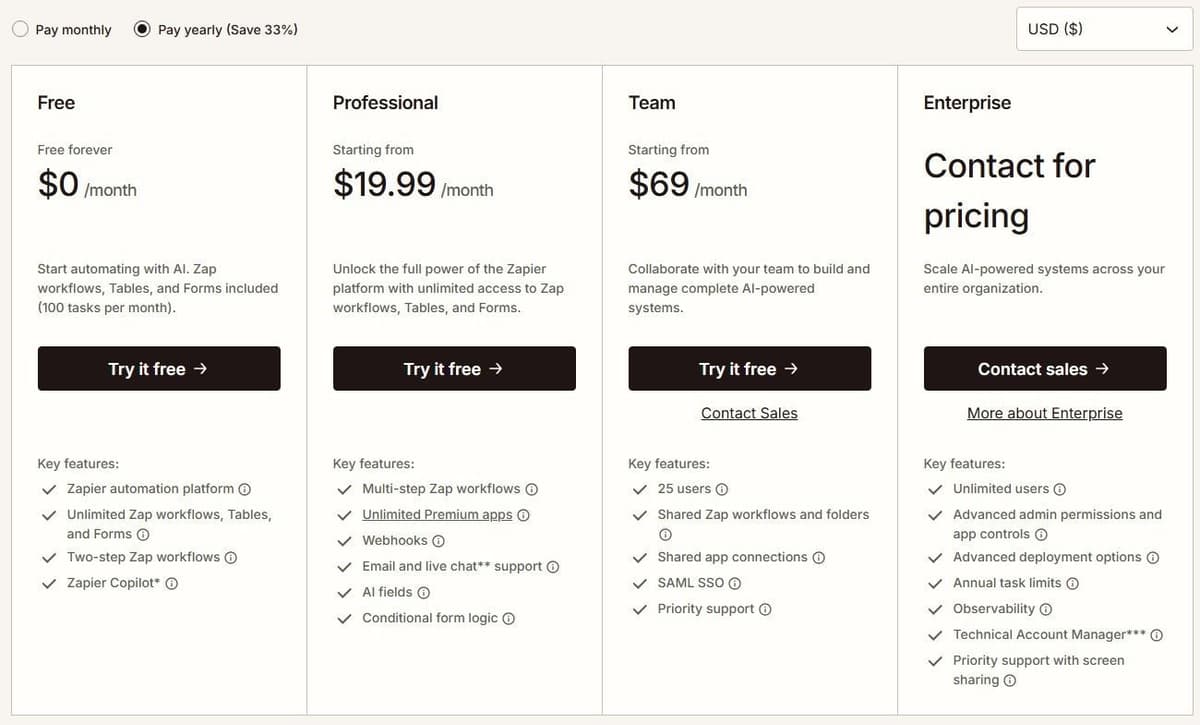
The Free plan is $0 a month with 100 tasks a month plus Zap workflows, Tables and Forms. Professional costs $19.99 a month billed annually, or $29.99 a month billed monthly, and includes 750 tasks a month. Paying yearly is advertised as a 33% discount. Enterprise pricing is not published and goes through sales. A task is an ordinary successful billable action, subject to documented built-in exemptions and feature-specific rates. Triggers, filters and failed steps are free. Billable Zap actions, AI steps, Code steps and MCP calls use the account's task allowance at their applicable rates. Zapier SDK actions are free during the current beta. Using the SDK inside Code by Zapier does not remove the Code step's own task or runtime charges. One MCP tool call consumes two tasks. Code steps run Python or JavaScript inside a Zap.
The limitation is volume. Because the meter counts billable actions, 750 tasks on Professional disappear quickly when one incoming record triggers half a dozen updates.
2. Make: best visual builder
Make lays scenarios out on a canvas as connected modules. Branching, iterators and error handling stay visible in a single view. It covers 3,500+ apps by its own count, and every plan includes multi-step scenarios and instant webhook execution.
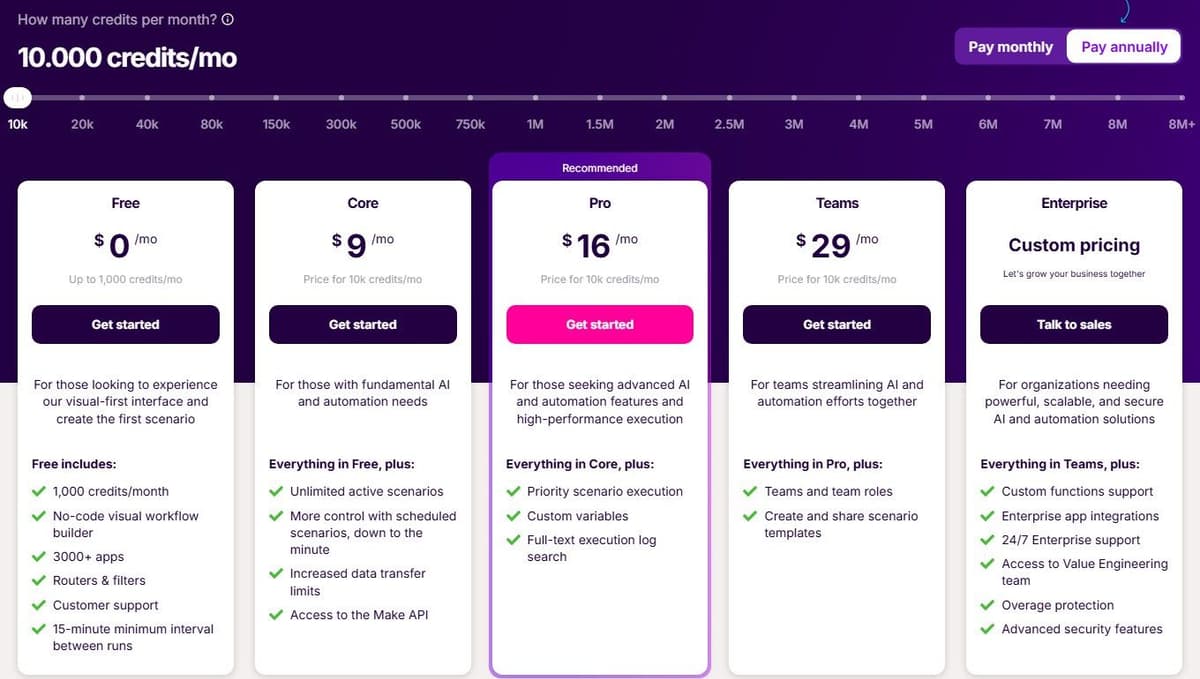
The Free plan is $0 a month with up to 1,000 credits. Scheduled scenarios on it run no more often than every 15 minutes, while Core adds scheduling down to the minute. Paid tiers are Core at $9 a month billed annually, Pro at $16 and Teams at $29, each with 10,000 credits a month. Ordinary module operations, such as adding a Google Sheets row or fetching Gmail data, consume a credit each, while Router and Filter consume none. Code execution costs 2 credits per second. The Make Code app supports custom Python and JavaScript on paid plans, and Enterprise plans include custom functions applied inline. The Make MCP Server turns scenarios into callable tools for MCP-compatible agents, connecting them to 30,000+ actions.
The limitation follows from the meter. A credit per operation means a long scenario costs more than a short one doing the same job. Consolidating steps is part of keeping the bill down.
3. Latenode: for runtime billing with code and AI
Latenode is a hosted low-code platform that bills workflow runtime in CPU seconds: runs multiplied by their average duration, not per operation or per step. Extra steps do not multiply the bill. Long steps do. The first 10,000 CPU seconds each month are free on both plans, about 10,000 quick executions when runs average a second.
Free is $0 a month with 5 active workflows, one execution worker, 3 minutes per run and 3 days of history. Every app, AI agents, RAG storage and the built-in database come with it. Pay as you go has no base fee and keeps the same 10,000 free CPU seconds, then charges from $0.00012 per CPU second. It comes with unlimited active scenarios, 5 parallel workers and 10 minutes per run.
The builder is drag and drop, and code steps take custom JavaScript. Also on board: an AI Copilot, an AI agent builder, a headless browser and 335+ LLM models. The limitation is that runtime billing rewards short runs, so a slow third-party API costs you directly. And CPU seconds do not map cleanly onto tasks or credits.

4. Workato: best enterprise iPaaS with MCP tiers
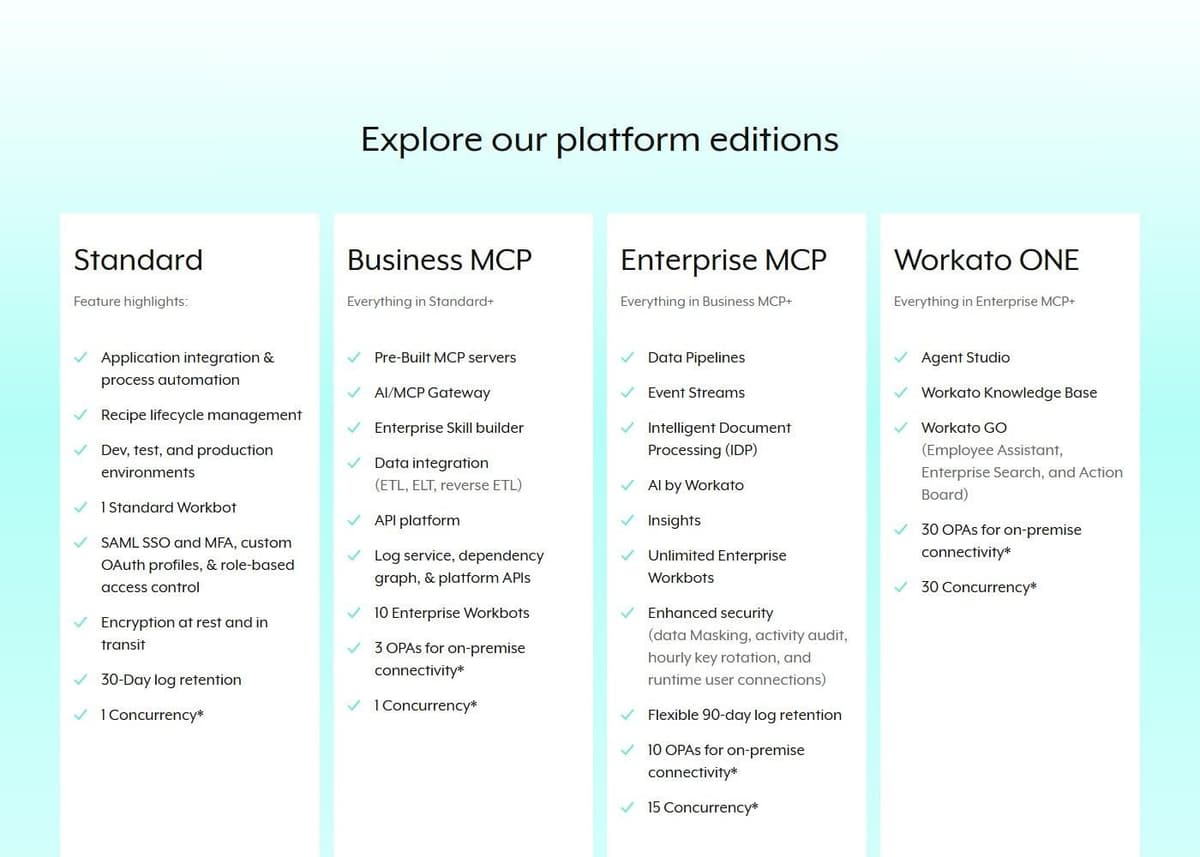
Workato sells to organizations that need integration under governance: recipes, environments and controls rather than a weekend self-serve build. Its pricing page lists Business MCP and Enterprise MCP tiers. The enterprise tier adds unlimited Enterprise Workbots, plus data masking, activity audit, hourly key rotation and runtime user connections. Our guide to Workato alternatives compares enterprise, mid-market and open-source options.
"1,200+ pre-built connectors included out-of-the-box for every user. Unlimited workspaces and users to scale without limits."
Source: workato.com
Workato offers both self-service and enterprise purchasing paths. Its self-service documentation lists Free with a one-time grant of 50,000 credits, and Pro from $75 per month for 2,500 recurring monthly credits. These are not monthly Free credits or an enterprise price quote. Enterprise editions and existing contracts must be evaluated separately, including their platform fees, usage metrics and negotiated terms.
By its own count, the platform includes 1,200+ pre-built connectors for every user plus unlimited workspaces and users. On the enterprise path the pricing page offers a quote and notes that pricing and plan structures may vary based on contract terms and when the customer joined, so two companies on the same tier can be paying differently for it. That is the limitation here. The self-service plans let a small team try recipes this week, but an enterprise budget still starts with a discovery call and a usage estimate. Leave time for it in the evaluation.
5. Tray.ai: best for enterprise orchestration with agents
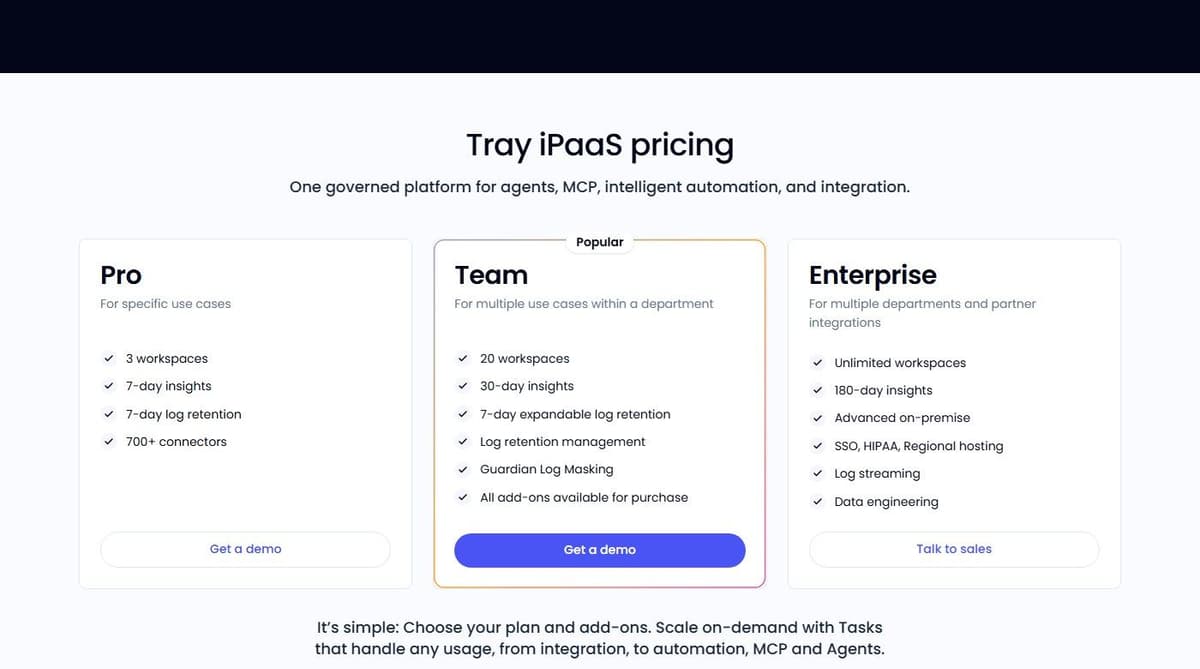
Tray.ai puts agents next to integration work. It provides a no-code Agent Builder for conversational or autonomous agents and an Agent Gateway for building and deploying MCP services. Tray Helix is marketed as a governed runtime for AI-built apps. Agent behavior lives on the same platform as the connectors those agents call. Our guide to no-code automation tools compares visual builders and their meters.
Pro, Team and Enterprise are all priced by custom quote based on usage and features. Usage is measured in Tasks, and that single meter covers integration, automation, MCP and agents. That makes forecasting simpler than tracking four separate counters, but still impossible to price without a conversation. The single meter is the notable part: agent activity is counted in the same currency as integration work. Growth in one shows up in the same line item as the other. A free trial is arranged through the sales team. Every plan includes business-hours support, and Team and Enterprise add 24/7/365 support with enhanced SLAs and dedicated Slack channels.
The limitation: quote-only pricing plus a trial that goes through sales means evaluation takes days rather than minutes. That suits teams with a defined project, a budget and a procurement process. Less so an engineer comparing four tools on a Friday.
6. Boomi: best enterprise iPaaS with a pay-as-you-go entry
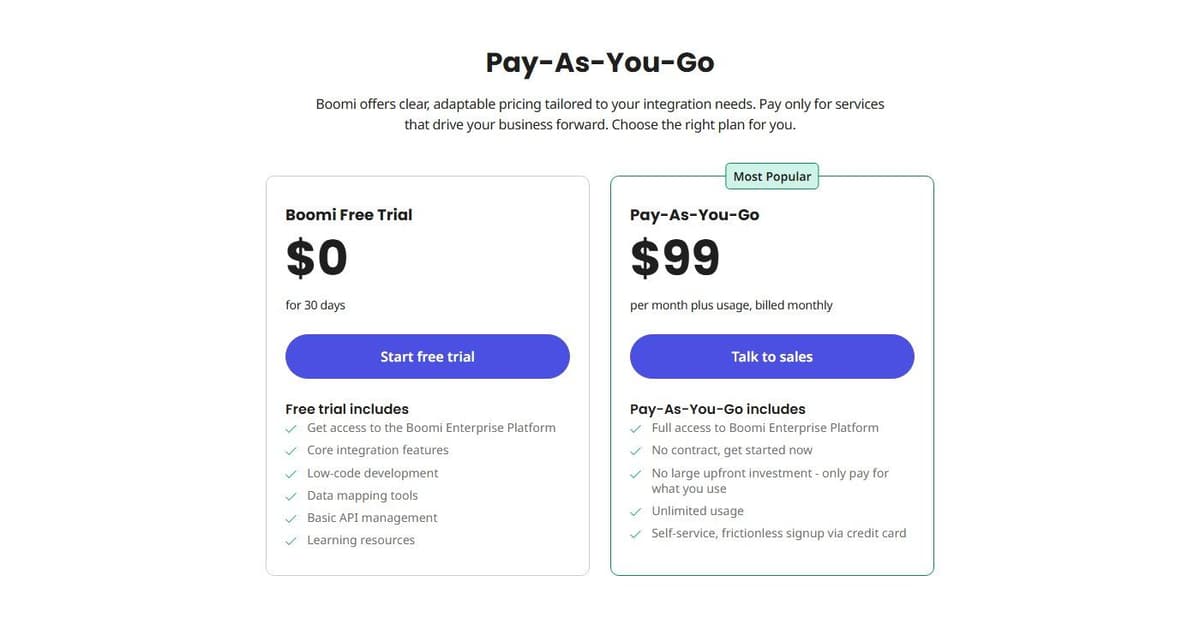
Boomi is the enterprise option that publishes an entry price. Pay-As-You-Go costs $99 per month plus usage, billed monthly. It includes full access to the Boomi Enterprise Platform with community support, documentation and basic monitoring. The Base pay-as-you-go edition covers one environment, two users, unlimited connections, workflow orchestration and built-in version control. A 30-day free trial opens the full platform.
Boomi's Pay-As-You-Go documentation fills in the usage rate: a flat $0.05 per Boomi Message on top of the $99 base fee, which is charged even in a month with no Messages. A Message is each inbound or outbound document, including responses to request/response calls; internal component-to-component messages do not count. The plan is currently open only to active trial users, who opt in with a credit card. The same documentation lists unlimited users and environments and Standard support for Pay-As-You-Go, which differs from the pricing card and Base edition terms above, so confirm which terms apply to your account.
The Integration subscription tiers are Professional, Professional Plus, Enterprise and Enterprise Plus, all priced through sales. Enterprise connectors are eligible at extra cost. Enterprise adds custom roles, clustered runtime and parallel processing, and Enterprise Plus adds message queuing. AI agents drive the positioning, with an Agent Control Plane, Agentstudio for building agents and governed MCP tools. By its own count, 1,000+ enterprise applications are reachable for AI work.
The limitation: above the pay-as-you-go entry every tier is sales-priced. And the usage that sits on top of the $99 base is the part you cannot size until real volume runs through it. Still, the trial and the published entry price make this platform unusually testable for enterprise software. A small integration team can prove the fit before procurement gets involved.
7. Zoho Flow: best for Zoho users
Zoho Flow connects apps with trigger-and-action flows plus logic and utility blocks. By its own statement it is an AI-powered app integration and workflow automation platform. The obvious fit is a company already running Zoho software, where flows tie the suite to everything outside it.
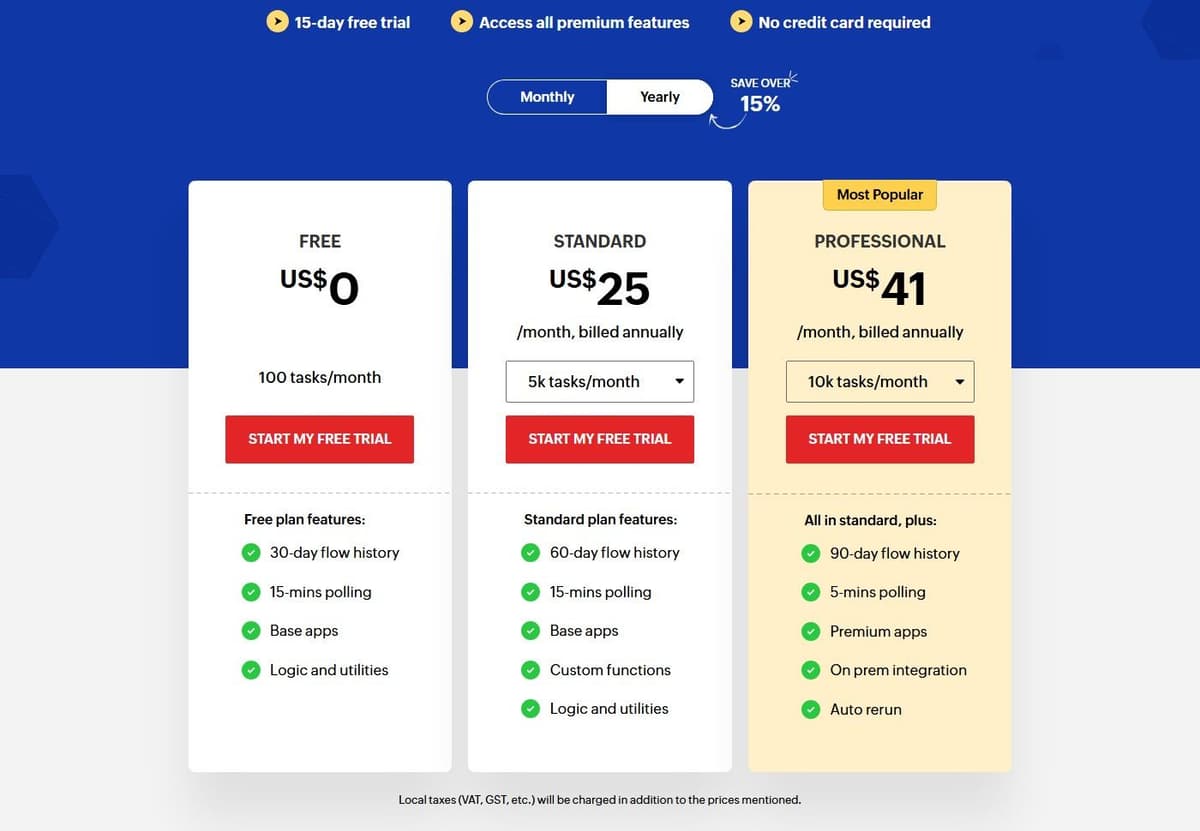
The Free plan costs nothing. It includes 100 tasks a month, 30-day flow history, 15-minute polling, base apps and the logic and utilities blocks. A 15-day free trial opens all premium features with no credit card. The Standard plan starts at 5,000 tasks a month and is priced by region and currency. In the United States it costs $25 a month billed annually for 5,000 tasks. Above that: $31 for 10,000, $46 for 20,000, $80 for 50,000 and $105 for 100,000 tasks. Prices vary by region, so if you buy outside the United States, check the vendor's pricing page for your local figures.
The limitation: regional pricing makes cross-border budgeting awkward. And the 15-minute polling interval on Free delays anything that is not webhook-driven. Task counting is easy to follow. But 100 tasks a month is a demo allowance rather than a working one, so a team with live flows lands on Standard quickly.
8. Activepieces: best open-source alternative
Activepieces is open source at the core. It offers 760+ integrations and can be embedded inside another product. That matters if you resell automation rather than only use it.
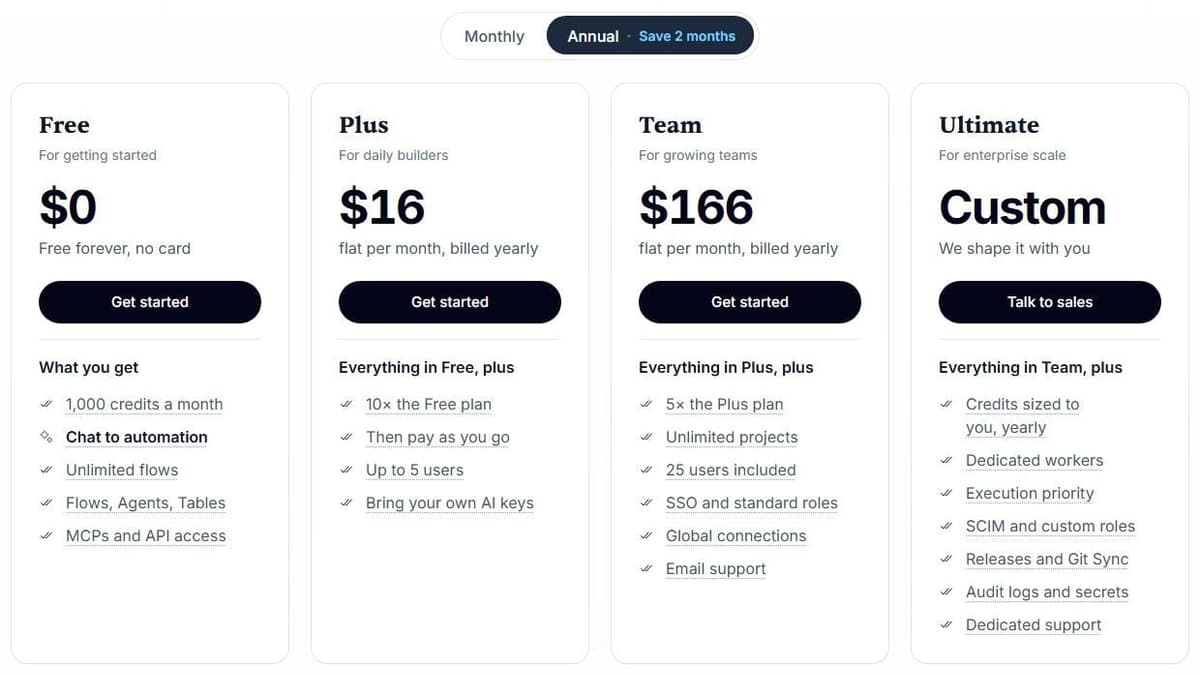
Activepieces Community Edition is a free, self-hosted option built on the MIT-licensed core. It has no credit meter or cap on runs and users. You pay for hosting and operations, and for any external services your flows use. Community Edition excludes features such as SSO, audit logs, projects and Git Sync. Its credit-metered plans cost the same on Activepieces' cloud or your own servers, and their credit allowances do not apply to the free Community Edition.
Free is $0 with 1,000 credits a month for up to 5 users. Plus costs $16 a month billed annually with 10,000 credits a month for up to 5 users. Team costs $166 a month with 50,000 credits for 25 users, and Ultimate is custom pricing. Overage on Plus and Team costs $0.007 per credit. Unlimited automations and every integration are included, and for ordinary steps one credit covers a whole run regardless of how many steps it contains.
The limitation on those metered plans is AI. With Activepieces-supplied AI models, each AI step adds 2 credits for a fast model, 10 for a smart model or 20 for a frontier model; agentic actions add one credit each. On Plus and higher plans, using your own AI provider keys makes each AI step cost one Activepieces credit, with model usage billed separately by your provider. An agent-heavy workflow drains a monthly allowance far faster than the one-credit-per-run rule suggests. Ordinary steps stay cheap, and model choice is the variable to watch.
9. Windmill: best free self-hosted platform for scripts and internal apps
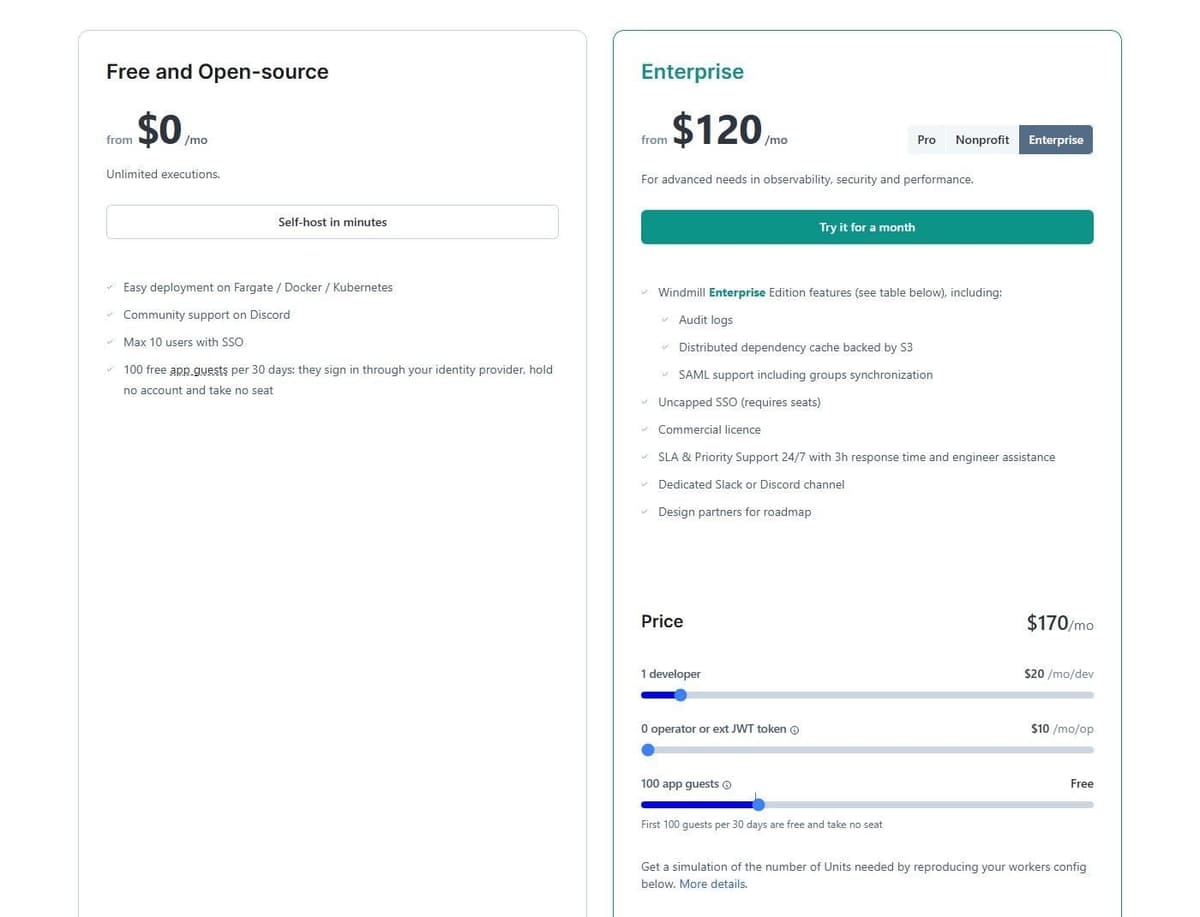
Windmill turns scripts into workflows and internal apps. Community Edition is free to self-host, with unlimited executions, up to 50 users in total or 10 users with SSO, and 100 app guests per 30 days. Infrastructure, maintenance and backups remain your responsibility.
Windmill Enterprise is listed from $120 a month and adds audit logs, SAML with group sync, uncapped SSO, a commercial license and 24/7 priority support with a 3-hour response time. Its price combines developer and operator seats with compute units: the pricing page lists developer seats at $20 per month and operator seats at $10, and the complete estimate also depends on the selected compute capacity and deployment. Use the calculator total for the intended configuration.
The limitation is that neither headcount nor execution count alone describes the total cost. Size the required compute capacity as well as the developer and operator seats. With self-hosting, include infrastructure and operating work in the budget.
10. Pipedream: best for existing users who want code steps
For teams already on it, Pipedream suits people who would rather write a function than wire another module. Workflow steps run Node.js, Python, Go or Bash next to prebuilt actions. The platform integrates 3,000+ apps.
If you already run workflows on it, check the timeline. Pipedream's documentation says Pipedream Workflows will shut down on March 31, 2027, and Pipedream is no longer accepting signups or subscriptions for Workflows; existing workflows keep running until that date. Pipedream Connect, which covers its Connect API, MCP Servers and API Proxy, is not affected.
None of the old Workflows tiers can be bought now. As of October 2026, Pipedream's pricing page shows only Connect plans: Free for development, without a production environment; Startup at $99 a month on annual billing or $150 on monthly billing, covering 10,000 usage credits and 100 external users before $0.012 per extra credit; and Business, on an annual contract with SSO and HIPAA support.
Until the shutdown, existing workflows bill by compute: one credit covers up to 30 seconds at 256 MB for each workflow segment. A 35-second segment uses two credits; allocating 512 MB doubles the credit use for the same duration. Branches and pauses can create separately billed segments. Pipedream Connect also has an external-user billing component, so a Workflows estimate does not price an embedded-auth deployment.
The limitation is the clock. Existing workflows stop on March 31, 2027, and Pipedream's export leaves out credentials and OAuth tokens, so every connected account has to be authorized again wherever you rebuild.
How to choose
Inventory the current flows before pricing a move. Mark which use standard connectors, premium connectors, shared access and desktop execution. Then identify whether the existing process is licensed per user or through process capacity. Rebuild one representative flow with the same data boundaries and recovery requirements. A cheaper API subscription does not include the work of replacing a desktop automation environment.
If testing and version control are what push you off Power Automate, ask how each tool keeps a workflow outside its editor before you migrate. In this list, Activepieces leaves Git Sync out of its free Community Edition, and of its Free, Plus, Team and Ultimate plans only the custom-priced Ultimate includes Releases and Git Sync.
Eight questions for the shortlist.
- What does the meter count? Tasks at Zapier and Zoho Flow, credits at Make, Activepieces, Workato self-service and Pipedream, Tasks at Tray.ai, CPU seconds at Latenode, usage over a base fee at Boomi, seats plus compute units at Windmill Enterprise, a quote for Workato enterprise editions.
- Are internal steps free? Zapier does not charge for triggers, filters or failed steps, while Make charges a credit for each ordinary module operation but none for Router and Filter, so identical logic costs different amounts.
- How large is the free tier, and what does it cap? Tasks, credits and CPU seconds are not comparable, so translate each free plan into your own monthly volume.
- What is the polling interval on the free plan? 15 minutes on Make and Zoho Flow, 10 minutes on Latenode Free, with webhooks instant where they are offered.
- How are seats billed? Activepieces Free and Plus cover up to 5 users and Team 25; Windmill Community allows 50 users, or 10 with SSO; Windmill Enterprise charges for developer and operator seats plus compute units; Workato lists unlimited users.
- How are code and AI steps metered? Make charges 2 credits per second of code execution, Activepieces model-tier credits per AI step, or one credit with your own provider keys on Plus and higher plans, and Zapier draws code and MCP from the same task pool.
- Can the required workload run on your own infrastructure? Activepieces and Windmill offer self-hosting. If another vendor offers an on-premises agent or runtime, confirm what runs locally; that is not the same as self-hosting the platform.
- Which enterprise controls come with it? Data masking and activity audit at Workato's enterprise tier, 24/7/365 support at Tray.ai Team and Enterprise, clustered runtime at Boomi Enterprise, audit logs and SAML at Windmill Enterprise.
A last word on free plans and open source. Permanent free plans exist at Latenode, Zapier, Make, Zoho Flow and Activepieces, and at Pipedream for existing Workflows users until March 31, 2027. The Activepieces and Windmill Community Editions are free to self-host, Workato's self-service Free carries a one-time credit grant, Tray.ai publishes no free tier, and Boomi offers a 30-day trial. Open source covers two of the ten: Activepieces and Windmill's Community Edition.




