



Quick answer: the cheapest cold email software by volume, and the best for each need
On price, the cheapest cold email software depends on volume. At about 5,000 emails a month to 1,000 new contacts, Snov.io Starter and Smartlead Base both list $39 a month on monthly billing, and Snov.io drops to $29.25 a month on annual billing. At about 100,000 emails to 20,000 contacts, Instantly Hypergrowth has the lowest monthly price at $97 a month, while Snov.io Pro S at $74.25 and Saleshandy Pro at $76 a month lead on annual billing. Prices are in US dollars and keep their billing period and usage unit.
Evaluate Instantly or Smartlead for unlimited connected mailboxes, lemlist for multichannel outreach, Reply.io for outreach with AI, Woodpecker for agency accounts. Look at Saleshandy for active-prospect plans, QuickMail for sender workspaces, Snov.io or Hunter for email finding, Apollo for prospecting with sequences, and Salesforge for agent-led outreach. Latenode is our own platform, listed last and held to the same criteria as the rest: here it is the workflow layer around a sender, not a cold email tool with its own mailboxes or sending allowance.
What cold email software does in 2026
Begin with the part of outreach you need to organize. Sending, finding a contact address, verifying it and managing replies are separate jobs. Buying them together can simplify the workflow. It does not necessarily put them under the same allowance. For the wider category, see our guide to sales automation tools.
The products here show those differences. Smartlead distinguishes stored contacts from individual email sends, while Snov.io separates recipient consumption from the credits spent finding or verifying data. Active contacts at Reply.io mean initial messages plus follow-ups within a month. Woodpecker counts contacted prospects across campaigns, and QuickMail also specifies workspaces. AI SDR tools are compared in our guide to AI sales agents.
Review the surrounding tools as well: sequence controls, connected mailboxes, warm-up, shared inboxes, AI drafts and CRM access. Verify each one for the plan you select. An unlimited mailbox headline says nothing about how many contacts, emails, credits or client accounts that subscription covers.
Cold email software at a glance
| Tool | Best for | Meter | Entry price |
|---|---|---|---|
| Instantly | Connected mailboxes | Contacts and sends | From $47/month |
| Smartlead | Mailbox-based setup | Contacts and sends | From $39/month |
| lemlist | Multichannel outreach | Users and credits | From $55/mo yearly |
| Reply.io | Outreach with AI | Active contacts | From $59/user/month |
| Woodpecker | Agency accounts | Contacted prospects | From $35/month |
| Saleshandy | Active-prospect plans | Prospects and sends | $34/mo billed yearly |
| QuickMail | Unlimited senders | Contacts and sends | From $49/month |
| Snov.io | Finding and sending | Credits and recipients | Free Trial; $39/month |
| Hunter | Email finding | Shared credits | Free; $34/mo yearly |
| Apollo | Prospecting sequences | Seats and credits | Free plan |
| Salesforge | Agent-led outreach | Selected contact tier | From $40/mo yearly |
| Latenode | Workflow layer | CPU seconds | Free plan |
What cold email software costs at 5,000 and 100,000 emails a month
Both tables price one campaign shape: every new contact gets a first email and four follow-ups. That makes 5,000 emails a month for 1,000 contacts and 100,000 emails for 20,000 contacts. Each row is the smallest plan whose contact and sending limits cover the volume, in US dollars a month, before taxes, domains and mailboxes.
| About 5,000 emails | Plan covers | Monthly billing | Billed annually |
|---|---|---|---|
| Snov.io Starter | 5,000 recipients, 1,000 credits | $39 | $29.25 a month |
| Smartlead Base | 2,000 contacts, 6,000 sends | $39 | 17% less |
| Salesforge Pro | 1,000 active contacts, 5,000 emails | Confirm at checkout | $40 a month |
| Saleshandy Starter | 2,000 active prospects, 6,000 emails | $41 | $34 a month |
| Instantly Growth | 1,000 contacts, 5,000 emails | $47 | $37.6 a month |
| QuickMail Starter | 1,000 contacts, 5,000 sends | $49 | No annual price |
| Reply.io Email Volume | 1,000 active contacts, follow-ups included | $59 per user | $49 per user |
| Woodpecker | 2,000 contacted prospects, 32,000 emails | $67 | Confirm at checkout |
| lemlist Email | 50,000 emails, unlimited contacts | $69 | $55 a month |
At about 100,000 emails a month, the plans compare like this:
| About 100,000 emails | Plan covers | Monthly billing | Billed annually |
|---|---|---|---|
| Instantly Hypergrowth | 25,000 contacts; 125,000 emails on Instantly's card, 100,000 in its comparison table | $97 | $77.6 a month |
| Snov.io Pro S | 25,000 recipients, 5,000 credits | $99 | $74.25 a month |
| Saleshandy Pro | 30,000 active prospects, 100,000 emails | $99 | $76 a month |
| QuickMail Growth | 25,000 contacts, 100,000 sends | $99 | No annual price |
| lemlist Multichannel | Unlimited emails and messages, 5 senders per user | $109 per user | $87 per user |
| Smartlead Unlimited Smart | Unlimited contacts, 150,000 sends | $174 | 17% less |
| Reply.io Email Volume | 25,000 active contacts, unlimited users | $299 | $259 a month |
| Woodpecker | 20,000 contacted prospects, 320,000 emails | $329 | Confirm at checkout |
Read each row with its meter. Snov.io charges a recipient once per lead, so follow-ups stay free only inside the same billing period. Woodpecker's $35 monthly tier stops at 500 contacted prospects, so 1,000 contacts need its 2,000-prospect tier, priced before VAT. Smartlead's verification add-on, $59 a month on Base, is not in its row. Smartlead Pro stops at 90,000 sends, Salesforge Growth at 50,000 emails and lemlist Email at 50,000 emails, which is why lemlist moves to Multichannel, where you should confirm the minimum users. Hunter and Apollo meter data and seats, not sends, so they have no row.
Mailshake, outside the numbered list, bills per user. Starter costs $29 a month, or $25 billed yearly, for 1,500 sends a month, too few for either table. Email Outreach, $49 a month or $45 billed yearly, lists unlimited sends from two email addresses, so the mailbox provider's daily limits set the real ceiling.
1. Instantly: best for unlimited mailboxes on a flat plan
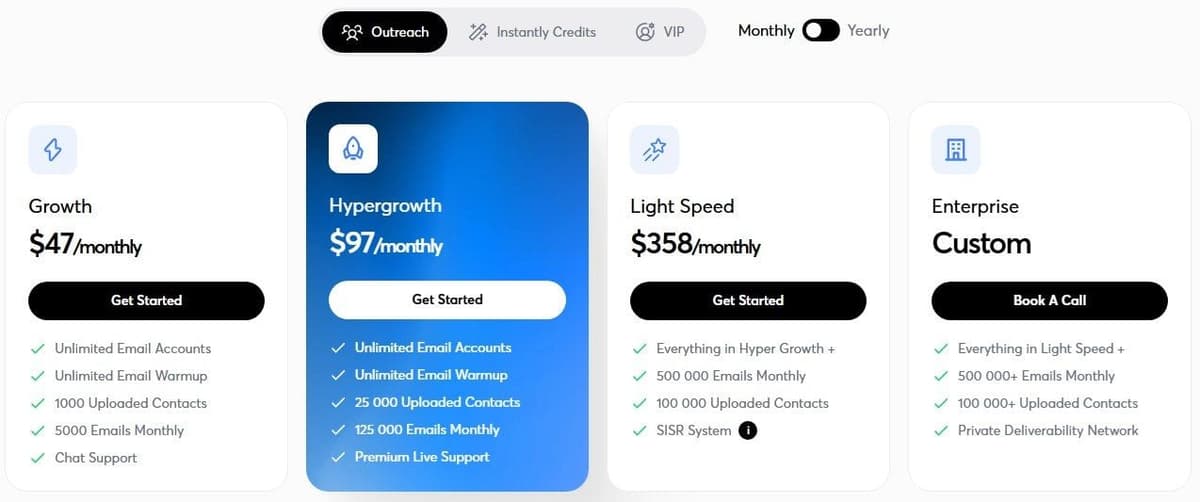
Instantly Outreach Growth includes unlimited connected email accounts and warm-up. Growth lists $47 per month with monthly billing, or $37.6 per month on yearly billing. The plan covers 1,000 uploaded contacts and 5,000 monthly emails; check the selected billing cycle and volume before purchase.
"Unlimited Email Accounts ... Unlimited Email Warmup ... 1000 Uploaded Contacts ... 5000 Emails Monthly ... Chat Support"
Source: instantly.ai
Hypergrowth lists $97 per month monthly or $77.6 per month yearly with 25,000 uploaded contacts; check the selected billing cycle and volume before purchase. Sends are the sticking point. Its monthly card shows 125,000 emails per month, while the comparison shows 100,000. The monthly card and comparison table disagree; confirm the included sends.
Light Speed lists $358 per month with monthly billing, or $286.3 per month on yearly billing, with 100,000+ uploaded contacts and 500,000+ monthly emails; check the selected billing cycle and volume before purchase.
Outreach, the credit products and the bundles are separate purchases. Instantly sells lead-data credits on their own, while its VIP service uses a sales call for a custom price. Compare the selected sending allowance with your existing data source before you add another subscription. Unlimited connected accounts do not remove the contact and sending limits.
2. Smartlead: best for entry plans with unlimited mailboxes
Smartlead lists Base at $39 per month, Pro at $94, Unlimited Smart at $174 and Unlimited Prime at $379 on monthly billing, and says annual billing saves 17% across all plans; billed yearly, the cards show $32, $78, $144 and $315 a month. All plans include unlimited connected email accounts without a per-mailbox connection charge.
"A lead credit is a unique email address (prospect) stored in your account, counted toward your contacts limit. An email credit is each individual email sent across any campaign. For example, the Base plan includes 2,000 contacts and 6,000 email sends per month. These are separate counters."
Source: smartlead.ai
Base lists 2,000 stored contacts and 6,000 monthly sends. Pro lists 30,000 contacts and 90,000 monthly sends. On Base and Pro, verified prospect emails cost an additional $59 per month, and that add-on covers 2,000 or 30,000 verified prospect emails respectively. For contact and company data, see our guide to data enrichment tools.
Smart lists 150,000 monthly sends and 50,000 verified emails. Prime includes 170,000 verified emails, but its detailed card lists 500,000 sends while the compact comparison shows 510K; confirm before purchase. Both upper plans list unlimited contacts. Sending stays capped.
A lead credit counts a unique stored prospect address, and an email credit counts an individual send. Keep those counters separate when estimating follow-ups. A free trial needs no card; confirm its duration and allowances, and note it is not a permanent free plan.
3. lemlist: best multichannel outbound with a lead database
The Email plan lists $55 per month on yearly billing, with a $69 monthly list amount and 50,000 emails per month, and its card lists unlimited users and email senders.
Multichannel lists $87 per user per month yearly, with a $109 monthly list amount and 5 senders per user. Confirm the minimum users and the monthly checkout price. The tier adds LinkedIn automation and SMS automation; WhatsApp is an add-on.
lemlist lists unlimited contacts. Credits pay for data and other actions, and lemlist charges them only when an action succeeds: 1 credit is worth $0.01, a verified email costs 5 credits and a phone number 20 credits. You can top them up without upgrading the plan.
The standard trial opens Multichannel for 14 days without a credit card. Use it to check the channels and accounts you need, and confirm the price offered to your account at checkout.
4. Reply.io: best outreach with a contact database and AI
Reply.io measures active contacts as unique people receiving an initial email plus unlimited follow-ups in a month. Email Volume starts at $59 per user per month for 1,000 active contacts. The low-volume card says per user despite unlimited-user copy; confirm account scope.
Multichannel starts at $99 per user per month, or $89 per user per month billed annually. On the pricing page the 10-mailbox line sits on the annual card and the 5-mailbox line on the monthly card, while the comparison table says 5 mailboxes per user; confirm which applies to the billing period you choose.
Jason AI SDR Starter begins at $500 per month billed annually, at the annual 1,000-active-contact starting tier. Jason finds prospects, personalizes messages and manages responses, as described by Reply.io, without a performance guarantee.
Reply.io offers a 14-day trial. Channel and infrastructure purchases sit outside the plan. LinkedIn adds $69 per account per month, while Calls and SMS add $29 per account per month on top of a Reply plan.
5. Woodpecker: best for agencies with client workspaces
Woodpecker shows $35 per month for 500 contacted prospects and 8,000 monthly emails, equivalent to $7.00 per 100 contacted prospects, excluding VAT. Watch the meter: the same prospect in 5 campaigns counts as 5 contacted prospects.
At the contacted-prospect limit, campaigns stop sending new emails to new prospects until you upgrade or the allowance renews on the billing date. The plan includes unlimited team members and connected email accounts. Neither changes that prospect cap.
Agency Panel costs $27 per active client per month. White Label adds $5 per active client per month. Both sit on top of the base plan, excluding VAT. New domains list $1 per domain per month billed annually, approximately, excluding VAT.
The free trial ends after 14 days or 100 cold emails, whichever limit comes first, and requires no credit card. Test the client-account arrangement there. Budget domains, sending mailboxes and agency add-ons separately.
6. Saleshandy: best for active-prospect plans
Saleshandy Starter costs $34 per month billed annually at $408 per year, or $41 per month paid monthly, for 2,000 active prospects, excluding applicable taxes. Pro moves to $76 per month billed annually at $912 per year, or $99 per month paid monthly, for 30,000 active prospects, excluding applicable taxes.
Scale costs $149 per month billed annually at $1,788 per year, or $189 per month paid monthly, for unlimited active prospects, excluding applicable taxes. Scale stays subject to its Fair Usage Policy. Active prospects are contacts in live sequences, distinct from stored prospects.
The default Starter, Pro and Scale sending allowances are 6,000, 100,000 and 200,000 emails per month across connected mailboxes. Saleshandy advertises unlimited connected mailboxes, but its rotation comparison lists 10, 100 and 1,000 accounts respectively; confirm sender rotation limits separately from connected mailboxes.
A 7-day trial requires no credit card. Use it to check the sequence volume and account controls you need. Choose a plan around simultaneous active prospects and total sends, not around the assumption that every stored contact consumes the active allowance.
7. QuickMail: best for unlimited email and LinkedIn senders on every plan
QuickMail Starter costs $49 per month with 1,000 uploaded contacts, 5,000 monthly sends and a workspace. Growth raises that to $99 per month for 25,000 uploaded contacts, 100,000 monthly sends and a workspace. At the top, Agency costs $299 per month with 100,000 uploaded contacts, 500,000 monthly sends and 2 workspaces.
Agency lists $49 per extra workspace; confirm the billing period for that additional workspace. Ask for the complete workspace cost before you put that add-on figure in a recurring agency budget.
The 14-day trial requires card details, but QuickMail does not automatically charge or subscribe the account when it ends. It sends through the connected email provider. Its Gmail example uses Google's sending infrastructure. During evaluation, check the connected account and the intended workflow, including how you will handle replies and store contacts across your workspaces.
8. Snov.io: best email finder that also sends
Snov.io separates data credits from contacted recipients. Finding a prospect, verifying an email or viewing a company profile costs a credit. The first contact with a lead spends a recipient; follow-ups to that lead within the same billing period are free and unlimited.
The Trial allowance lists 50 credits, 100 recipients and an email warm-up slot; confirm the renewal terms. As of September 17, 2026, Snov.io's page says those free credits and recipients renew every 30 days and the Trial can be used for as long as you like; confirm the terms on your own account before you plan around them.
Starter lists $39 per month on monthly billing or $29.25 per month on annual billing. Pro S lists $99 per month monthly or $74.25 per month annually. Confirm allowances before purchase. As of September 17, 2026, the plan cards list 1,000 credits and 5,000 recipients a month on Starter and 5,000 credits and 25,000 recipients a month on Pro S; confirm the allowance for the plan and billing period you select.
Estimate finding, verification and outreach separately, then decide whether Snov.io covers both data and sending or works alongside another sender.
9. Hunter: best for a shared email-finding credit pool
Hunter's Free allocation lists 50 credits per month; confirm the other Free-plan limits. Team members share the plan's credit pool, and the page permits unlimited team members at no extra cost. So estimate usage across the whole team.
As of September 29, 2026, Hunter's pricing page lists Starter at $34 a month billed yearly ($408 a year) or $49 billed monthly, with 2,000 credits a month; Growth at $104 a month billed yearly ($1,248 a year) or $149 monthly, with 10,000 credits; and Scale at $209 a month billed yearly ($2,508 a year) or $299 monthly, with 25,000 credits. Every plan includes unlimited team members. Compare the yearly total with twelve monthly payments before you commit: on Starter that is $408 against $588.
Finding an email through Domain Search, Email Finder or Bulk Email Finder consumes a credit, for the quoted email-finding actions only. Confirm verification charges separately. Before you pick Hunter as both finder and campaign tool, check the connected-account and recipient limits on the plan you select: as of September 17, 2026, the Free plan lists 1 connected email account and 500 recipients per sequence, so Hunter's free tier is a finder with a small sequence attached rather than a sending platform. Confirm the paid plans' limits at checkout.
10. Apollo: best prospecting database with sequences
Apollo Free costs $0 and includes 900 credits per seat per year, granted monthly. Its paid-plan trial lasts 14 days and includes 100 credits, so keep the ongoing Free allowance apart from the temporary paid-plan evaluation.
Basic costs $49 per seat per month with 30,000 credits per seat per year granted upfront, billed annually. Professional costs $79 per seat per month with 48,000 annual credits per seat granted upfront, billed annually. Confirm the minimum seats on both.
Free lists 2 sequences and Basic unlimited sequences. Above Professional, Apollo lists a Custom plan for custom volumes, SSO, advanced security and dedicated support, priced through sales. Apollo also bills month to month, at a higher effective monthly cost, so use that rate when you compare Basic or Professional with a monthly plan elsewhere.
Enrichment needs a separate check: the table lists 1-8 credits while the FAQ says up to 9 per enriched record; confirm before purchase. Budget seats, sequences and data consumption separately. A large annual credit balance is not unlimited prospecting.
11. Salesforge: best for evaluating AI agent-run outreach
Salesforge Agent Frank's headline is $499 per month billed annually for 2,000+ contacts per month. Its Base slider shows $416 per month billed annually for up to 1,000 active contacts. Headline and slider describe different contact volumes; confirm the selected offer.
Underneath the agent, Salesforge sells ordinary sending plans: Pro at $40 per month billed annually for 1 user, 1,000 active contacts in sequence and 5,000 emails a month, and Growth at $80 per month billed annually for unlimited users, 10,000 active contacts and 50,000 emails a month. The plan cards show annual prices and the page advertises a monthly rate elsewhere, so confirm the billing period before comparing with the agent price.
Mailbox infrastructure is priced apart from the agent. The stack builder lists Primeforge at $45 per month and Mailforge at $30 per month, but each product needs its own subscription; confirm the builder quantities.
Salesforge also offers a 14-day platform trial capped at 50 contacts and 100 emails, with 50 validation credits, 50 personalization credits and 100 social-action credits. Confirm whether the agent offer has separate trial terms, then compare the contact tier plus infrastructure with a conventional sending plan.
12. Latenode: for custom outreach workflows between tools, a CRM and AI
Latenode is the workflow layer to evaluate around your chosen outreach tools. Its visual builder, AI Copilot and AI Agent builder support custom processes, with 335+ LLM models under one subscription. The building blocks are webhook triggers, a built-in database, a headless browser and custom JavaScript nodes. Other builders that can join a sending tool to a CRM are compared in our guide to no-code automation tools.
Latenode bills runtime in CPU seconds, based on runs and average duration; workflow steps do not multiply the bill. Free costs $0 per month, needs no credit card and includes 10,000 CPU seconds each month plus 5 active workflows.
Pay as you go has no base fee and includes 10,000 CPU seconds monthly, then charges $0.00012 per CPU second in the 10,001-100,000 bracket. Each bracket applies only to the runtime inside it. Paid external-provider usage costs extra, and 1 PnP token equals $1 per token. The runtime allowance is not an email-sending quota.

How cold email tools are priced
Read the allowance beside the price. Smartlead counts stored prospect addresses and sent emails separately. At Reply.io the meter is unique active contacts reached during the month, with follow-ups included in that contact definition. Woodpecker can count the same prospect again across campaigns. Those are different ways to measure the workload, even when the headline price is monthly.
Then find the second purchase. A data-credit plan may sit beside a sending subscription. Domains, mailboxes, client workspaces and channel add-ons can each have their own unit and renewal period. Unlimited connected accounts do not mean unlimited emails or an unlimited data allowance.
Separate monthly billing from a monthly equivalent paid annually. Saleshandy shows both the annual charge and the monthly option. Elsewhere, ambiguous selectors or incomplete quotations need confirmation before purchase. Hold the chosen currency and tier in your budget, and request the total commitment instead of trusting the largest price printed on a card.
Deliverability setup before you send
Mailbox providers decide what reaches the inbox, so set up the sending domain before you compare features. Google's email sender guidelines ask every sender to set up SPF or DKIM, keep valid forward and reverse DNS, send over TLS and keep the spam rate in Postmaster Tools below 0.3%. Anyone sending 5,000 or more messages a day to personal Gmail accounts also needs both SPF and DKIM, a DMARC record, where a policy of none is enough, a From domain aligned with one of them and one-click unsubscribe on marketing mail. Yahoo uses the same 0.3% ceiling and asks bulk senders to honor unsubscribes within 2 days.
- Authenticate every sending domain with SPF, DKIM and DMARC before the first campaign.
- Send from a separate domain and mailboxes, as the FAQ below explains.
- Start small: Google advises a low volume to engaged recipients first, raised slowly, with no sudden spikes.
- Verify the list and remove invalid addresses promptly, as Yahoo recommends, with the verification credits several tools above sell.
- Follow CAN-SPAM in the US: accurate headers and subject lines, a valid postal address and a working opt-out honored within 10 business days. The FTC says the law makes no exception for business-to-business email.
In the trial, check that the tool stops a sequence after a bounce or an unsubscribe and lets you cap daily sends per mailbox. Warm-up inside a plan is a setting to use, not a promise of placement.
How to choose cold email software
Start with mailbox count, uploaded contacts, contacts active at the same time and expected monthly sends. Include follow-ups in the sending estimate, then map those activities to the vendor's definitions. For agency work, list each client account and the people who need access.
Check how the platform connects to the email provider and CRM you actually use. In Gmail or Google Workspace, verify the connection method, permissions and available actions during evaluation. Ask what happens after a reply, how you stop a sequence, where exceptions appear and how the team avoids contacting someone twice by accident.
If an event in your CRM, such as a deal marked lost, should start a sequence, check the sender's API before you buy: you need a documented way to add a lead to a specific campaign, and webhooks for sends, bounces and replies rather than replies alone. One user on r/automation described the gap they kept finding: "webhooks only fire on inbound events (someone replied)". Ask too whether API access needs a higher tier, because that changes which plan you are really comparing.
Decide whether lead finding belongs in the same subscription. Compare a complete suite with the cost of your existing sender and data source, including the work needed to keep them connected.
Use a trial to check workflow fit and account controls. Warm-up and delivery features are capabilities to inspect, not promised outcomes. Before buying annually, record the selected volume, currency, tax treatment, mailbox scope and any written clarification of conflicting limits.
If the plan adds LinkedIn steps, test two more things in the trial. Check that a reply on either channel stops every campaign the person is in, including the ones they did not answer, and read LinkedIn's own rules on automation tools before you connect a personal profile, since a sender's daily limits are the vendor's settings rather than LinkedIn's terms. One user on r/b2bmarketing described a prospect who sat in two campaigns from the same account: "he replied to the first one and there was already a proper conversation going", yet the second campaign still sent him a follow-up.
Which tools work together and which replace each other
Map the jobs before you replace a subscription: if your sender already runs the sequences you need, add a finder as a data source; if you want one suite, check it covers both finding and sending at the tier you would buy.
Compare replacements at the job level. Instantly, Smartlead, lemlist, Reply.io, Woodpecker, Saleshandy and QuickMail are alternatives to each other for sending, so pick one rather than two. Snov.io, Hunter and Apollo are alternatives to each other for finding, and lemlist, Reply.io and Apollo sell data next to a sender, which is where one suite can replace two subscriptions. Reply.io's Jason and Salesforge's Agent Frank are the agent-run version of the same sending job. Latenode replaces none of them: it is the layer between whichever sender, finder and CRM you keep. A product that covers several jobs may still meter them separately; check who owns failed handoffs and duplicate records.
Latenode works as a custom workflow layer built from webhooks, its database, AI building blocks and JavaScript nodes; verify the connections to your sender and CRM, then budget CPU runtime and any paid provider usage alongside those subscriptions.
Reply.io vs Woodpecker
The two count outreach in opposite ways, which moves the price more than the headline does.
| Point | Reply.io | Woodpecker |
|---|---|---|
| Meter | Active contacts: a first email plus unlimited follow-ups a month | Contacted prospects, counted again in each campaign |
| Entry plan | $59 per user a month for 1,000 active contacts | $35 a month for 500 prospects and 8,000 emails |
| 1,000 new contacts a month | $59 per user a month | $67 a month on the 2,000-prospect tier |
| Client accounts | Agency Core plan with unlimited clients and users | Agency Panel $27 plus White Label $5 per active client a month |
| Sending domains | From $6 per domain a year plus $5 per mailbox a month | About $1 per domain a month, billed annually |
| Trial | 14 days | 14 days or 100 cold emails, no card |
Reply.io suits long sequences where each contact sits in one campaign; Woodpecker suits agencies, since unlimited team members and email accounts come with the plan and each client adds a fixed fee.




