



Quick answer: the best sales automation tool for each need
What does sales automation software cost? Among the three CRMs here, seats with automation cost $20 a month on HubSpot Starter billed monthly ($7 on a limited-time annual offer for new customers), $25 per user on Salesforce Starter Suite and $39 per seat on Pipedrive Growth billed annually, while Pipedrive Lite at $14 billed annually leaves the automation out. HubSpot's sequences and lead scoring start on Professional at $90 per seat billed annually. Prospecting and sequencing tools add $49 to $89 per seat a month on annual billing (Apollo Basic, Reply.io and lemlist Multichannel), and cold email senders such as Smartlead and Instantly charge a flat $39 to $47 a month. Outreach and Salesloft are quote only. Prices are in US dollars as listed in September and October 2026, and each entry names the meter the vendor bills: seats, credits, emails, contacts or runtime.
All-in-one CRM with a free tier: HubSpot Sales Hub. Pipeline-first CRM: Pipedrive. Enterprise CRM with AI agents: Salesforce Sales Cloud. Prospecting data on a budget: Apollo. Enterprise sales engagement: Outreach or Salesloft. Multichannel outreach with usage-based enrichment: lemlist. Cold email volume: Instantly or Smartlead. Enrichment and data workflows: Clay. AI SDR sequences: Reply.io. Custom workflows between them: Latenode.
Editorial note: Latenode publishes this article and is one of the products discussed. The comparison uses public product documentation and pricing pages. Worked examples are calculations under stated assumptions, not results from a hands-on benchmark. Recommendations describe which requirements a product may fit; they are not a measured ranking of performance or reliability.
What sales automation tools do in 2026
Buyers meet several shapes of product under one label. A CRM holds the pipeline and automates what happens around it: stage changes, task creation, follow-up reminders and reporting. A sales engagement platform runs sequences across email, calls and LinkedIn, then tracks replies and books meetings. Cold email infrastructure sits under that. It manages many sending inboxes, warms them up and spreads volume across domains. Data platforms find and enrich contacts, turning a company name into a verified email, a phone number or a funding signal. A workflow layer connects the rest, moving a record from one system to another when something happens. For contact and company data, see our guide to data enrichment tools.
Categories overlap. Billing does not. One vendor charges per seat, another per credit, another per email sent, another per contact stored. Products at the same sticker price can cost very different amounts once the meter runs. So every price below names its unit.
What to automate at each stage of the sales process
Sales automation runs from lead generation at the top of the funnel to pipeline management and forecasting further down. The table maps each stage to the tools in this list that handle it and the plan where that starts.
| Stage | Tools in this list | Plan or tier to check |
|---|---|---|
| Lead capture | Pipedrive, Latenode | Pipedrive LeadBooster web forms: add-on on Lite and Growth, included from Premium; Latenode webhooks on every plan |
| Enrichment | Apollo, Clay, lemlist | Credits: up to 9 per record at Apollo, Data Credits from $0.05 at Clay, 5 per verified email at lemlist |
| Lead scoring | HubSpot, Pipedrive | HubSpot Professional, up to 5 scores; Pipedrive custom scoring from Premium |
| Lead routing | Salesforce, Pipedrive | Salesforce lead routing from Starter Suite; Pipedrive automatic assignment from Premium |
| Sequences | HubSpot, Pipedrive, Apollo, lemlist, Reply.io, Outreach, Salesloft | HubSpot from Professional; Pipedrive from Growth; Apollo Free has 2, Basic unlimited |
| Follow-up tasks | HubSpot, Pipedrive | HubSpot workflows from Starter, up to 50 with restricted triggers and actions, or 300 on Professional; Pipedrive automations from Growth |
| Meeting booking | HubSpot, Pipedrive, Reply.io | HubSpot on every plan, 1 personal link on Free; Pipedrive scheduler from Growth; Reply.io Jason AI from $500 a month |
| CRM updates | Pipedrive, Salesforce, Latenode | Pipedrive email sync from Growth; Salesforce activity capture from Starter Suite |
| Forecasting | Salesforce, HubSpot, Pipedrive, Salesloft | Salesforce Pro Suite; HubSpot Professional; Pipedrive forecast view from Growth; Salesloft by quote |
Sales automation tools at a glance
Twelve tools follow, in the order of the sections below. Read the pricing model column before the entry price: it says what you are billed for. That is where these products differ most.
| Tool | Best for | Pricing model | Entry price |
|---|---|---|---|
| HubSpot Sales Hub | All-in-one CRM | Seats plus credits | $0; $7 seat, annual promo |
| Pipedrive | Pipeline CRM | Per seat | Growth, $39 per seat |
| Salesforce Sales Cloud | Enterprise CRM | Per user | $25 per user |
| Apollo | Prospecting data | Seats plus credits | $0, then $49 per seat |
| Outreach | Sales engagement | Quote only | Quote only |
| Salesloft | Revenue platform | Quote only | Quote only |
| lemlist | Multichannel outreach | Plan plus credits | Multichannel $109/user |
| Instantly | Cold email volume | Flat monthly plan | $47 a month |
| Smartlead | Many inboxes | Flat monthly plan | $39 monthly; verification extra |
| Clay | Enrichment workflows | Credits plus actions | $0, then $185 a month |
| Reply.io | AI SDR sequences | AI SDR plus contact tier | AI SDR $500/mo yearly |
| Latenode | Custom workflows | CPU seconds | $0, 10,000 CPU sec |
Compare tools by the part of the sales process they own
| Job | Candidates in this list | What to verify before paying |
|---|---|---|
| CRM records and pipeline | HubSpot, Pipedrive, Salesforce | Plan that includes the automation, permissions, reporting |
| Prospect data and enrichment | Apollo, Clay | Coverage, verification, credit rules, CRM writeback |
| Rep-led engagement | Outreach, Salesloft, lemlist, Reply.io | Sequence channels, stopping rules, reply handling, CRM sync |
| Sending across multiple inboxes | Instantly, Smartlead | Inbox costs, verification, limits, operational ownership |
| Coordination between tools | Latenode | Exact API actions, duplicate prevention, failure handling, runtime |
The categories overlap, but the tools are not interchangeable. A sending platform does not become the CRM of record merely because it can update a CRM field.
What sales automation costs for a 5-rep team
Here is the monthly bill for five sales reps on each tool's entry or main plan, at the list prices in the sections below, before taxes, add-ons and extra credits. Seat-based tools multiply by five; flat plans do not.
| Tool and plan | Five reps | Monthly total | What grows the bill |
|---|---|---|---|
| HubSpot Sales Hub Starter | 5 x $20, monthly billing | $100 | Credits past 500; sequences and lead scoring need Professional |
| HubSpot Sales Hub Professional | 5 x $90, annual billing | $450, plus $1,500 once | Credits past 3,000 a month |
| Pipedrive Growth | 5 x $39, annual billing | $195 | VAT and add-ons such as LeadBooster |
| Salesforce Starter Suite | 5 x $25, monthly or annual | $125 | Forecasting starts on Pro Suite |
| Salesforce Pro Suite | 5 x $100, annual billing | $500 | Premier support at 30% of net license fees; Agentforce from $125 per user |
| Apollo Basic | 5 x $49, annual billing | $245 | Phone numbers at 8 credits each |
| lemlist Multichannel | 5 x $87, yearly billing | $435 | Enrichment credits at $10 per 1,000 |
| Reply.io Multichannel | 5 x $89, annual billing | $445 | LinkedIn accounts at $69 each, extra mailboxes at $29 |
| Instantly Outreach Growth | Flat plan | $47 | More than 5,000 emails a month |
| Smartlead Base with verification | Flat plan plus add-on | $98 | More than 6,000 sends a month |
| Clay Launch | Unlimited users, annual billing | $167 | Data Credits and Actions |
| Outreach, Salesloft | Quote only | Quote only | Seats plus AI credits at Outreach |
| Latenode | Not priced per seat | Depends on runtime | CPU seconds past the 10,000 included each month |
Annual-billing totals are monthly equivalents: Pipedrive Growth for five reps comes to $2,340 a year, and Apollo Basic grants 150,000 credits a year across the five seats. Stacks combine rows. Pipedrive Growth for the pipeline plus Apollo Basic for data and sequences comes to $440 a month for five reps on annual billing. With HubSpot Professional in place of Pipedrive, the same stack is $695 a month plus a one-time $1,500 onboarding fee.
1. HubSpot Sales Hub: best all-in-one CRM with a free tier
HubSpot Sales Hub puts the CRM, email tracking, sequences and reporting under one login. The entry point is free. The Free plan costs $0 a month for up to 2 users with no credit card. Paid tiers add automation and reporting depth, billed per seat. For sending at volume, see our guide to cold email software.
"HubSpot Credits reset monthly during your subscription term. Unused credits do not roll over into the following month."
Source: hubspot.com
The advertised $7-per-seat monthly equivalent for HubSpot Starter is a limited-time offer for new customers with annual billing. It is not a guaranteed renewal price or the price of every Sales Hub capability. Check the specific package, the required automation feature and the renewal terms before using this promotional entry point in a budget. Starter is $20 per seat billed monthly, with 500 HubSpot Credits.
Professional starts at $90 per seat a month annually or $100 monthly, with 3,000 credits and a one-time $1,500 Professional Onboarding fee on top. Enterprise starts at $150 per seat a month with 5,000 credits and a $3,500 onboarding fee.
Credits are the AI meter. They sell in capacity packs of 1,000 credits for $10 or at $0.010 per credit added to an account, and they reset monthly with no rollover. The Prospecting Agent costs 100 credits per recommended outreach for one lead, the Customer Agent 50 per resolved conversation. Over 2,000 apps connect, by HubSpot's own count.
In dollars, the Prospecting Agent's 100 credits per recommended outreach come to $1 per lead at $0.010 a credit, so the 500 credits listed with Starter cover 5 such leads a month and the 3,000 listed with Professional cover 30. An agent that recommends outreach for 1,000 leads a month draws 100,000 credits, about $1,000 at the per-credit rate. One user on r/hubspot put it this way: "I'm not a fan of the usage based pricing as it adds potential hidden costs and unpredictable accounting." Ask HubSpot which actions in your package draw credits besides the agents, and price a busy month, since unused credits do not roll over.
The limitation: paid tiers charge per seat. From Professional upward, an onboarding fee lands before the first invoice.
Before you budget from Starter, list each automation you need, such as sequences, reply-triggered follow-ups, round-robin routing or deal-stage rules, and find the tier that includes it in HubSpot's plan comparison. If one of them sits in Professional, the seat moves from $20 a month on monthly Starter billing to $100 paid monthly or $90 billed annually, plus the one-time $1,500 onboarding fee. Anything the native workflows cannot do goes to a workflow layer between the systems, which is a second bill to add.
2. Pipedrive: best pipeline-first CRM for small teams
Pipedrive is built around one screen: the pipeline. Deals move through stages by drag, activities attach to them, and the automation that matters is the follow-up nobody remembers.
Prices are per seat, and Pipedrive states that they exclude VAT.
For Pipedrive's automations and nurturing sequences, use Growth as the comparison starting point rather than the cheaper Lite plan. The pricing page lists Growth at $39 per seat per month with annual billing. Three seats therefore cost $117 per month as an annual equivalent, or $1,404 per year, before taxes and add-ons. Lite can be a CRM entry point without being the right price for the automation discussed here.
Lite costs $14 per seat a month billed annually, charged as one payment of $168 per seat a year. Premium is $59 and Ultimate $79 per seat a month on the same basis, Ultimate as $948 a seat a year.
A 14-day free trial gives full access without a card, and co-workers can join it. Five add-ons sit on top of any plan, each with its own starting price: LeadBooster, Projects, Campaigns, Web Visitors and Smart Docs. Check Pipedrive's pricing page for their current prices before you add them to the budget. Pipedrive lists 500+ integrations by its own count.
One limitation: email and follow-up automation is what Growth advertises, so Lite is a workspace rather than an automation plan.
3. Salesforce Sales Cloud: best for enterprise sales organizations
Salesforce Sales Cloud is aimed at large sales organizations. The base is lead, account, contact and opportunity management, with built-in sales flows and lead routing. Quoting, forecasting and AI agents sit higher up.
Starter Suite costs $25 per user a month, billed monthly or annually. Pro Suite costs $100 per user a month billed annually and adds quoting and forecasting. Above those sit Core at $195, Advanced at $395 and Max at $550 per user a month on annual billing. Max includes 2.75M Flex Credits per org a year and Agentforce for Sales. Agentforce for Sales also sells as an add-on from $125 per user a month, Revenue Intelligence from $220.
Support is its own line. The Standard Success Plan comes with every license, while Premier costs 30% of net license fees. A free 30-day trial covers all editions with no card, and the Starter Suite trial covers up to 10 users.
The limitation: AI arrives from Core upward, and detailed pricing comes from a sales representative. The real number lands in a quote.
4. Apollo: best prospecting data and sequences on a budget
Apollo bundles a contact database with sequences. The same tool finds the prospect and emails them. That combination is what puts it into budget-conscious stacks: one subscription instead of a data vendor plus an outreach tool.
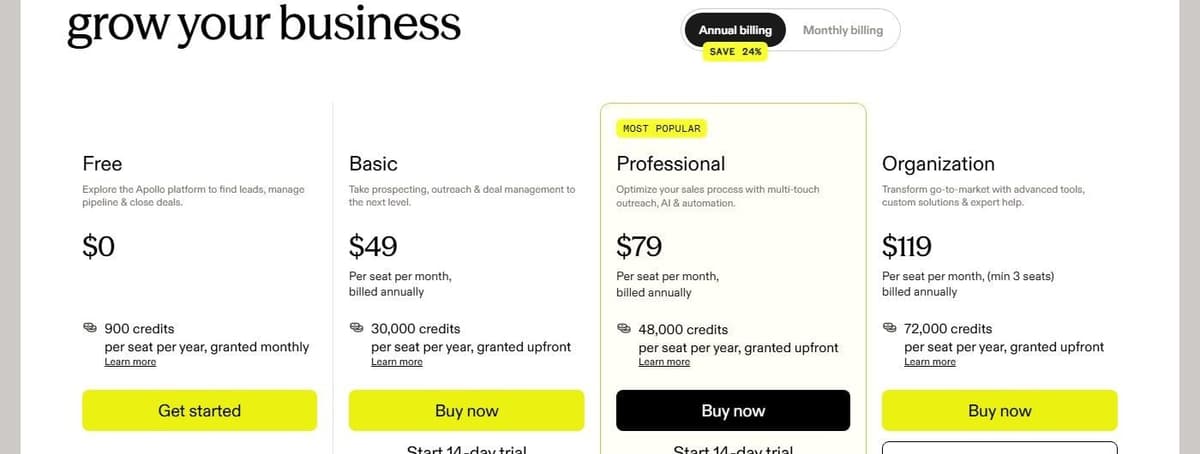
The Free plan costs $0 and includes 900 credits per seat a year, granted monthly. Basic costs $49 per seat a month billed annually, with 30,000 credits per seat a year granted upfront. Professional is $79 with 48,000 credits, and Organization $119 with 72,000 credits and a minimum of 3 seats.
Credits are the real budget line. A contact email costs 1 credit, a phone number 8 credits, enrichment up to 9 credits per record and the US dialer 2 credits a minute. Paid plans come with a 14-day trial that includes 100 credits. The Inbound and Advanced Dialer add-ons cost $119 per team a month each, billed annually.
The limitation: the seat price is half the story. Phone numbers burn credits eight at a time, so a team that dials often should model credits before seats.
5. Outreach: best enterprise sales engagement, quote-based
Outreach is a sales engagement platform for teams running structured sequences at scale. Email, calls and tasks sit in one workflow, with AI layered over the activity data. It is aimed at enterprise revenue organizations.
No prices appear on the pricing page. In the vendor's own wording: "Reach out to our team for custom pricing based on your team's needs." What the page does set out is the billing shape: seat-based pricing combined with consumption-based pricing measured in AI credits, with extra credit packs available at any time, priced per user with no platform fees and support included.
Four packages set the credit allowance: Amplify Essentials with 10,000 AI Credits, Amplify Core with 25,000, Amplify Plus with 50,000 and Amplify Pro with 100,000. Caps move with them. Essentials and Core allow 250,000 API calls, 5 custom objects and 500 MB of knowledge, Plus 500,000 calls, 10 objects and 750 MB, Pro 1,000,000 calls, 20 objects and 1,500 MB. Onboarding is quoted separately, from self-serve to full implementation and training.
The limitation: no self-serve price, so budgeting starts with a sales call.
6. Salesloft: best for revenue teams that want a full platform, quote-based
Salesloft sells a revenue platform packaged as named products rather than priced plans. Account teams get Cadence, Conversation Intelligence, Deals and Rhythm. Revenue leaders get Clari Forecast, Inspect and Analytics.
Cost is not published. The pricing URL renders a sales-contact page with no prices and no plan tiers. The only calls to action are Talk to Sales and Book time with us. There are no trial terms on it either, and no metering unit is named. Nothing on the page says whether you would be billed per seat, per credit, per contact or per email. Anyone weighing Salesloft against a self-serve tool has to collect a quote first.
The limitation: everything about price sits behind a conversation.
7. lemlist: multichannel outreach with usage-based enrichment
lemlist runs multichannel sequences: email, LinkedIn steps and calls, with enrichment in the same screen. Its credit model charges for outcomes rather than attempts.
"They're only charged when an action is successful. If you run out, you can top up anytime directly from your account."
Source: lemlist.com
Email costs $69 per month, or $55 per month with yearly billing, at 50,000 emails per month with unlimited users and email senders on the plan card. The plan comparison shows Email from $55 per user per month, so confirm the seat basis at checkout. Multichannel starts at $109 per user per month, or $87 with yearly billing, with five senders per user. The 14-day trial provides Multichannel access without a card.
Enrichment and other credit-based features are charged separately from the subscription. At lemlist's listed rates, 1,000 credits cost $10; a verified email uses five credits and a phone number uses twenty. Successful data or feature actions consume credits. This does not mean the subscription is billed only when a prospect replies or buys.
The Email entry price does not include the Multichannel plan's channel set. Choose the required channels first, then add the relevant users, credits and optional add-ons to the subscription total.
8. Instantly: best for cold email volume
Instantly is cold email infrastructure: sending accounts, warmup and volume, with a lead database attached. It suits outbound teams whose constraint is how much mail goes out.
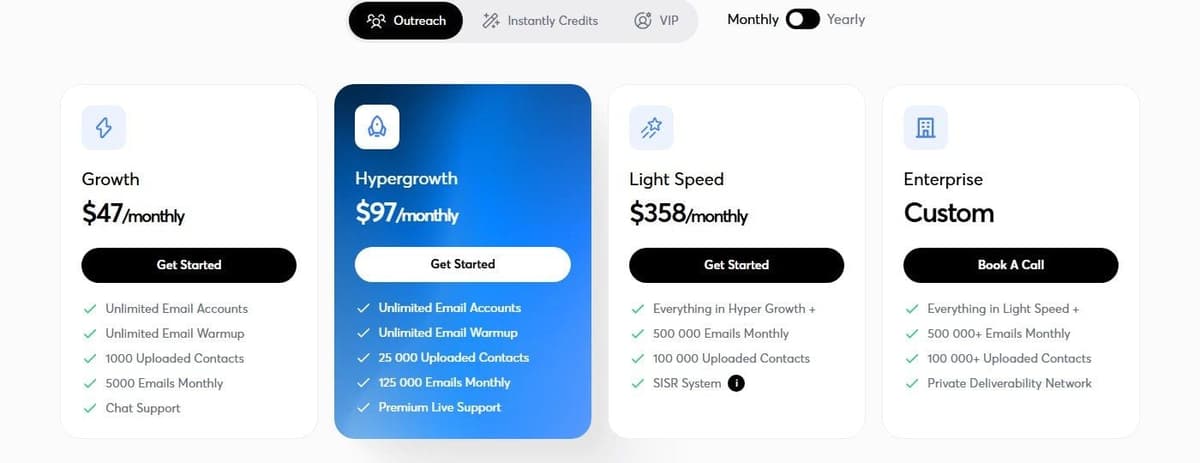
Three price lists share one page. Standalone Outreach plans run Growth at $47 a month, Hypergrowth $97, Light Speed $358 and Enterprise at custom pricing. Growth covers unlimited email accounts, unlimited warmup, 1,000 uploaded contacts and 5,000 emails monthly.
Bundles combine sending and data: Starter at $94 a month, or $85 on yearly billing, with 5,000 emails, 1,000 contacts and 1,500 credits; Scale at $194 or $175 with 100,000 emails, 25,000 contacts and 5,000 credits; Agency at $555 or $500 with 500,000 emails, 100,000 contacts and 10,000 credits. Credits also sell alone, from $47 a month for 1,500 to 2,000 credits, up to Hyper Credits from $197 for 10K to 200K. Credit plans include a database of 450M+ B2B leads by Instantly's own count. The VIP tier sells via a call.
The limitation: three overlapping lists on one page. Fix your monthly email volume first, then pick the line that covers it. Our comparison of cold email software priced by send volume sets Instantly against other senders.
9. Smartlead: best for agencies running many inboxes
Smartlead is the other cold email platform here. Its pitch to agencies is the mailbox count: unlimited email accounts on all plans, with no per-mailbox charge, plus client workspaces.
Plans are flat monthly prices rather than per seat. Smartlead Base is $39 per month and Pro is $94 with monthly billing. Email verification is a separate $59-per-month add-on on these tiers, not part of the base subscription. Base plus that add-on is therefore $98 per month; Pro plus it is $153, before other purchases and taxes. Higher plans have different included verification allowances.
Base covers 2,000 contacts and 6,000 email sends a month, Pro 30,000 contacts and 90,000 sends. Unlimited Smart costs $174 a month with unlimited contacts, 150,000 sends and 50,000 verified emails included. Unlimited Prime runs $379 a month with unlimited contacts, 500,000 sends and 170,000 verified emails included. Annual billing saves 17%.
Contacts and sends are separate counters: a lead credit is one stored prospect email address, an email credit is each individual email sent. Whitelabeling costs $29 a month per client workspace from Pro onward, and Unlimited Prime includes 3 workspaces. Every plan comes with a free trial, no credit card needed.
The limitation: two counters to watch, not one. A list that fits the contact limit can still exhaust the send limit, since each email counts on its own.
10. Clay: best for enrichment and data workflows
Clay combines prospect data, enrichment and workflow orchestration. It also supports sending through its native Clay Sequencer or sequencing integrations. Evaluate data quality, Data Credits, Actions and the sending capabilities you need; Clay is not limited to preparing data for another sender.
The Free plan costs $0 with 100 Data Credits and 500 Actions a month, unlimited seats and tables, 200 rows per table. Launch starts at $185 a month with 2,500 Data Credits and 15,000 Actions, or $167 with annual billing. Growth starts at $495 a month with 6,000 Data Credits and 40,000 Actions, or $446 with annual billing. Enterprise is custom pricing on an annual commitment, with 100,000+ Data Credits and 200,000+ Actions a month.
Two meters run at once: Data Credits from $0.05 each for marketplace data, and Actions from less than $0.01 each for orchestration. A 14-day trial is available. Actions reset each billing cycle without rolling over. Unused Data Credits roll over up to 2x the monthly amount on Launch and Growth.
The limitation: two meters to track, and a long step from $0 to $185.
11. Reply.io: best for AI SDR and multichannel sequences
Reply.io runs multichannel sequences and sells an AI SDR on top: Jason AI writes and sends sequences, handles replies, books meetings.
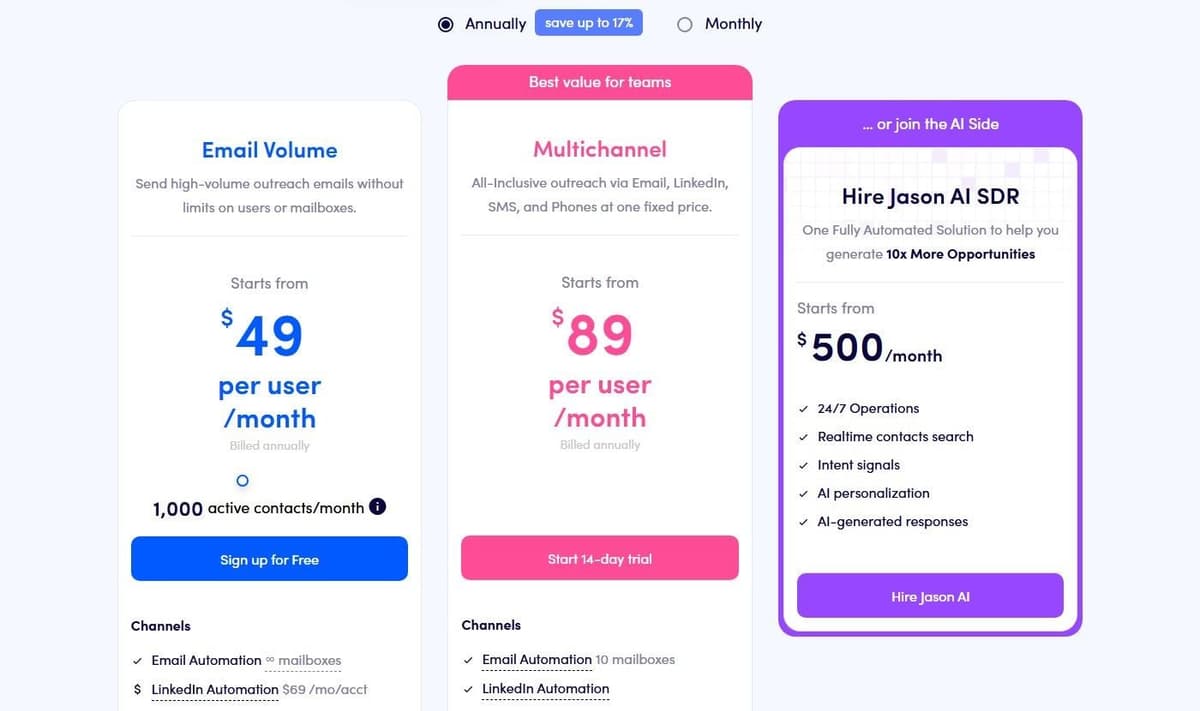
Reply Email Volume starts at $59 per user per month, or $49 with annual billing, for the entry contact tier. Multichannel starts at $99 monthly or $89 with annual billing. Jason AI SDR is a separate offer starting at $500 per month on the annual plan. Reply's annual Multichannel card lists 10 mailboxes, while the monthly card and the detailed comparison list five per user; confirm the allowance in the selected order before budgeting additional mailboxes.
Channel add-ons cost $69 per LinkedIn account a month, $29 per Calls and SMS account, $29 per extra mailbox on Multichannel. Plans include 50 Live data credits a month, up to 200 website visitor reveals, a 14-day free trial and a default prospect limit of 100,000 on Business and Agency plans.
The limitation: prices sit on sliders, so every figure here is a floor.
12. Latenode: for custom sales workflows between tools
Latenode is a workflow layer, not a CRM and not an inbox tool. It sits between the others. A form fills in, a webhook fires, the record gets enriched, the lead is scored and routed, and the CRMs stay in sync. You build that on a visual drag-and-drop canvas, with an AI Copilot in every workflow and an AI agent builder. A headless browser covers sites without an API. There is also a built-in database, global variables, and custom JavaScript nodes for custom logic. More than 335 LLM models are available under one subscription. AI SDR tools are compared in our guide to AI sales agents, and processes beyond sales in our guide to business process automation tools.
Billing is usage-based and counts CPU seconds of workflow runtime, not operations and not steps. Adding steps does not multiply the bill. The Free plan costs $0 a month with 10,000 CPU seconds included and 5 active workflows. Pay as you go has no base fee. It keeps the same 10,000 free CPU seconds, then charges from $0.00012 per CPU second. Webhooks are instant on every plan; 1-minute polling is a $10 a month add-on.
The trade-off: runtime billing depends on run length, so it is not directly comparable to a per-seat or per-credit price.
How to choose a sales automation tool
Start with the meter, not the sticker price. Two tools at the same monthly figure can bill in opposite ways, and the difference shows up in month three.
- Name the unit first: seats, credits, emails sent or contacts stored. Then compare like for like.
- Count the one-time fees. HubSpot charges $1,500 for Professional Onboarding and $3,500 for Enterprise Onboarding, and neither sits in the monthly price.
- Check what the list price leaves out. Pipedrive states that its prices exclude VAT.
- Treat quote-only vendors as a separate track. Outreach and Salesloft publish no prices, so a demo comes before the budget line.
- Test on the free tiers. HubSpot, Apollo, Clay and Latenode each have one, and a real workflow on a free plan settles more than a feature grid.
- Read the credit rules, not the credit count alone. A phone number costs 8 credits at Apollo, lemlist charges only when an action succeeds, and Clay rolls unused Data Credits over up to 2x the monthly amount.
- Decide who owns the process. If the sequence lives in the CRM, buy the CRM tier that automates it; if it crosses four systems, a workflow layer owns it instead.
Then write down the volume you actually expect next quarter: seats, emails sent, records enriched, deals in flight. Run that through each shortlisted vendor's meter, and compare the totals rather than the headline plans. A low sticker price does not settle that arithmetic. The quote-only vendors cannot enter it at all until someone calls you back.
Two more vendors are worth a quote or a trial if none of the twelve fits. ZoomInfo sells contact and company data without published prices: its pricing page says cost depends on features, the number of licenses and credit usage, and it offers free trials of ZoomInfo Professional, Copilot Advanced and Copilot Enterprise. Freshsales is a CRM priced per user: Growth costs $9 per user a month billed annually with basic workflows, Pro at $39 adds contact scoring and sales sequences, and Enterprise at $59 adds forecasting insights.
Follow one lead through the complete process
Start with a fictional inbound lead. Validate the record, check for an existing contact, enrich only missing fields, assign an owner and write the result to the CRM. Then create the permitted follow-up or a task for the rep. A reply, an opt-out or a changed ownership decision must stop or redirect the sequence appropriately.
Run the same test with replies that arrive outside the sequence. A reply sent to a rep's own Gmail or Outlook inbox, a call note from the dialer and a WhatsApp or text message should all land on the same record, matched by email address or phone number, with a task for the owner when an inbound message sits unanswered for a few hours. One user on r/CRM described what happens otherwise: "a lead replies, nobody follows up for a day or two because it wasn't visible to whoever was supposed to catch it". Ask which plan includes two-way inbox sync and call logging before you count on either.
Track where data is stored, which system owns the final record and what happens when an API call fails. Repeating the input must not create another contact or restart outreach unintentionally. Use this path to compare the plan's actual capabilities and the full monthly cost, including seats, data, verification, sending infrastructure and integration usage.




