



Quick answer: the best data enrichment tool for each need
Clay is the best data enrichment tool for waterfall enrichment in spreadsheet-style workflows. Apollo is a prospecting database with enrichment built in, and Cognism covers enterprise and European contact data. HubSpot's built-in data enrichment, once sold as Breeze Intelligence, enriches records inside HubSpot. Lusha or Kaspr handle LinkedIn lookups from a browser extension, and Hunter or Snov.io cover email finding and verification. People Data Labs does API-first enrichment, FullEnrich a multi-provider waterfall on a budget. Latenode builds the custom enrichment workflows between them.
The twelve tools below run through waterfall aggregators, prospecting databases, CRM-native enrichment, browser extensions, email finders and API-first providers, and close with Latenode, the workflow layer whose team publishes this blog. Prices are as listed in September and October 2026, and pricing pages change, so confirm the terms before you buy.
What data enrichment tools do in 2026
Enrichment appends or verifies fields you do not have: work email, mobile number, job title, company size, industry, technology stack, funding. Vendors group them as contact data, firmographic data such as size and industry, technographic data on the tech stack, and intent data that shows which companies are researching a purchase. You send an identifier, usually a name and a domain or a LinkedIn URL, and the tool returns the missing fields. For moving data into a warehouse, see our guide to data pipeline tools.
Apollo and Clay can also research a prospect with AI, the step a rep otherwise does by hand before a first message, and that research spends credits as well. Apollo's credit table prices an AI research run at 1 credit, while Clay shows an estimated number of Data Credits per row for variable-cost AI models, marked with a tilde, and settles the final cost after the run. Count those runs per prospect next to the email and phone credits when you size a plan.
Six categories turn up in any shortlist: contact data providers, company and technographic providers, waterfall aggregators that query several sources in order, CRM-native enrichment, API-first providers that sit under your own product, and a workflow layer that triggers any of them. Our guide to sales automation tools compares CRM, outreach and data platforms.
The meters differ more than the features do: per credit, per enriched record, per seat, per API call, per export, so every price below names its unit. Test match rate and freshness on your own sample before you pay for a year.
Budget for that test, because the free tiers are small. Clay Free gives 100 Data Credits a month, Hunter Free 50 credits and Lusha Free 40, and People Data Labs' free Testing tier obfuscates emails, phones and addresses. Clay and Apollo offer 14-day trials, Apollo's with 100 credits, so a test of a few hundred records may still need one month on monthly billing, such as Snov.io Starter at $39.00 or Hunter Starter at $49, before you move to an annual rate. One user on r/MarketingAutomation recalled the cost of skipping it: "bought a tool based on a great demo and spent six months discovering the gaps."
Data enrichment tools at a glance
| Tool | Best for | Pricing model | Entry price |
|---|---|---|---|
| Clay | Waterfall enrichment | Credits plus Actions | $185 a month, monthly |
| Apollo | Prospecting database | Per seat plus credits | $49 seat/mo, annual |
| ZoomInfo | Enterprise B2B data | Licenses plus credits | Quote only |
| HubSpot Breeze | Enrichment in HubSpot | Seats; no credits | In paid HubSpot plans |
| Lusha | LinkedIn extension | Per seat plus credits | $37.45 a month, yearly |
| Cognism | Europe, phone-verified | Seats plus credits | Quote only |
| Hunter | Email find and verify | Credits per year | Free; $34/mo yearly |
| Snov.io | Budget email outreach | Credits and recipients | $39.00 a month, monthly |
| Kaspr | European phone data | Per user plus credits | $49 user/mo, annual |
| People Data Labs | API-first enrichment | Records retrieved | $98 a month, monthly |
| FullEnrich | Budget waterfall | Per credit, volume | $0.055/credit, 1K/mo |
| Latenode | Custom workflows | CPU seconds, no ops fee | Free, then usage |
1. Clay: best for waterfall enrichment and spreadsheet-style workflows
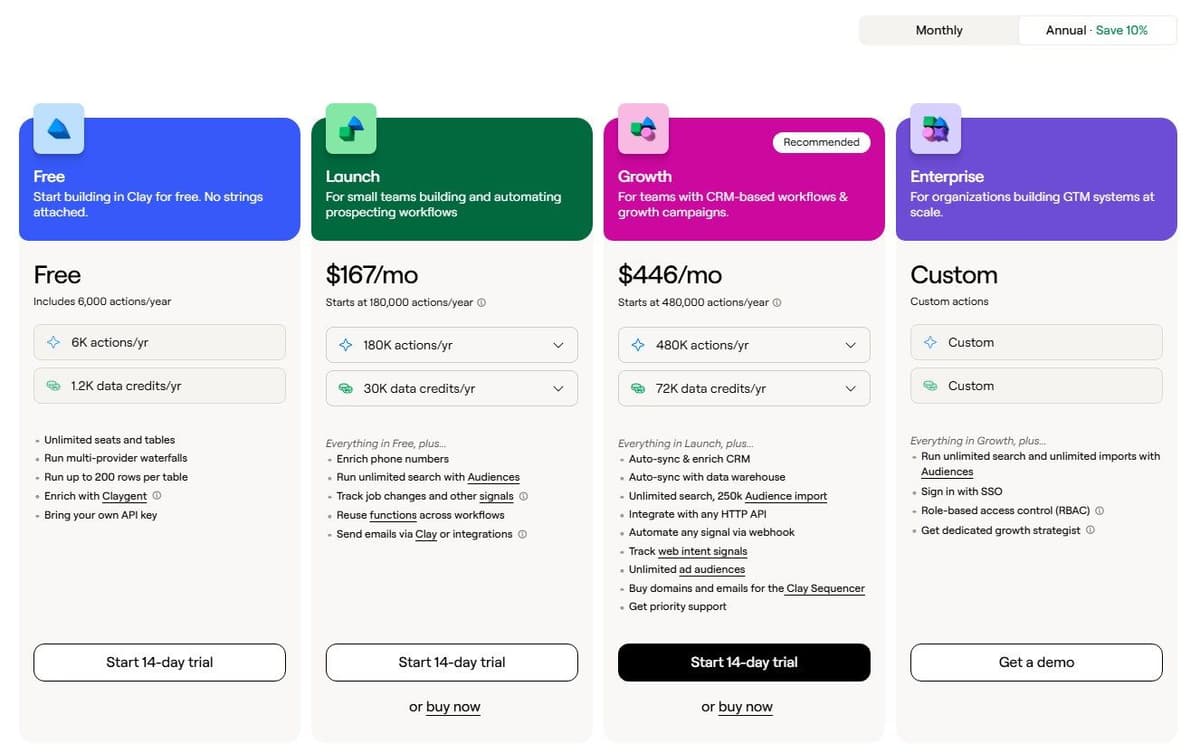
Clay is a spreadsheet where every column is an enrichment step, so a row can run a waterfall across sources. The page also lists a Sequencer. Prices here are Clay's annual-billing rates, which Clay says save 10 percent against monthly billing. For sending at volume, see our guide to cold email software.
"If you bring your own API keys for third-party data, you skip Data Credit costs entirely and only use Actions for the platform work Clay handles behind the scenes."
Source: clay.com
Free is $0 a month: 100 Data Credits, 500 Actions, unlimited seats and tables, 200 rows per table, and it already runs multi-provider waterfalls. Launch is $185 a month monthly or $167 annually, for 2,500 Data Credits and 15,000 Actions a month. Growth is $495 monthly or $446 annually, for 6,000 Data Credits and 40,000 Actions. Enterprise is custom priced on an annual commitment.
Two meters run at once: Data Credits buy marketplace data from $0.05 each, Actions pay for platform work from under $0.01. Clay's pricing FAQ calls that marketplace 150+ data partners while the site navigation on the same page says 200+ providers, so confirm before you buy. Clay charges nothing when an enrichment returns no result. Actions never roll over, and unused Data Credits roll over only to twice the monthly amount on Launch and Growth.
2. Apollo: best prospecting database with built-in enrichment
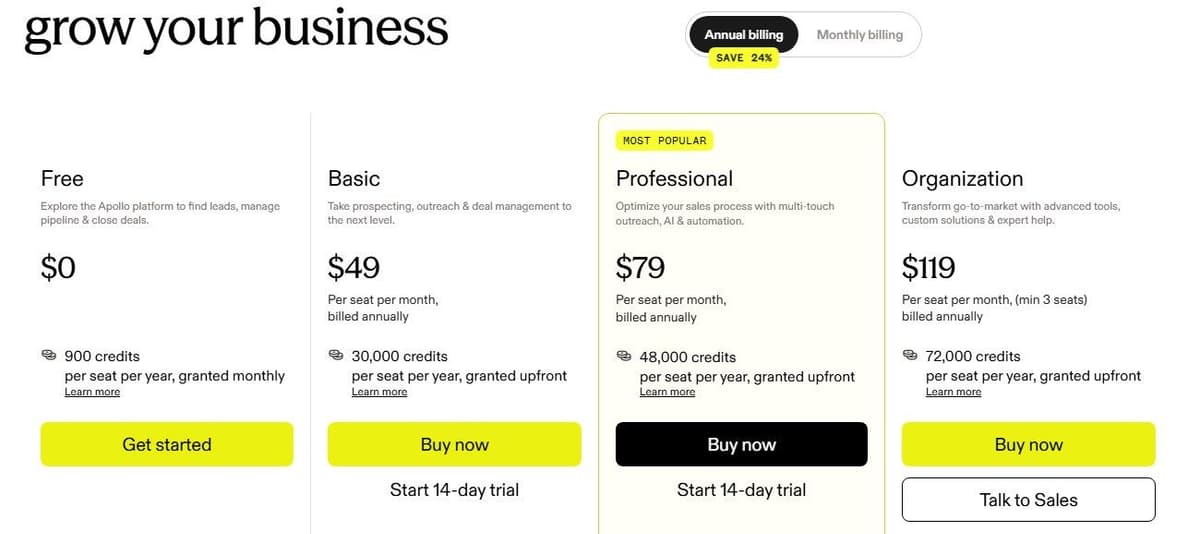
Apollo is a prospecting database first: you search its contacts, then enrich what you export. Prices below are Apollo's annual-billing figures, shown with the Save 24 percent toggle; confirm the monthly rate on its pricing page. Our guide to AI sales agents compares AI SDR tools and how to build your own.
Free costs $0 with 900 credits per seat per year granted monthly, and CRM enrichment capped at 100 records a month according to the pricing page. Basic is $49 per seat a month billed annually, with 30,000 credits per seat a year granted upfront. It is the cheapest tier listing waterfall enrichment plus CSV, CRM and API enrichment. Professional is $79 and Organization $119 per seat a month billed annually, with 48,000 and 72,000 credits per seat a year and a 3-seat minimum on Organization.
Credits go fast on phones: 1 credit for a contact email, 8 for a phone number. On enrichment the page disagrees with itself. The credit table says between 1 and 8 credits to enrich data, while the FAQ on the same page says up to 9 credits per record. Confirm which applies before purchase.
3. ZoomInfo: enterprise B2B data, quote-based
ZoomInfo sells B2B contact and company data by quote: its pricing page shows no dollar figures and sends buyers to a pricing form or a demo. Price depends on features, the number of licenses and credit usage. One credit is spent on each export of a contact or company profile, whether from the platform, the ReachOut Chrome extension or an API call from a connected CRM, and every package comes with a set number of monthly credits. Credits for deeper data cover technographics, department budgets and org charts, while basic credits cover demographic and firmographic details.
The sales plans are Professional, Copilot Advanced and Copilot Enterprise, each with a free trial. Professional lists mobile numbers, business email and CRM integrations including HubSpot and Salesforce, and Copilot Advanced adds buyer intent signals and tech insights. The marketing plans are sold through a demo, and Marketing Demand lists 75K included credits. ZoomInfo's sales team sets the payment frequency, so get the license count, the monthly credits and the term in writing before you sign.
4. HubSpot Breeze Intelligence: best for enrichment inside HubSpot
The enrichment once sold as Breeze Intelligence is now HubSpot's built-in data enrichment, and HubSpot's knowledge base says it does not consume HubSpot Credits. HubSpot acquired Clearbit for its B2B data and set out to integrate Clearbit's services into its platform; Clearbit no longer sells new standalone subscriptions, and its help center points new buyers to Breeze Intelligence. As of September 16, 2026, HubSpot no longer has a Breeze Intelligence product page, and its pricing link leads to the Manage HubSpot Credits article.
Credits now pay for the AI features around enrichment, such as smart properties, at $0.010 per credit, sold up front in packs of 1,000 credits for $10, or $9.00 per 1,000 on HubSpot's Sales Hub pricing page when paid annually. The minimum is one pack a month, or Pay-as-You-Go past the monthly limit. How many credits you get depends on the account's highest subscription tier. They refresh every month and expire unused. Sales Hub Professional is $90 per seat a month paid annually, $100 paid monthly, with 3,000 credits, plus a one-time $1,500 Professional Onboarding fee the price excludes.
Data enrichment comes with the Starter, Professional and Enterprise editions of Marketing Hub, Sales Hub, Service Hub, Data Hub and Content Hub. It matches a contact on first name, last name and work email and a company on its domain, and it can run on one record, in bulk or automatically on new records. Only paid seats can spend credits, and the AI features that use them pause once the included credits run out and no pack has been bought.
5. Lusha: best browser extension for LinkedIn lookups
Lusha is the extension reps install to pull an email or a number off a LinkedIn profile. The yearly figures below are Lusha's Pay-yearly prices.
Free is $0 a month with 40 credits, 1 seat and no credit card. Starter is $37.45 a month billed yearly, $449.10 for the year with 4,800 credits. On monthly billing that plan is $49.90 a month for 400 credits a month, 1 seat included. Pro is $52.45 a month billed yearly for 7,200 credits upfront with 2 seats, and Premium $299.95 a month billed yearly for 40,800 credits with 5 seats. Scale is quoted individually, with custom credits, custom seats and no published minimum, and teams larger than 5 users are told to contact sales.
A verified email costs 1 credit and a phone number 5 credits. An API call or CSV export of 1 to 25 results also costs 1 credit. Seats are the constraint: they come with the tier, and above 5 users you are into a quote.
6. Cognism: best for phone-verified European contacts
Cognism publishes no prices. It says only that pricing scales with seats and shared credits, and that its Standard and Pro prospecting packages each include 5 seats. Standard is described as the package for teams that need core prospecting workflows.
One credit reveals one contact, and the same credits work across the prospecting platform, Enrich and the API. Cognism says a revealed contact can be reused for the contract term and that a credit is only spent again if that contact changes jobs.
Cognism's pricing page describes on-demand mobile verification as submitting selected high-priority prospects to its verification engine. It also says administrators can pick up to 12 intent topics from over 11,000. Procurement is the hard part: there is no self-serve price to compare, and API access requires a Prospecting seat.
7. Hunter: best for email finding and verification
Hunter finds and verifies email addresses and little else, which is why it stays cheap. As of September 29, 2026, Hunter's pricing page lists Starter at $34 a month billed yearly or $49 billed monthly (2,000 credits a month), Growth at $104 or $149 (10,000 credits) and Scale at $209 or $299 (25,000 credits).
Free is $0 a month with 50 credits a month, 1 connected email account, 500 recipients per sequence and unlimited team members. On yearly billing Starter includes 24,000 credits a year, Growth 120,000 and Scale 300,000. Enterprise is a custom quote.
According to Hunter's credit-counting FAQ on its pricing page, an email found costs 1 credit and a verification half a credit. No credit is charged when no email is found or a verification fails. Unlimited team members share one credit pool on every plan at no extra cost. The scope is narrow: email addresses only, no phone numbers.
8. Snov.io: best budget email finder with outreach
Snov.io bundles an email finder, a verifier and outreach into one subscription. The headline prices are the monthly-billing ones; confirm the allowances before purchase.
The Trial plan is free and renewable: 50 credits, 100 recipients and 1 email warm-up slot, and it renews every 30 days. Starter is $39.00 a month on monthly billing, or $29.25 a month on annual billing, with 1,000 credits and 5,000 recipients. Pro S is $99.00 a month monthly or $74.25 a month annually, with 5,000 credits and 25,000 recipients. Team seats are unlimited.
A credit covers one prospect found, one email verified or one company profile viewed. A recipient is charged once, the first time you contact a lead, and follow-ups in the same billing period are free. Phone and Data Enrichment is a separate token product with no subscription: $0.02 per token, a 1,000-token minimum, 10,000 tokens for $200.00 billed once, and each package valid 90 days. Snov.io charges only for results there, not for the search. One caveat: as of September 16, 2026, its page still labels verified phone numbers and deep insights as Coming June 2026, so treat them as announced.
9. Kaspr: best for European phone data from LinkedIn
Kaspr is the nearest rival to Lusha on European phone data from LinkedIn. Its pricing page contradicts itself in three places.
Free is $0 per user a month with 5 phone credits and 5 direct email credits. It adds either 15 B2B email credits, per the Free card and the first comparison table, or 25, per the second comparison table on the same page. Confirm which before you buy. Starter is $49 per user a month on annual billing, $65 monthly, with unlimited B2B email credits and 1,200 phone credits plus 60 direct email credits a year on the annual plan, or 100 phone credits and 5 direct email credits a month on monthly billing. Its card promises up to 12,000 exports a year while that second table gives it 3,000 export credits, worth pinning down before purchase. Business is $79 per user a month on annual billing, $99 monthly, with unlimited B2B email credits and 2,400 phone credits plus 2,400 direct email credits a year on the annual plan, or 200 phone credits and 200 direct email credits a month on monthly billing. Its card shows up to 30,000 exports a year against 12,000 export credits in that table, again worth confirming. The top tier is called Enterprise on the plan cards and Organization in the comparison table and FAQ. It is annual only, minimum 5 users, with no published price, so check the name and terms before purchase.
According to Kaspr's plan comparison table, CSV enrichment is capped at 25 rows per file on Free, 500 on Starter and 1,000 on Business. Watch that cap if you enrich in bulk.
10. People Data Labs: best API-first enrichment for your own product
People Data Labs sells the data under your product rather than an interface for reps: you call an API and pay for records retrieved, one credit per record returned.
The free Testing tier is $0 a month for up to 100 credits a month, but it leaves out contact data. Emails, phones and addresses are obfuscated there and become available on Pro. Self-serve Pro starts from $98 a month on monthly billing for the entry volume of 350 credits a month, contact data included. Above that volume the page publishes no price, only that pricing is volume-based. The annual toggle starts the same plan at $940 a year. Annual commitments save 20 percent and release the data upfront. Enterprise Bulk Data is custom priced on annual contracts with custom volumes.
One gap: the page does not say whether a lookup returning no record is charged. That matters on a long tail, so ask before you commit.
11. FullEnrich: best multi-provider waterfall on a budget
FullEnrich is the cheap way into waterfall enrichment. It keeps no contact database of its own, runs its waterfall across more than 25 sources and says it only selects providers that are CCPA and GDPR compliant.
Pricing is per credit on a volume slider, from $0.055 per credit at 1,000 credits a month on monthly billing. The lowest step is 500 credits a month. FullEnrich offers a free trial for testing data quality, and its card lists 50 credits to start and no credit card.
One credit buys a work email, 3 a personal email, 10 a mobile number and 1 a reverse email lookup. Credits are only spent when verified data is found, so a miss costs nothing. Every plan including the trial comes with unlimited users at no extra cost. Worth flagging: as of September 2026 the comparison table still marks enriching contacts already in HubSpot and FullEnrich inside HubSpot as Soon, so treat both as announced, not available.
12. Latenode: for custom enrichment workflows between tools
Latenode is the workflow layer, not a data provider: it has no contact database. It calls the providers in this list, deduplicates records and writes clean fields into a CRM on a trigger.
"Usage-based: pay for workflow runtime in CPU seconds (runs x average seconds), not per operation and not per step. Workflow steps do not multiply the bill."
Source: latenode.com
You build in a visual builder with an AI Copilot and an AI agent builder, and reach 335+ LLM models including GPT, Claude and Gemini on one subscription. A headless browser pulls data from sites with no API. There are also webhook triggers, a built-in database and custom JavaScript nodes.
Billing is in CPU seconds of runtime, not per operation or step, so adding steps does not multiply the bill. The Free plan is $0 a month forever, no credit card: 10,000 CPU seconds a month, 5 active workflows, a 3-minute cap per run. Pay as you go has no base fee: $0.00012 per CPU second from 10,001 to 100,000, $0.00011 from 100,001 to 200,000 and $0.00010 from 200,001 to 300,000, with lower rates above that, and each bracket bills only the seconds that fall inside it. On both plans the first 10,000 CPU seconds each month are free. Nodes calling paid external providers add PnP tokens at $1 each, on top of runtime.

How to choose a data enrichment tool
- Write down the fields you actually need, such as work email, mobile, title, company size and tech stack, and ignore the rest of the feature grid.
- Test match rate on 200 of your own records before you buy, not on a vendor sample, because your territory and seniority mix decide the result.
- Read what one credit buys and whether failed lookups are charged: Clay, Hunter and FullEnrich say a miss costs nothing, and Snov.io charges only for results.
- Check region coverage and the phone data rules for the countries you sell into, since mobile numbers are where providers differ most.
- Look at the CRM integration and the dedupe behavior: what happens to an existing record, overwrite, skip or create a duplicate.
- Run one provider against a waterfall on the same 200 rows, then add seats, credits and refresh cadence into one monthly figure before comparing.
- Confirm GDPR and CCPA handling as the vendor states it, before signing rather than after the first list upload.
Settle the write rules before the first bulk run. Decide which value wins when two records or two sources disagree, for example on domain, name or owner, and merge duplicates before you pay to enrich them. Send new values to separate fields first and copy them over only when the CRM field is empty or a person approves the change, so a blank or generic answer never replaces a number a rep has already checked. A user on r/hubspot who cleaned up after a rushed AI enrichment script reported: "The script hallucinated data about corporate headquarters and replaced 600 verified phone numbers with generic switchboard lines."
What 1,000 work emails and 1,000 mobile numbers cost
Plans sell credits, not results, so turn the job into credits first. The counts below assume every lookup finds a match.
| Tool | 1,000 work emails | 1,000 mobile numbers | Smallest plan for both |
|---|---|---|---|
| Apollo | 1,000 credits | 8,000 credits | Basic, one seat: 30,000 credits a year at $49 a month billed annually |
| Lusha | 1,000 credits | 5,000 credits | Pro: 7,200 credits upfront at $52.45 a month billed yearly |
| FullEnrich | 1,000 credits, $55 at the 1,000-credit step | 10,000 credits | The 15,000-credit slider step, the first above 11,000 |
| Hunter | 1,000 credits | Not offered | Starter for the emails: 2,000 credits a month at $49 monthly |
Lusha Starter's 4,800 yearly credits fall short of the 6,000 this job needs, which is why the table moves to Pro. Misses change the math too: Clay, Hunter and FullEnrich charge nothing when a lookup finds no data, so a low match rate costs less there.
Which tools work together and which replace each other
A database provider and a waterfall aggregator overlap. Apollo or Cognism sells you one source. Clay and FullEnrich query many and stop at the first verified hit, so paying for both only makes sense when the single source keeps missing rows you need. An extension and a database work fine together: reps run Lusha or Kaspr on a LinkedIn profile while the database feeds the list build. CRM-native enrichment covers one CRM and nothing else, so HubSpot's enrichment fills HubSpot records and stops at the edge of the portal. An API-first provider such as People Data Labs sits under your product, and Hunter and Snov.io mostly replace each other. A workflow layer, whether Latenode, Zapier or Make, is not a data source. It calls whichever provider you already pay for, on a schedule or a webhook, and writes the result where it belongs. No tool wins without a scenario. A two-person outbound team, a RevOps function cleaning 100,000 CRM records and a product shipping enrichment to its users buy three different things.




