




Quick answer: what Gumloop costs in 2026
Gumloop Pro costs $37 a month and includes 20,000 credits, after a 14-day free trial of Pro that requires a card. Enterprise is custom-priced through sales, with no published figure. One credit is $0.005. Usage past the monthly allotment bills at $0.005 per credit once pay as you go is enabled.
This guide prices Gumloop's current agent conversations. Legacy workflow runs have their own execution limits and should not be assumed to have the same cost as a chat. The examples below use the documented agent-credit model and state the subscription and overage assumptions.
Prices are as listed on Gumloop's pricing page in October 2026. There is no permanent free tier, only a free 14-day trial of Pro.
Editorial note: Latenode publishes this article and is one of the products discussed. The comparison uses public product documentation and pricing pages. Worked examples are calculations under stated assumptions, not results from a hands-on benchmark. Recommendations describe which requirements a product may fit; they are not a measured ranking of performance or reliability.
Gumloop pricing plans at a glance
Two paid tiers, plus a metered extension you switch on yourself:
| Plan | Price | Credits | Notes |
|---|---|---|---|
| Pro | $37 a month | 20,000 a month | 8% orchestration fee |
| Enterprise | Custom, via sales | Custom, with rollover | Fee discounts, VPC |
| Overage on Pro | $0.005 per credit | Capped, 1,000,000 max | Off by default |
Overage is not a third plan. It is a switch on Pro that keeps agents running past the monthly grant, and it stays off until you turn it on.
What a Gumloop credit is worth
Gumloop meters everything in credits, and the conversion is fixed at $0.005 per credit. That makes the arithmetic work in both directions. A dollar buys 200 credits. A model call that lists at $0.03 shows up as 6 credits. Charges round up to whole credits, so nothing lands as a fraction on the log. For other options, see Gumloop alternatives.
"Agent credit costs are variable. The same agent might cost 2 credits for a quick question and 200 for a deep research task."
Source: docs.gumloop.com
Not all of the 20,000 credits on Pro are bought at that indexed rate. Pro includes 7,400 credits at list price plus 12,600 bonus credits, so the allotment is worth more than $37 of list-price usage. The bonus is attached to the plan, not to headcount.
What none of this tells you is what one agent run costs, because that figure is genuinely variable. Gumloop's own examples span two orders of magnitude: a quick question can cost 2 credits, a deep research task 200. Three things drive the Chat and Reasoning component. The model you pick matters, and so does the length of the conversation, since every message carries the earlier exchange as context. So does the number of tools connected, since each tool adds its definition to the prompt. One message can also trigger several billed AI steps when the agent loops through tools. Budget from your own logs, not from one sample run.
How a run is billed: four main components
The four components below explain the base agent-credit model. The usage breakdown can also show charges for additional features, such as subagents or model routing. Include any such charges when applying the monthly calculation to your own workload.
Chat and Reasoning is the model's own cost, converted into credits at $0.005 each. Tool Calls are 1 credit for each successful call, plus whatever the tool itself charges. Compute runs at 5 credits per session-minute of active processing, with a minimum of 1 credit per response. The Orchestration Fee is 8% of the other three on Pro.
Several rules cut the other way. Failed tool calls are not charged. Reading and writing ordinary apps such as Slack, Google Sheets and Gmail costs the 1 base credit and nothing more. Data tools such as Apollo enrichment or Firecrawl scraping add their own charge on top. Time the agent spends waiting for you costs nothing, so a conversation left open overnight does not drain the allotment. Enterprise customers running Gumloop inside their own virtual private cloud are not charged for compute.
From a 459-credit conversation to a monthly bill
Gumloop's documented example uses 400 credits for model work, 10 for compute and 15 for tools. The 8% fee adds 34, producing 459 credits. Repeating that example gives this budget on Pro:
| Conversations per month | Credits | Above the 20,000 allowance | Total monthly platform bill |
|---|---|---|---|
| 40 | 18,360 | 0 | $37 |
| 50 | 22,950 | 2,950 | $51.75 |
| 100 | 45,900 | 25,900 | $166.50 |
The calculation assumes a $37 subscription, enabled overage at $0.005 per credit, and an overage cap high enough to complete the work. Taxes, other purchases and additional feature charges are excluded. These are repeated copies of the vendor's example, not measured average conversation costs.
Bring your own keys: what changes
Gumloop supports bringing your own API keys, and the trade is explicit. Point a model provider key at your account on Pro or higher, and Chat and Reasoning drops to 0 credits. You are paying that provider directly. In exchange, the orchestration fee rises from 8% to 16%, computed on the full list cost the task would have had without BYOK. You do not leave the meter. You change what it charges for.
Bringing your own key for MCP tool calls works differently. It reduces the credit cost to a minimum of 1 credit per tool call.
Does BYOK reduce the total bill?
For the same example, assume the external model provider charges $2 per conversation, equivalent to the original 400 model credits. With BYOK, Gumloop waives those model credits but applies a 16% fee to the original 425-credit cost: 68 credits. Adding the 10 compute and 15 tool credits gives 93 platform credits per conversation.
Fifty such conversations use 4,650 Gumloop credits, within Pro's allowance: $37 to Gumloop plus $100 to the model provider, or $137 in total. Without BYOK, the example above costs $51.75. Included and bonus credits make the difference. BYOK can serve account-control or procurement needs, but fewer platform credits do not automatically mean a lower total bill.
Free trial, rollover and overage rules
Every new account starts on a 14-day free trial of Pro. It requires a card, it is a one-time offer per customer, and it rolls into a paid Pro subscription unless it is canceled first. Treat it as a paid plan with a delayed first invoice.
"No. The 20k credit allotment is a monthly grant that resets each billing period. You get the full 20k again next month; you don't bank what you didn't use."
Source: gumloop.com
Credits do not roll over. The 20,000 on Pro are a monthly grant that resets each billing period, and whatever you did not spend is gone. Enterprise is the exception, with rollover listed on that tier.
Spend past 20,000 credits mid-month and agents stop working until pay as you go is enabled. That switch is off by default, which is reassuring for finance and inconvenient mid-task. Once it is on, from the Usage and Limits page, usage past the monthly credits bills at $0.005 per credit.
Overage on Pro is always capped. The default ceiling is 1,000,000 overage credits per billing period, which is $5,000, and the cap can be set lower. When the cap is reached, agents stop. Enterprise plans set their own cap or run uncapped. For most Pro teams the sensible move is to lower that ceiling to a number the budget can absorb before enabling overage.
What Pro and Enterprise include
Compare capacity and governance separately. Pro's included credits and concurrency limits determine how much work the workspace can run. Enterprise adds contract-specific capacity and controls. Confirm the edition for each required feature instead of assuming that a longer feature list changes the underlying credit calculation.
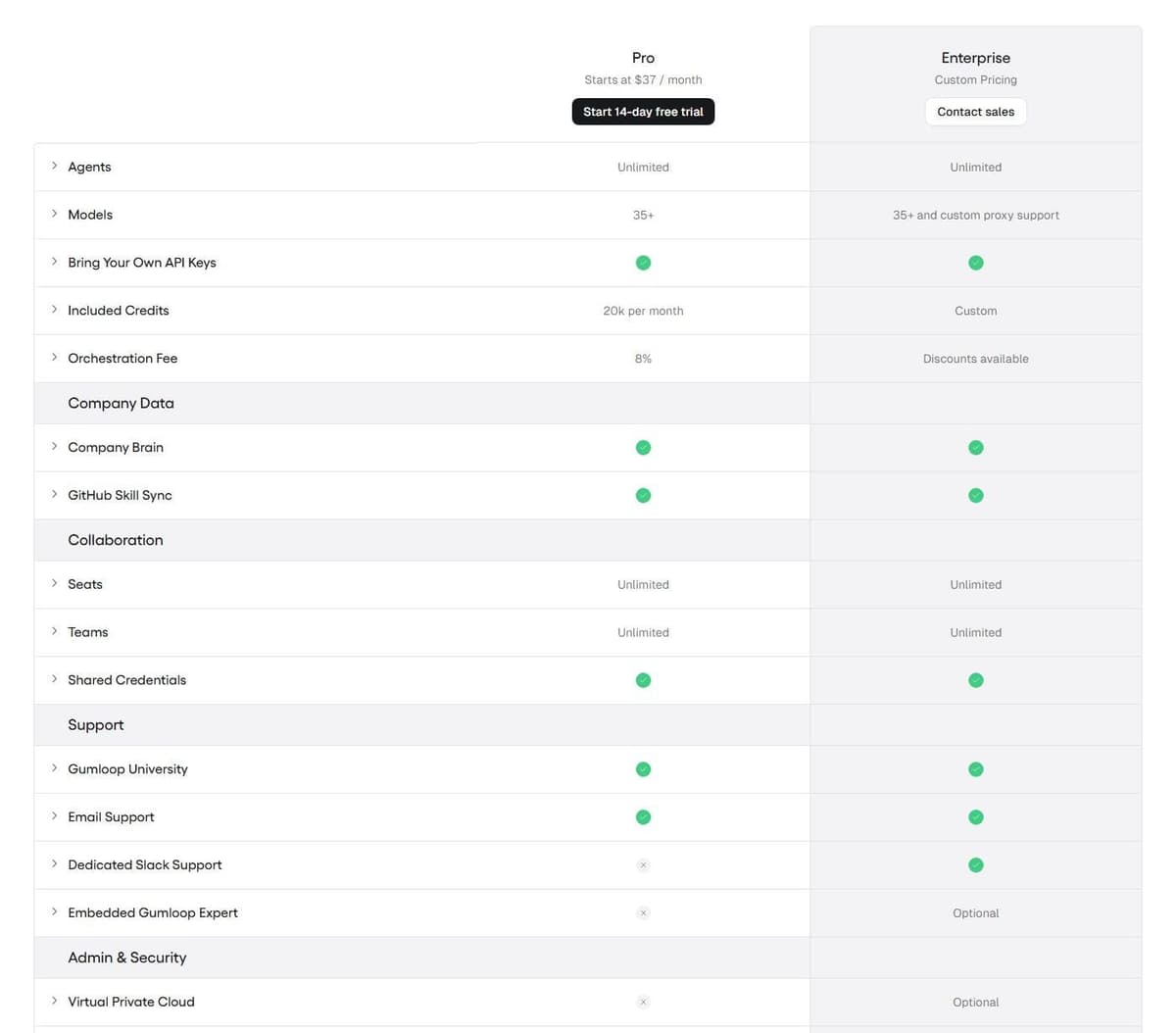
Both tiers list unlimited agents, 35+ models, bring-your-own API keys, unlimited seats and teams, shared credentials, Gumloop MCP and Gumloop CLI. Enterprise adds custom proxy support to the model list. Pro lists 20k credits a month, the 8% orchestration fee, 1 hosted MCP server, 5 concurrent workflow runs and 25 concurrent agent chats. Enterprise lists custom credits with rollover, discounts on the fee, custom MCP hosting and custom concurrency. Workflows appear under a Legacy label, which matters if you started your evaluation there.
Everything else in the Enterprise column is governance, not capacity. It covers dedicated Slack support, an optional embedded Gumloop expert, an optional virtual private cloud, org-wide connector policies, AI spend insights and a usage analytics agent. The rest is role-based access control, SCIM/SAML, an admin dashboard, audit logs, custom data retention rules, regular security reports, data exports, incognito mode and AI model access control. If procurement needs any of those, the route is a sales conversation.
Where to see what a chat cost
The running cost of a conversation appears live in the chat header. A details drawer lists one row per credit type charged. The rows are Chat and Reasoning, Tool Calls, Compute, Orchestration Fee, Evaluation and Self-Improvement, Subagents, Model Routing when the agent is set to Auto, and Other. Waived credits still appear, struck through and labeled Free, so BYOK and VPC savings stay visible.
After a representative conversation, open its credit breakdown and record model, tool, compute and orchestration charges. Compare both platform usage and any separate provider invoice when BYOK is enabled. A reduction in Gumloop credits alone does not establish a saving.
Credit logs under Usage and Limits offer a grouped view, one row per conversation, and a detailed view, one row per charge. Organization admins see usage across all users. Logs export as CSV from Data Export, and the Insights dashboard is Enterprise only.
Re-measure whenever someone edits an agent's instructions, switches its model or connects another tool, since each of those changes can move the Chat and Reasoning charge described above. Run the same representative task before and after the change and compare its two rows in the grouped credit log. One user on r/AI_Agents described the problem: "when someone changes the prompt and suddenly the agent decides it needs 3 extra reasoning steps for the same task."
Gumloop's own advice for spending less: start with the Recommended model preset and reach for Auto or Smartest only when the task calls for it. Start fresh conversations instead of carrying old context. And stay inside the short context window, since some models charge higher long-context rates for the whole request.
How Gumloop's pricing compares with automation platforms
Headline prices are the wrong comparison. What matters is what each meter counts.
Gumloop counts the model bill: tokens at cost, tool calls, compute, plus 8%. Zapier counts tasks; a task is an ordinary successful billable action, subject to documented built-in exemptions and feature-specific rates. Its Professional plan is $19.99 per month billed annually for 750 tasks a month. The free plan is $0 a month for 100 tasks across Zap workflows, Tables and Forms. Our Zapier pricing guide lists the higher task tiers.
Make counts credits for ordinary module operations, while Router and Filter use none. Core starts at $9 per month billed annually for 10,000 credits a month, and a free plan covers up to 1,000 credits. Lindy counts credits pooled across users. After a free start of $50 in credits that last 7 days, its Team plan bills every active user, from $29.99 a month for 3,000 credits or $49.99 for 5,000, and every seat adds its credits to one shared pool. When the pool is exhausted, Lindy pauses credit-using work until the next cycle unless an admin buys top-ups at $10 per 1,000 credits or moves to more monthly credits. See Lindy pricing for plans and credits in detail. See Make.com pricing for the larger credit volumes.
Latenode counts runtime in CPU seconds rather than operations or steps, so workflow steps do not multiply the bill. The first 10,000 CPU seconds are free every month on both plans, and the rate is $0.00012 per CPU second in the first paid bracket.
That difference decides who pays what. An agent-heavy team pays mostly for tokens on Gumloop, and mostly for volume or seats elsewhere. A team running many small app-to-app jobs pays per billable action on a task or credit meter, and per second on a runtime meter. None of these units convert into each other, so test them against your own month.
How Gumloop bills compared with other agent platforms
Agent platforms do not share a billing unit, so the table compares what each one meters rather than a price per unit.
| Platform | What it meters | Entry plan | When the allowance runs out |
|---|---|---|---|
| Gumloop | Credits per account | Pro $37, 20,000 credits | Stops unless overage is on |
| Lindy | Credits per user, pooled | Team from $29.99 or $49.99 per user, 3,000 or 5,000 credits | Work pauses; top-ups or more credits |
| Zapier Agents | Activities | Pro $33.33 a month, 1,500 activities | Plan limit, 40 activities per run |
| StackAI | Runs | Free plan, 500 runs a month | Not stated |
| Relevance AI | Custom vendor credits | Enterprise only, by quote | Not published |
Zapier Agents Pro is billed annually at $400. A credit, an activity and a run are different amounts of work, so the fair test is the same task run on each platform.

Who Gumloop's pricing suits and who should look elsewhere
Gumloop's pricing suits teams that want agents with a predictable entry cost and a hard stop on the downside. Pro is $37 a month for 20,000 credits. Overage stays off until you enable it, and the cap can be set below the 1,000,000-credit default. Teams that already buy model capacity directly can use BYOK, which takes Chat and Reasoning to 0 credits and raises the orchestration fee to 16%. Whether that lowers the total depends on both bills, as the calculation above shows.
It fits less well in two situations. First, when the work is thousands of simple app-to-app runs a month. A 1-credit tool call, plus model tokens, plus the fee, adds up on volume that a task or runtime meter prices differently. Second, when a permanent free tier is a requirement, because the pricing page offers a 14-day trial of Pro and paid usage after it. Model your own month first. The gap between a 2-credit question and a 200-credit research task is too wide for a rule of thumb.




