



Quick answer: the best Gumloop alternative for each need
Want an AI teammate in Slack and email? Lindy. Agents on company data with a team workspace? Dust. Agents beside automations you already run? Zapier Agents or Make AI Agents. Open source? Activepieces. A free tier for agent apps? StackAI. An enterprise AI workforce? Relevance AI. Code steps with runtime billing? Latenode.
Where a vendor sells only through sales, its entry names the billing model, because no price is published. Plans move, so treat the figures as a starting point and confirm the current tier before you commit budget. Each one wins a different kind of buyer, and the headings say which.
Editorial note: Latenode publishes this article and is one of the products discussed. The comparison uses public product documentation and pricing pages. Worked examples are calculations under stated assumptions, not results from a hands-on benchmark. Recommendations describe which requirements a product may fit; they are not a measured ranking of performance or reliability.
Why teams look for Gumloop alternatives in 2026
Gumloop describes itself as an AI agent platform: build agents that use your tools and data, then automate them with triggers, schedules and the API. Python and JavaScript SDKs come with it. That part does the job. The friction is commercial. Plans and credits are broken down in our guide to Gumloop pricing.
"Additionally, Gumloop charges you an 8% orchestration fee on the full list cost of the task (including tokens, compute, and tool calls). Please note that if you bring your own API key(s) for models, the orchestration fee increases to 16%."
Source: gumloop.com
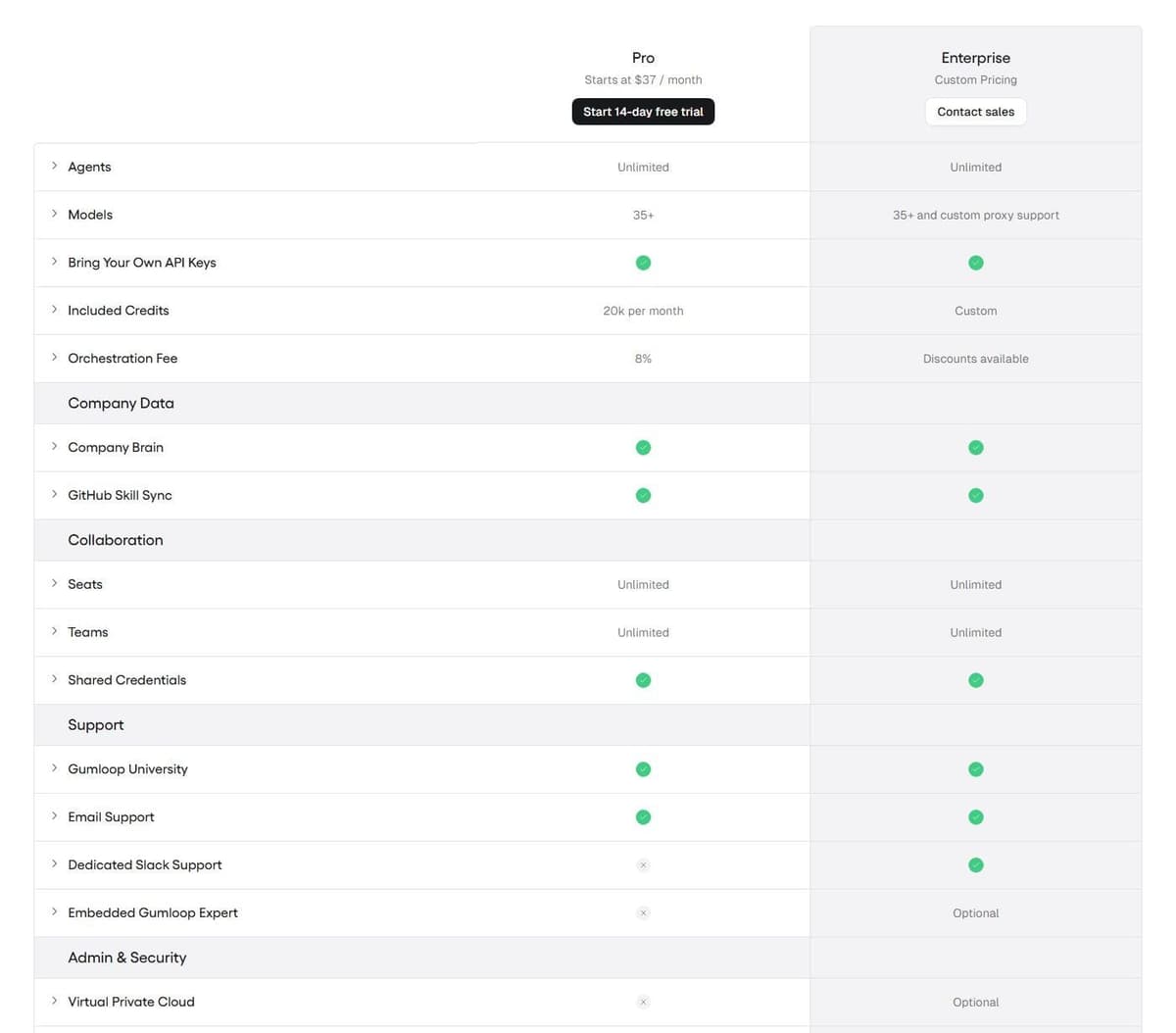
Just one self-serve tier exists. Pro starts at $37 a month. The way in is a 14-day free trial of Pro. That trial requires a card, is a one-time offer per customer and rolls into a paid Pro subscription unless you cancel first. Enterprise is custom-priced through sales. No permanent free plan appears on the pricing page, so a team that wants to keep one small automation running for nothing has to look elsewhere. For agents that work the pipeline, see our guide to AI sales agents.
Metering is the second reason. Credits are indexed at $0.005 each, and Pro includes 7,400 credits plus 12,600 bonus credits, 20,000 in total, for $37 a month. Every agent run is billed at the list cost of model tokens, compute and paid-API tool calls, with a base cost of 1 credit per call. On top sits an 8% orchestration fee on the full list cost of the task. Bring your own model API keys and that fee rises to 16%. Credits do not roll over month to month except on Enterprise.
What Gumloop does well deserves stating. Pro and Enterprise both list unlimited agents, unlimited seats and teams, 35+ models, bring-your-own API keys and shared credentials. Pro also lists 5 concurrent workflow runs and 25 concurrent agent chats. If your constraint is headcount rather than usage, that is a generous shape. If your constraint is a model bill with a percentage on top, it is not.
When to stay on Gumloop
- Headcount grows faster than usage. Seats are unlimited, so a new hire adds nothing to the Gumloop bill, while Lindy and Dust bill per user.
- Your monthly use sits near the included 20,000 credits. The 12,600 bonus credits make that allowance worth $100 of list-price usage for $37 a month.
- You want a hard stop on spend. Pay as you go stays off until you enable it, and Pro overage is capped at 1,000,000 credits a billing period by default, a ceiling you can set lower.
If most of those describe your team, pull a month of credit logs before you migrate. The tools below change what the meter counts, and that can raise the bill as easily as lower it.
Gumloop alternatives at a glance
Eight tools, in the order they appear below. The pricing model column says what the meter counts. That usually matters more than the headline price.
| Tool | Best for | Pricing model | Free tier |
|---|---|---|---|
| Lindy | AI teammate in Slack | Per user, pooled credits | $50 in credits for 7 days |
| Latenode | Code steps in workflows | CPU seconds, usage | 10,000 CPU seconds |
| Dust | Agents on company data | Per seat with credits | 500 one-time credits |
| Zapier Agents | Teams already on Zaps | Annual plan, activities | 400 activities per month |
| Make AI Agents | Agents in scenarios | Per operation; AI varies | 1,000 credits a month |
| Activepieces | Open source, self-host | Credits; CE unmetered | CE, or 1,000 credits/mo |
| StackAI | Agent apps on a budget | Free or custom | 500 runs a month |
| Relevance AI | Enterprise AI workforce | Custom, via sales | None published |
CE in the table means Activepieces Community Edition, the free self-hosted edition without a credit meter.
One name to cross off: Relay.app, an AI automation tool, shut down in September 2026 and permanently deleted all accounts, workflows and run history.
Compare agents using one repeatable task
Give each shortlisted tool the same fictional support request and the same small knowledge base. Ask it to find the applicable policy, draft a reply, propose a CRM update and wait for approval before writing. Include a missing customer record and an ambiguous policy so the test covers failure handling.
| Check | What a useful result looks like |
|---|---|
| Grounding | The answer points to the relevant supplied source |
| Tool access | Only the intended tools and records are available |
| Approval | The proposed write stays pending until approved |
| Recovery | A failed call can be retried without duplicating a record |
| Context | The next request uses the appropriate workspace context |
| Cost | The run exposes enough usage detail to budget repeated work |
This is an evaluation procedure, not a claim that every tool passed it. A connected app logo does not establish permission handling, output quality or safe recovery.
What 1,000 agent runs a month cost
Each tool meters a different unit, so here is one workload priced in each of them. Take 1,000 research-style agent runs a month, each shaped like the example chat in Gumloop's credit documentation: 400 credits of model work, which is $2.00 at list price, plus 10 credits of compute and 15 of tool calls. On Lindy, count each run as deep work, which its pricing page puts at 250 to 1,000 credits. On Zapier, assume three agent activities per run. On Latenode, assume 30 seconds of runtime per run. Taxes are left out.
| Tool | What 1,000 runs draw | Monthly cost under these assumptions |
|---|---|---|
| Gumloop Pro | 459,000 credits: 425 per run plus a 34-credit fee | $37 plus 439,000 overage credits at $0.005, or $2,232, with pay as you go on |
| Gumloop Pro, own model key | 93,000 credits: 25 per run plus a 68-credit fee at 16% | $37 plus 73,000 credits at $0.005, or $402, plus about $2,000 to the model provider at list price |
| Lindy Team | 250,000 to 1,000,000 credits | $1,749.95 (the 175,000-credit option at $999.95 plus 75,000 in top-ups) to $6,999.80 (the 700,000-credit option at $3,999.80 plus 300,000 in top-ups) |
| Dust | Credits per message, set by the model and the actions used | No per-run figure published; a Pro seat is $30 a month with 8,000 credits |
| Zapier Agents | 3,000 activities | Twice the 1,500 in Agents Pro at $33.33 a month billed annually, so an Enterprise quote |
| Latenode | 30,000 CPU seconds | 20,000 billable CPU seconds at $0.00012, or $2.40 at the assumed 30 seconds a run, plus PnP tokens for any nodes that call paid external providers; the real figure depends on run length and model usage |
Gumloop's figures include model usage at list price. Latenode's $2.40 rests on the assumed 30 seconds a run, so the real figure moves with run length and model usage; nodes that call paid external providers add PnP tokens, charged by actual provider usage at $1 per token. Lindy's range is wide because its credit bands are wide, and Dust publishes no cost per run, so price it on a real task with the 500 free credits. Run your own task through the repeatable test above before trusting any row.
1. Lindy: best AI teammate in Slack and email
Lindy is a teammate rather than a canvas. It works in Slack threads and mentions, runs scheduled routines, records and summarizes meetings, schedules them, drafts email in your voice and keeps persistent workspace context. It reaches 1,500+ integrations by its own count, supports MCP servers and lets you pick the model. Built-in approvals cover anything that should not fire unattended. Our guide to Lindy AI alternatives compares other assistant and agent platforms.
Pricing starts free: $50 in credits that last 7 days, with no card. After that, the Team plan bills every active user for a monthly credit amount you pick. Lindy lists an entry tier of $29.99 a month for 3,000 credits per user and one of $49.99 for 5,000; 15,000 credits cost $99.99 and 35,000 cost $199.99. Credits are pooled across the workspace: every seat adds its credits to one shared pool, and admins can set allocations per seat. When the pool runs out, Lindy pauses credit-using work until the next cycle instead of billing extra, unless an admin buys top-ups at $10 per 1,000 credits or moves to more monthly credits. Model choice is the same on every plan, but a workspace connects 2 to 5 inboxes depending on plan, and Enterprise adds SSO, SCIM, audit logs and HIPAA with a signed BAA. Compare the plan required for the job, rather than its credit allocation alone.
The limitation is structural. Seats set the size of the shared credit pool, so a small team running heavy automation either pauses when the pool is exhausted or pays for top-ups at $10 per 1,000 credits or a larger monthly credit option.
2. Latenode: for agent workflows with code and runtime billing
Latenode is a visual automation platform with an AI agent builder, an AI Copilot inside every workflow and 335+ LLM models available under one subscription. Where a drag-and-drop step runs out, you drop in a custom JavaScript node. A headless browser handles sites with no API, and there is RAG knowledge storage and a built-in database. For workflow builders without the agent focus, see our comparison of no-code automation platforms.
Billing sets it apart from the credit platforms. You pay for workflow runtime in CPU seconds, not per operation and not per step. Adding steps to a scenario does not multiply the bill. The first 10,000 CPU seconds are free every month on both plans. The Free plan is $0 a month with no card, 5 active workflows, 1 execution worker and a 3-minute limit per run. Pay as you go has no base fee and keeps the same 10,000 included CPU seconds. After that it charges $0.00012 per CPU second in the first paid bracket, with unlimited active scenarios, 5 parallel workers and 10 minutes per run.
The trade-off: this is a low-code automation canvas, not a chat-first AI teammate. Cost tracks how long jobs run.

3. Dust: best for team agents on company data
Dust puts agents on company knowledge. You define custom agents with skills, knowledge and tools, then chain them into multi-agent workflows on schedules and triggers. Connect Slack, Notion, GitHub, Drive and 20 more sources, or any tool through MCP. It offers 20+ frontier models, team workspaces, SSO with Okta and Entra ID on request for workspaces with at least five seats, and US or EU data residency.
"A credit is Dust's unit for measuring AI usage. Credit consumption depends on the model used, the complexity of the task, and any tools the agent uses, such as search, data retrieval, code execution, or actions in connected apps."
Source: dust.tt
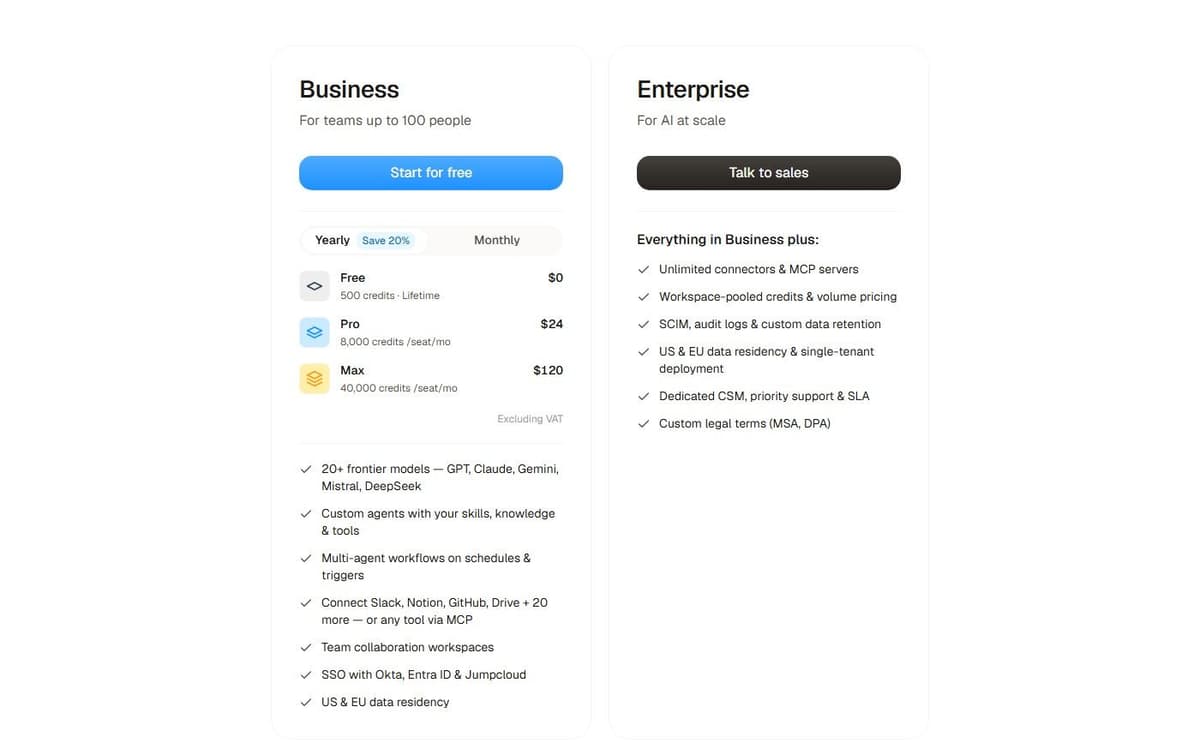
Dust Business offers Free, Pro and Max seat types. Pro is $30 per seat a month, or $24 with annual billing, with 8,000 monthly credits. Max is $150 a month, or $120 with annual billing, with 40,000 credits. Prices exclude VAT. Free provides 500 one-time credits. Business supports teams of up to 100 people. Programmatic usage is listed at $0.01 per credit; Enterprise, via sales, adds unlimited connectors and MCP servers, workspace-pooled credits, SCIM, audit logs, custom data retention and single-tenant deployment.
Two things to watch. The price is per seat. Business tiers list up to 3 data-source connectors and 5 remote MCP servers, so a company with many systems to wire up reaches sales sooner than expected.
4. Zapier Agents: best for teams already running Zaps
Zapier Agents is the agent layer beside the Zaps a company already runs. If your integrations, tables and forms live in Zapier, this keeps agents and automations under one vendor. Copilot, the AI building assistant, is available on every plan, with a daily cap on Free.
Zapier Agents is a separate product from ordinary Zap workflows. Its activity allowance and subscription should be evaluated separately from Professional or Team task tiers. Estimate the activities your agents will use before selecting their plan.
Two meters apply here. Zapier Agents Free includes 400 activities per month. An activity is not a complete agent run: one run can consume several activities. Agents Pro costs $400 billed annually, equivalent to $33.33 a month, and allows up to 1,500 activities a month. The Zapier platform is metered separately. Free is $0 a month with 100 tasks, Zap workflows, Tables and Forms, and Professional is $19.99 a month billed annually with 750 tasks. One Zapier MCP tool call consumes two tasks from that quota. That is easy to forget when an agent calls tools in a loop.
The limitation follows from the shape. A process that mixes an agent with a Zap draws down both meters, so budget for both lines and work out which one your real workload hits first.
5. Make AI Agents: best for agents inside visual scenarios
Make AI Agents live inside the Scenario Builder. You build, run and debug an agent on the same canvas as the rest of the automation. Upload files to give it context instead of assembling a RAG pipeline first. Make AI Agents are available on all plans with Make's AI Provider. Connecting your own AI provider requires a paid Make plan. With a custom connection, Make charges for operations and the AI provider bills token usage separately. Make AI Agents orchestrate processes across 3,500+ apps by Make's own count. Maia, described as a co-worker for AI and automation, turns plain language into automation and Make AI Agents. It is included in all plans.
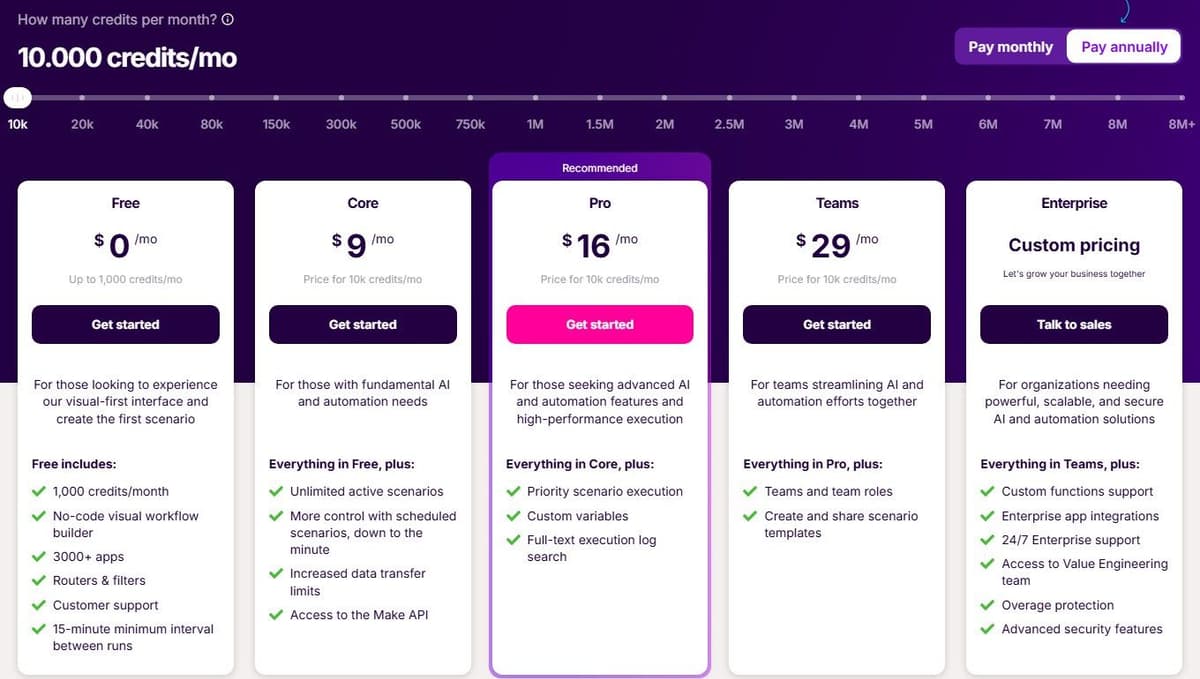
The meter is credits. Ordinary module operations consume one each, such as adding a row to a Google Sheet or fetching Gmail data, while Router and Filter consume none. Free is $0 a month with up to 1,000 credits. With yearly billing selected, Core is $9 a month billed annually, Pro is $16 and Teams is $29, each with 10,000 credits a month.
Two caveats. AI Agents are in beta, so treat them as a fast-moving feature rather than a settled one. Agent steps on Make's AI Provider are billed by tokens and operations. So a talkative agent that fans out across many modules drains an allowance faster than a simple scheduled scenario does.
6. Activepieces: best open-source alternative
Activepieces is open source at the core. It offers 760+ integrations, with unlimited automations and every integration on every plan. The engine can be embedded inside another product if you sell automation to your own users.
Activepieces Community Edition is a free, self-hosted option built on the MIT-licensed core. It has no credit meter or cap on runs and users. You pay for hosting and operations, and for any external services your flows use. Community Edition excludes features such as SSO, audit logs, projects and Git Sync. Its credit-metered plans cost the same on Activepieces' cloud or your own servers, and their credit allowances do not apply to the free Community Edition.
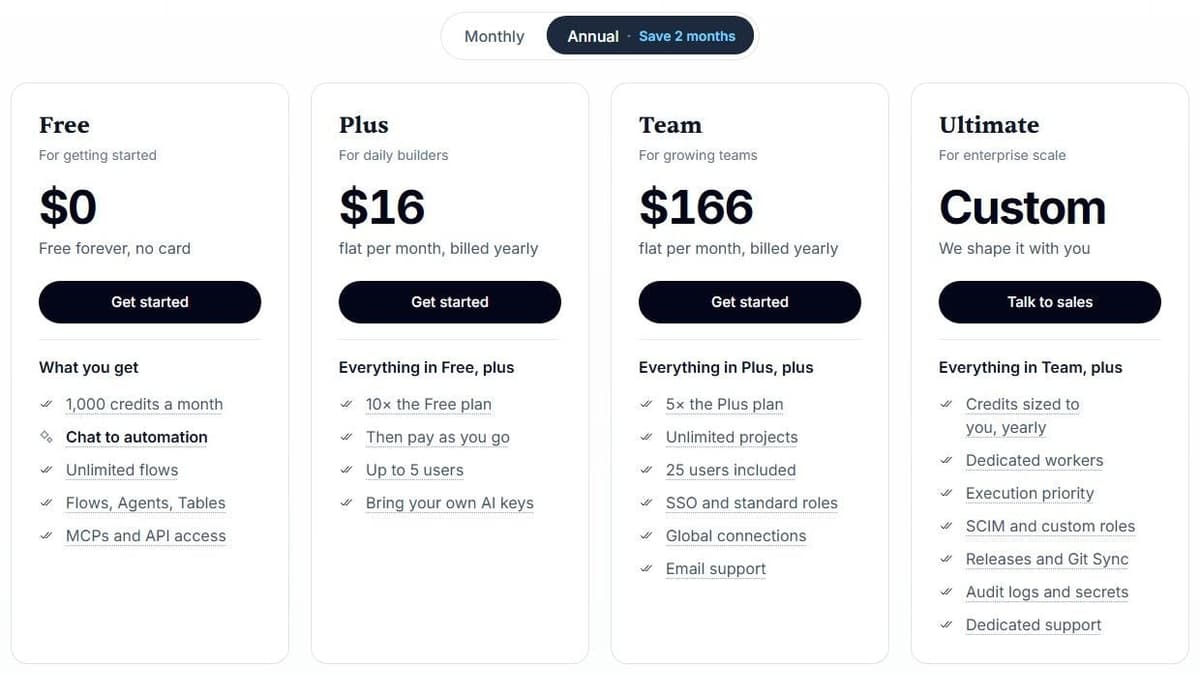
Credits are the meter on the Activepieces plans. The Free plan is $0 with 1,000 credits a month for up to 5 users. Plus is $16 a month billed annually with 10,000 credits a month for up to 5 users. Team is $166 a month with 50,000 credits for 25 users, and Ultimate is custom. Paid plans cost the same on Activepieces' cloud or on your own servers. Overage on Plus and Team costs $0.007 per credit. For ordinary steps, one credit covers a whole run no matter how many steps that run contains.
That rule stops at AI. With Activepieces-supplied AI models, each AI step adds 2 credits for a fast model, 10 for a smart model or 20 for a frontier model; agentic actions add one credit each. On Plus and higher plans, using your own AI provider keys makes each AI step cost one Activepieces credit, with model usage billed separately by your provider. Size the allowance around AI steps rather than around run count.
7. StackAI: best free tier for enterprise-style agent apps
StackAI suits teams building agent apps that will eventually face a compliance review. The plan comparison lists agent and flow modules, vision and speech modules, Python and JavaScript code logic. Data loaders cover web scraping, file upload, Google Drive and Notion. Also listed: a Chrome extension, a REST API and a Slack bot, plus knowledge bases with PDF, Word and PowerPoint readers. A builder's toolkit, not a chat assistant.
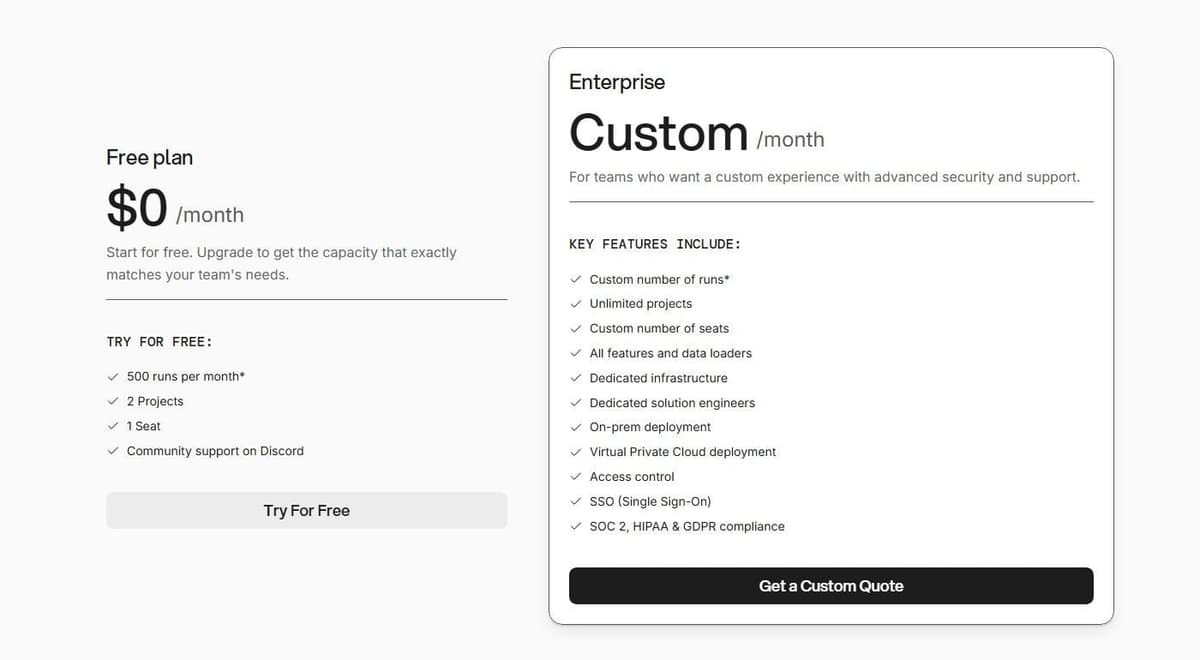
The Free plan costs $0 a month with 500 runs a month, 2 projects, 1 seat and community support on Discord. That is enough to put a working agent app in front of colleagues without a card. Enterprise is custom-priced, with a custom number of runs and seats, unlimited projects, all features and data loaders. It adds dedicated infrastructure and solution engineers, on-prem or VPC deployment, access control, SSO and SOC 2, HIPAA and GDPR compliance.
The gap between those two tiers is the catch. Nothing sits in the middle. A team that outgrows 500 runs or needs a second seat goes straight into a sales conversation. For the Enterprise number and the exact definition of a run, check the vendor's pricing page.
8. Relevance AI: best for an enterprise AI workforce
Relevance AI sells an AI workforce rather than a per-seat tool. The pricing page reflects that: a single Enterprise plan, priced through sales, with no self-serve tier at all.
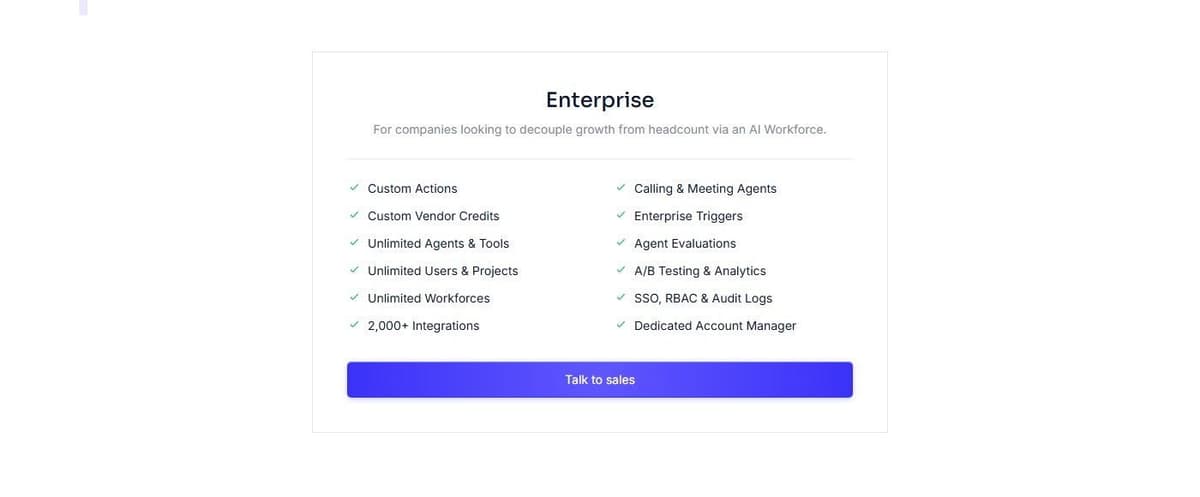
What the plan lists is broad. Actions and vendor credits are custom, while agents, tools, users, projects and workforces are all unlimited. The commercial conversation turns on volume rather than headcount. It lists 2,000+ integrations, calling and meeting agents, enterprise triggers, agent evaluations, A/B testing and analytics. SSO, RBAC, audit logs and a dedicated account manager sit on the same list. The evaluation and testing pieces matter more than they sound. Once agents touch customer-facing work, you need a way to show that one version behaves better than another before it goes live.
Say the limitation plainly. No self-serve price is published, so you cannot budget for Relevance AI from the website. You book a call, describe your volume and wait for a quote. That rules it out for a team that wants to test something this afternoon. A side-by-side cost comparison with the credit platforms stays impossible until the quote lands. Check the vendor's pricing page for the current plan shape before you book.
How to choose
Start with where the work arrives. A teammate used inside Slack or email should be judged on its request handling, approvals and retained context. A visual agent builder should be judged on tool configuration, repeatable execution and debugging. A company-data assistant should be judged on source permissions and answer grounding. All three can use AI, but they solve different parts of the workflow.
Put every candidate through the same questions before comparing headline prices.
- What does the meter count: seats, credits per seat, usage credits, runs, tasks or CPU seconds?
- How do access and consumption affect the bill? Lindy and Dust combine seats with credit allowances. Other products also vary access and features by plan, alongside their runtime, task, activity or credit meter. Compare all required users and the same workload.
- Where do the agents live: in Slack, on a visual canvas, or inside your own product?
- Is there a permanent free tier or only a trial, and what does it cap: runs, credits, projects or seats?
- Can you choose the model, and can you bring your own key?
- Does it speak MCP, and how many integrations do you genuinely need?
- Which enterprise controls are in scope: SSO, SCIM, audit logs, data residency, on-prem or VPC?
- What happens when the allowance runs out: does the platform pause, charge overage, or route you to sales?
Two questions come up often. On free plans, the table above shows what each vendor publishes, and the caps are not comparable: CPU seconds, runs, tasks and daily credits count different things, and Dust's 500 credits are one-time rather than monthly. Lindy gives $50 in free credits for 7 days before Team billing starts, at $29.99 per user a month for 3,000 credits or $49.99 for 5,000. Relevance AI publishes no self-serve price, and the Gumloop entry point is a 14-day trial that needs a card.
On open source, Activepieces is the one open-source engine here. Its Community Edition is self-hosted, and its paid plans cost the same on its cloud or on your servers.
For enrichment-heavy work: Clay
Gumloop's site lists use cases such as lead generation, lead qualification and CRM agents. If that is most of your Gumloop work, Clay is built around it. Claygent, Clay's AI agent, does web research to fill custom data points, and a marketplace sells data and AI from outside vendors. Clay meters two things: actions for platform usage and data credits for what you buy in that marketplace. The Free plan includes 500 actions and 100 data credits a month, unlimited seats and up to 200 rows per table. Launch is $185 a month billed monthly or $167 billed annually, for 15,000 actions and 2,500 data credits a month. That meter counts enrichment work rather than model cost, so compare it with Gumloop on the rows you enrich, not on agent runs. Our roundup of data enrichment tools compares Clay with other data providers.




