



Quick answer: the best Lindy AI alternative for each need
Want usage-priced agents with unlimited seats: Gumloop. Agents on company data with a team workspace: Dust. Agents beside automations you already run: Zapier Agents or Make AI Agents. Open source: Activepieces. A free tier for agent apps: StackAI. An enterprise AI workforce: Relevance AI. Code steps with runtime billing: Latenode.
The products combine access and consumption in different ways: Lindy and Dust use seats with credits, while other platforms meter credits, tasks, agent activities, runs or runtime. Identify the required users, features and workload before comparing complete bills.
Editorial note: Latenode publishes this article and is one of the products discussed. The comparison uses public product documentation and pricing pages. Worked examples are calculations under stated assumptions, not results from a hands-on benchmark. Recommendations describe which requirements a product may fit; they are not a measured ranking of performance or reliability.
Why teams look for Lindy alternatives in 2026
Lindy starts free and then sells per user. The Free plan gives $50 in credits that last 7 days, with no card required. Team bills every active user, and the price follows the monthly credits you choose. Team starts at $29.99 a month for 3,000 credits per user or $49.99 for 5,000, and larger options include 15,000 credits for $99.99 a month and 35,000 for $199.99. Credits are pooled across the workspace. Every seat adds its credits to one shared pool, and admins can set allocations per seat. When the pool runs out, Lindy pauses credit-using work until the next cycle instead of billing extra; an admin can buy top-ups at $10 per 1,000 credits or move to more monthly credits to keep it going. Plans and credits are broken down in our guide to Lindy pricing.
"Every seat adds its credits to a shared pool, so anyone can draw on it when they need more."
Source: lindy.ai
In shape it is a Slack-native teammate rather than a canvas. It works in threads and mentions, runs scheduled routines and keeps persistent workspace context. It also records and summarizes meetings, schedules them, sends daily briefs and manages an inbox with drafts in your voice. There are 40+ skills plus custom ones, computer use, model selection, built-in approvals, MCP support and 1,500+ integrations by its own count. Our guide to AI sales agents compares AI SDR tools and how to build your own.
Lindy's plans differ in usage and some capabilities. All models are available across plans, but a workspace connects 2 to 5 inboxes depending on plan, and Team lists live onboarding and computer use. Enterprise adds further controls. Compare an alternative against the email, meeting, Slack and workspace requirements your team actually uses before treating a different billing model as an equivalent replacement.
An alternative may fit better when the required users, credit consumption or workflow controls exceed what the selected Lindy tier provides. Compare pooled credits and additional usage as well as seat costs. For branching background work, evaluate execution control, retries, code and run history directly; the presence of a chat interface alone does not establish which capabilities are missing.
What a five-person team pays on one credit pool
Picture a five-person team in which each person hands Lindy one research task per working day, about 100 tasks over a month of 20 working days. Lindy's pricing page puts deep work, such as researching a competitor and writing the report, at 250 to 1,000 credits, so the month needs 25,000 to 100,000 credits from the shared pool. The table puts every seat on the entry option and buys any extra credits as top-ups at $10 per 1,000.
| Entry option | Five seats a month | Pool | Month at 25,000 credits | Month at 100,000 credits |
|---|---|---|---|---|
| $49.99 for 5,000 credits | $249.95 | 25,000 | $249.95, the pool covers it | $999.95 with 75,000 in top-ups |
| $29.99 for 3,000 credits | $149.95 | 15,000 | $249.95 with 10,000 in top-ups | $999.95 with 85,000 in top-ups |
Skip the top-ups and the heavy month stops early: the pool runs dry after the first 15 to 25 tasks, and Lindy pauses credit-using work until the next cycle instead of billing extra. Larger monthly options cost less per credit than top-ups, such as 105,000 credits listed at $599.97 a month, but Lindy does not spell out how they combine with five seats, so price that in its billing settings.
Set the same month against two other meters. Gumloop bills the account, not the people: Pro is $37 a month for 20,000 credits with unlimited seats, and 100 conversations shaped like its documented 459-credit example come to 45,900 credits, or $166.50 with pay as you go on, as our guide to Gumloop pricing works out. Dust bills seats: five Pro seats cost $150 a month, or $120 a month billed annually, with 8,000 credits each, and Dust lists workspace-pooled credits only on Enterprise. A Dust credit and a Lindy credit measure different work, so compare the seat lines here and the task cost in a trial.
When to stay on Lindy
- Requests come from people in Slack, email and meetings, and one teammate with shared workspace context should handle all three.
- You rely on approvals. Anything with outside impact, such as sending an email or updating a ticket, waits for a person, while read-only lookups from approved sources do not.
- You want to pick the model for each task and pay for all of it from one credit pool.
- You would rather pause than overspend. When the pool runs dry, work stops until the reset or a top-up, with no surprise bill.
If that list fits, try per-seat credit allocations or a larger monthly option before you migrate. Moving means rebuilding inbox, meeting and Slack routines elsewhere, as the mapping table below shows.
Lindy AI alternatives at a glance
The eight tools below appear in the order of the sections that follow. The pricing column names the meter rather than a headline price.
| Tool | Best for | Pricing model | Free tier |
|---|---|---|---|
| Gumloop | Usage-priced agents | Usage credits | No, 14-day trial |
| Dust | Agents on company data | Per seat with credits | 500 one-time credits |
| Zapier Agents | Teams running Zaps | Activity quotas | 400 activities per month |
| Latenode | Code steps and runtime | Per CPU second | 10,000 CPU seconds |
| Make AI Agents | Agents in scenarios | Per operation; AI varies | Yes, 1,000 credits |
| Activepieces | Open-source hosting | Credits; CE unmetered | CE, or 1,000 credits/mo |
| StackAI | Free agent apps | Free or custom quote | Yes, 500 runs a month |
| Relevance AI | Enterprise workforce | Custom, via sales | None published |
CE in the table means Activepieces Community Edition, the free self-hosted edition without a credit meter.
Two names to cross off: Relay.app, an AI automation tool, shut down in September 2026 and permanently deleted all accounts and workflows, and Vellum's personal assistant platform is shutting down on November 2, 2026.
Map the assistant's daily work before switching
| Lindy use case to replace | What the replacement must preserve |
|---|---|
| Email triage and draft replies | Thread context, mailbox permissions and approval before sending |
| Meeting preparation and follow-up | Calendar access, notes and the right record of each meeting |
| Slack requests | Thread replies, requester identity and access to the requested data |
| Scheduled work | Time zone, owner, failure notification and a way to pause the routine |
| Shared workspace knowledge | Appropriate source access and context that does not leak between users |
A general agent builder may support the integrations yet still need substantial configuration to reproduce this experience. Compare the setup and operating work as well as the subscription.
Whichever tool replaces Lindy, stage its permissions. For the first weeks give an email or calendar assistant read and draft access only, review what it would have sent, and widen access one action at a time, keeping sending, booking, paying and deleting behind a person's approval. Make's agent guidance points the same way: give an agent only the data it needs, such as the free or busy slots of a calendar rather than the entire calendar, and expect that guardrails written into its instructions may still be ignored or misread. One user on r/AI_Agents put it this way: "give it read and draft, not send, for the first few weeks and read what it would have sent."
Security and data controls at a glance
| Tool | Published controls |
|---|---|
| Lindy | SOC 2 and GDPR compliance; Enterprise adds SSO, SCIM, audit logs and HIPAA with a signed BAA |
| Dust | SSO on request for workspaces with at least five seats, US or EU data residency; Enterprise adds SCIM, audit logs, custom retention and single-tenant deployment |
| StackAI | Enterprise adds access control, SSO, on-prem or VPC deployment, and SOC 2, HIPAA and GDPR compliance |
| Relevance AI | SSO, RBAC and audit logs on its single Enterprise plan |
| Activepieces | The free self-hosted Community Edition excludes SSO and audit logs |
Each row is the vendor's own statement. If procurement depends on one, ask for the audit report or the signed agreement in writing before you move any inbox or calendar access.
1. Gumloop: best for usage-priced agents with unlimited seats
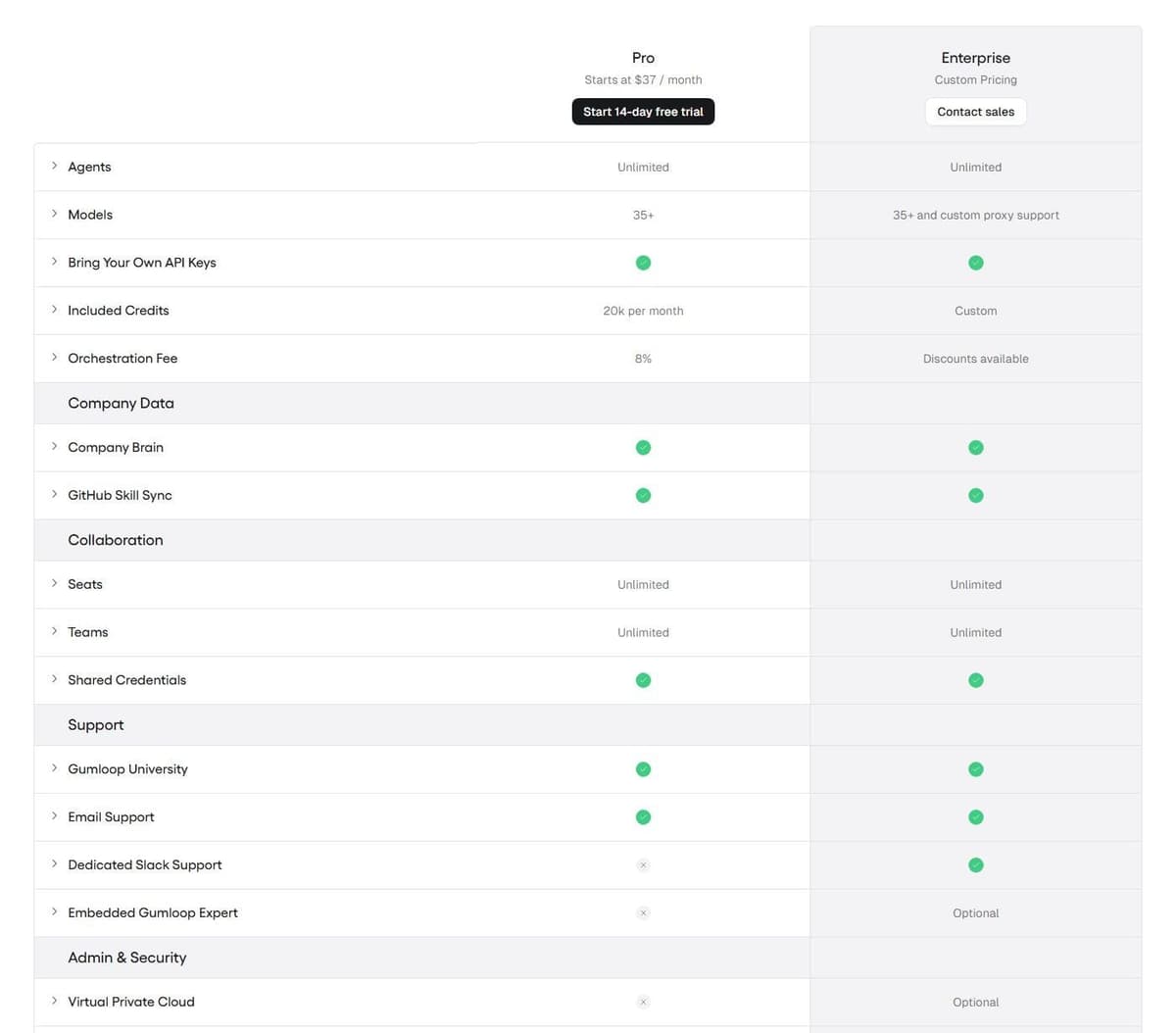
Gumloop describes itself as an AI agent platform. You build agents that use your tools and data, then run them on triggers, on schedules or through the API, with Python and JavaScript SDKs. Pro and Enterprise both list unlimited agents, unlimited seats and teams, 35+ models, bring-your-own API keys, shared credentials, Gumloop MCP and the Gumloop CLI. A growing team is not priced by headcount. Our guide to Gumloop alternatives compares other AI agent and automation platforms.
"Additionally, Gumloop charges you an 8% orchestration fee on the full list cost of the task (including tokens, compute, and tool calls). Please note that if you bring your own API key(s) for models, the orchestration fee increases to 16%."
Source: gumloop.com
Pro starts at $37 a month and includes 20,000 credits, made up of 7,400 credits plus 12,600 bonus credits, with credits indexed at $0.005 each. Enterprise is custom-priced through sales. Every new account starts on a 14-day free trial of Pro that requires a card. The trial is a one-time offer per customer and rolls into a paid Pro subscription unless you cancel first. Each run is billed at the list cost of model tokens, compute and paid tool calls, plus an 8% orchestration fee on that list cost. Bring your own model keys and the fee rises to 16%.
Two limitations. There is no permanent free plan on the pricing page. Credits do not roll over month to month outside Enterprise, so an unused allowance simply expires.
2. Dust: best for team agents on company data
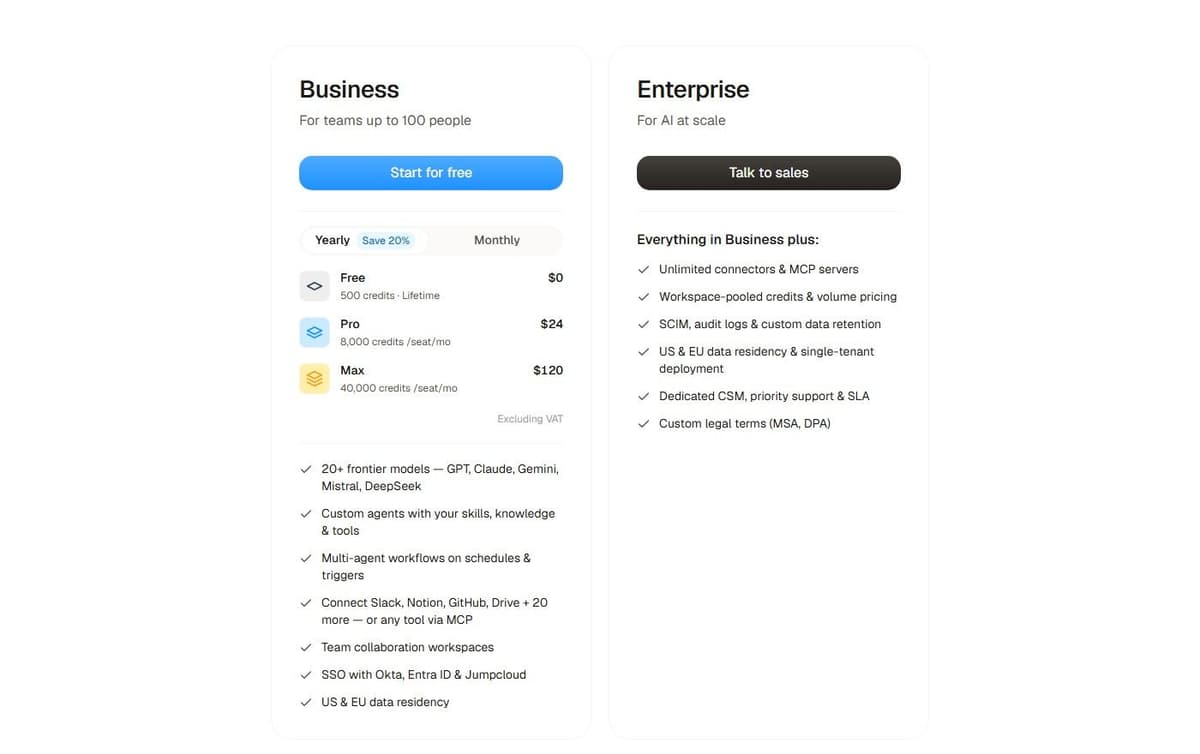
Dust builds agents that sit on your company's own material. You give an agent skills, knowledge and tools, then chain several into multi-agent workflows on schedules and triggers. Connect Slack, Notion, GitHub, Drive and 20 more sources, or anything else through MCP. Behind them sit 20+ frontier models including GPT, Claude, Gemini and Mistral, plus team workspaces, SSO on request for workspaces with at least five seats, and a choice of US or EU data residency.
Dust Business offers Free, Pro and Max seat types. Pro is $30 per seat a month, or $24 with annual billing, with 8,000 monthly credits. Max is $150 a month, or $120 with annual billing, with 40,000 credits. Prices exclude VAT. Free provides 500 one-time credits. Business supports teams of up to 100 people. Programmatic usage is listed at $0.01 per credit; Enterprise, arranged with sales, adds unlimited connectors and MCP servers, pooled credits, SCIM, audit logs and single-tenant deployment.
Two limits stand out. You pay per seat, and the plan comparison lists up to 3 data-source connectors, 5 remote MCP servers and 5 spaces on Business.
3. Zapier Agents: best for teams already running Zaps
For a team that already runs Zaps, Zapier Agents is the option that keeps agents and automations under one vendor. Zapier Agents Free includes 400 activities per month. An activity is not a complete agent run: one run can consume several activities. This allowance is separate from Zap task usage. Agents Pro costs $400 billed annually, equivalent to $33.33 a month, and allows up to 1,500 activities a month.
The platform underneath keeps its own meter. Zapier Free costs $0 a month and includes 100 tasks a month with Zap workflows, Tables and Forms. Professional costs $19.99 a month billed annually and includes 750 tasks a month. One MCP tool call consumes two tasks from that quota. Worth knowing before you wire an agent into a dozen MCP-driven steps. Copilot, the AI-powered building assistant, is available on every plan, with a daily cap on Free.
The limitation fits in one line. Agent activities and Zap tasks are two separate meters. A busy agent can drain the second one through the automations it sets off.
4. Latenode: for agent workflows with code and runtime billing
Latenode is a low-code automation platform with an AI agent builder, not a chat-first AI teammate. The comparison is not like for like. You build in a visual drag-and-drop editor and ask the AI Copilot for help inside a workflow. Pick from 335+ LLM models under one subscription, add custom JavaScript nodes when a step needs real logic, and drive sites that have no API using the headless browser.
Billing runs on workflow runtime in CPU seconds, not per operation and not per step. So extra nodes do not multiply the bill. Both plans include the first 10,000 CPU seconds each month. Free is $0 a month forever with no card. It caps you at 5 active workflows, one execution worker and 3 minutes per run. Pay as you go has no base fee and charges $0.00012 per CPU second in the 10,001 to 100,000 bracket, with unlimited active scenarios and 10 minutes per run.
One trade-off: cost follows run duration. CPU seconds do not map onto tasks or credits, so you have to measure your own workflows before you can compare.

5. Make AI Agents: best for agents inside visual scenarios
Make put agents inside the builder its users already live in. You create, run and debug an agent in the Scenario Builder. Give it context by uploading files instead of assembling a RAG workflow first, then let it orchestrate processes across 3,500+ apps by its own count. Make AI Agents are available on all plans with Make's AI Provider. Connecting your own AI provider requires a paid Make plan. With a custom connection, Make charges for operations and the AI provider bills token usage separately. Maia, described as a co-worker for AI and automation, turns plain language into automation and Make AI Agents, and is included in all plans.
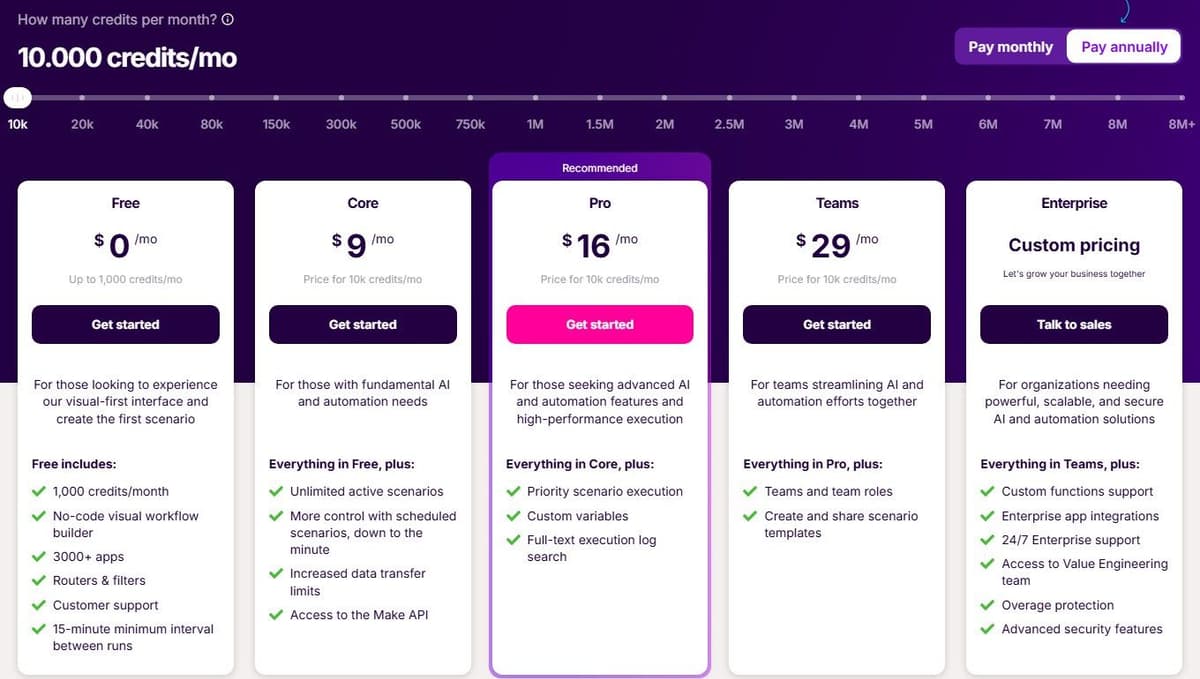
Pricing is credit-based. Ordinary module operations, such as adding a Google Sheet row or fetching Gmail data, consume a credit each, while Router and Filter consume none. Free costs $0 a month with up to 1,000 credits a month. With yearly billing selected, Core costs $9 a month, Pro costs $16 a month and Teams costs $29 a month, each billed annually and each carrying 10,000 credits a month.
Two caveats. Make AI Agents are still in beta. And because the meter counts operations rather than finished tasks, an agent that touches many modules per job burns credits faster than the plan sizes suggest.
6. Activepieces: best open-source alternative
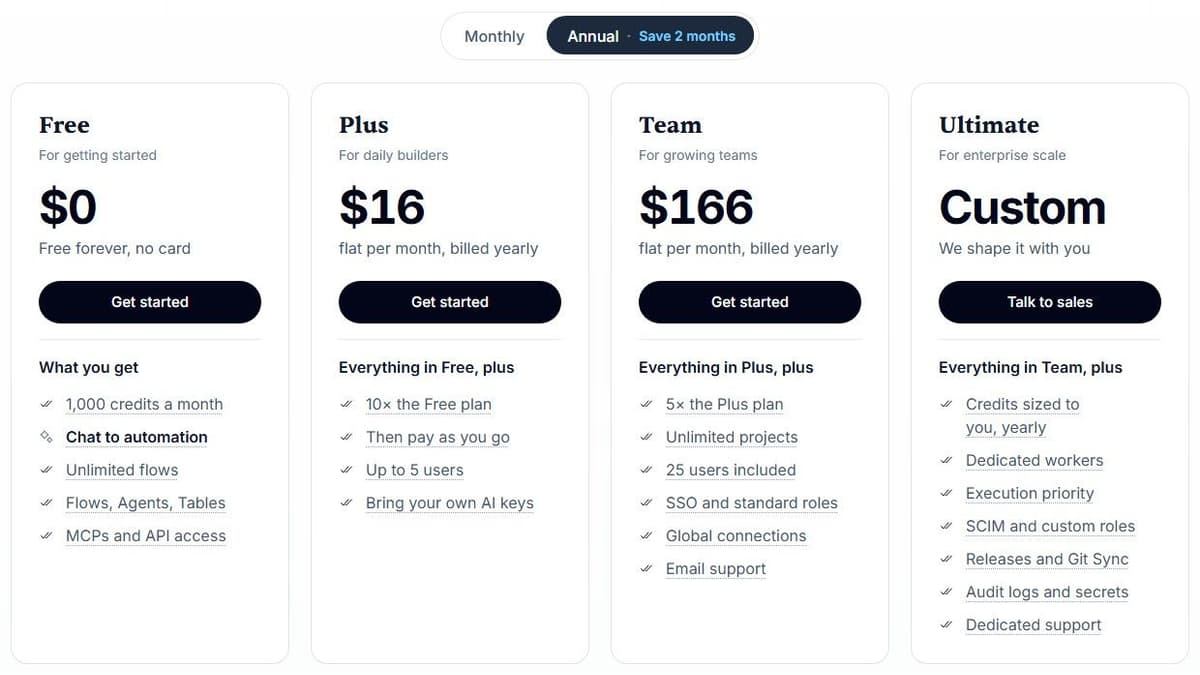
Activepieces Community Edition is a free, self-hosted option built on the MIT-licensed core. It has no credit meter or cap on runs and users. You pay for hosting and operations, and for any external services your flows use. Community Edition excludes features such as SSO, audit logs, projects and Git Sync. Its credit-metered plans cost the same on Activepieces' cloud or your own servers, and their credit allowances do not apply to the free Community Edition.
The plans on the Activepieces pricing page are metered in credits, and they cover 760+ integrations and unlimited automations, with the builder available for embedding inside another product. Free costs $0 with 1,000 credits a month for up to 5 users. Plus costs $16 a month billed annually with 10,000 credits a month for up to 5 users. Team costs $166 a month with 50,000 credits a month for 25 users, and Ultimate is custom-priced. Overage on Plus and Team costs $0.007 per credit. For ordinary steps, one credit covers a whole run no matter how many steps it contains.
AI is where that generosity stops. With Activepieces-supplied AI models, each AI step adds 2 credits for a fast model, 10 for a smart model or 20 for a frontier model; agentic actions add one credit each. On Plus and higher plans, using your own AI provider keys makes each AI step cost one Activepieces credit, with model usage billed separately by your provider. An agent-heavy build drains a monthly allowance far quicker than a plain integration flow does.
7. StackAI: best free tier for enterprise-style agent apps
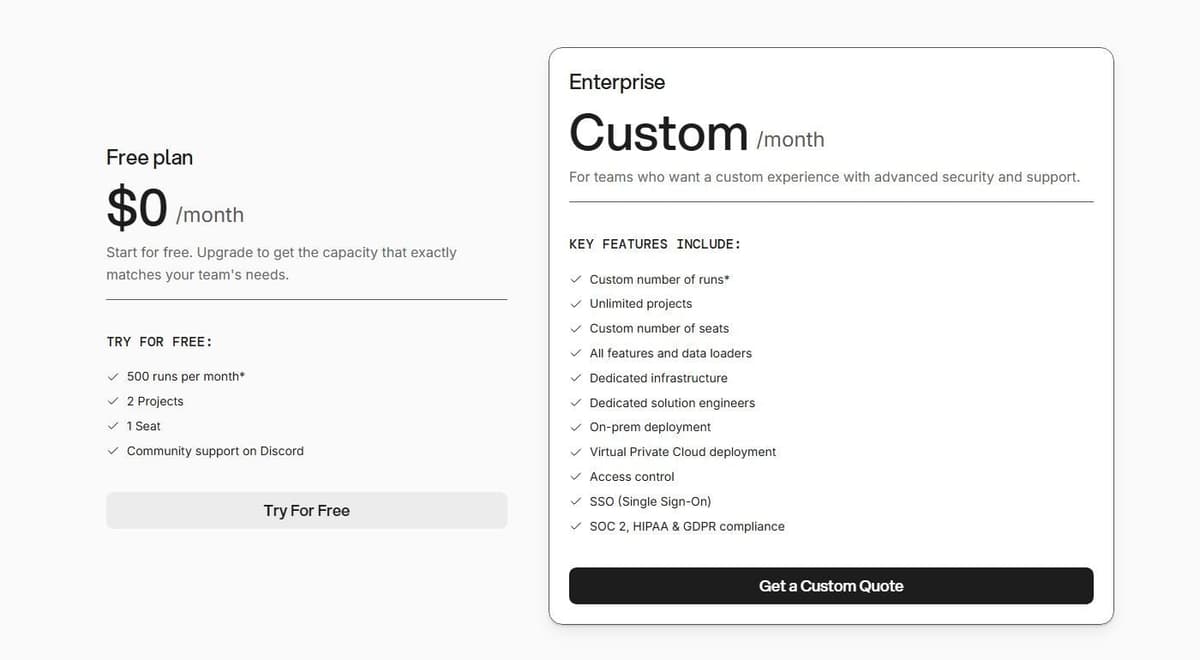
StackAI gives you a standing free tier for building agent apps rather than a countdown trial. Free costs $0 a month and includes 500 runs a month, 2 projects, 1 seat and community support on Discord. That is enough to put an internal tool in front of colleagues before anyone signs anything.
The plan comparison lists agent and flow modules, vision and speech modules, Python and JavaScript code logic, and data loaders for web scraping, file upload, Google Drive and Notion. It also lists a Chrome extension, a REST API and a Slack bot, plus knowledge bases and readers for PDF, Word and PowerPoint files. That is a wide surface for something you can start on without a card.
Enterprise is custom-priced. It adds a custom number of runs and seats, unlimited projects, all features and data loaders, dedicated infrastructure and solution engineers, on-prem or VPC deployment, access control, SSO and SOC 2, HIPAA and GDPR compliance. The gap between the two is the problem. Nothing sits in between, so the moment 500 runs or a single seat stops being enough, you are in a sales conversation.
8. Relevance AI: best for an enterprise AI workforce
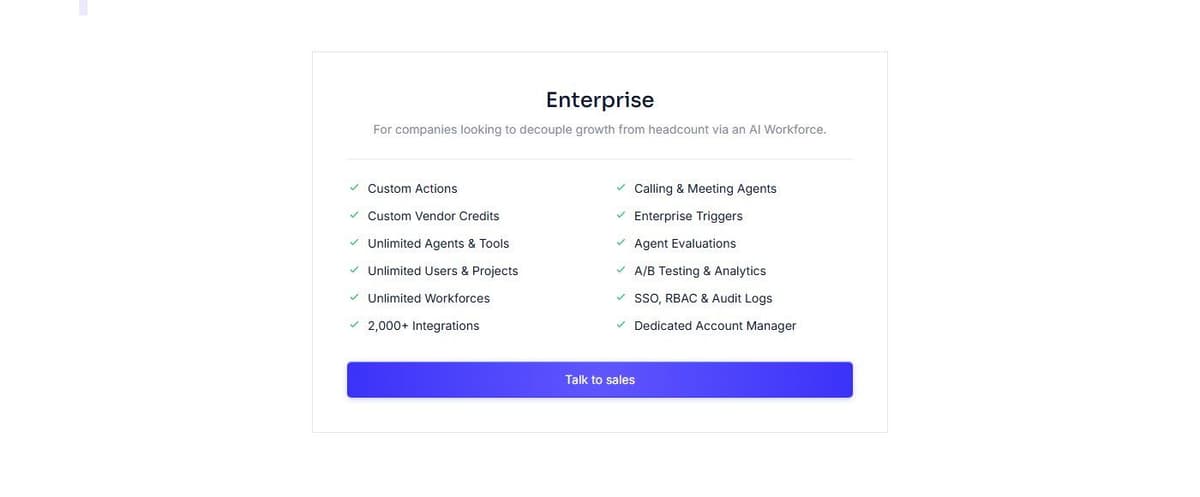
Relevance AI sells an AI workforce rather than a per-seat assistant, and it publishes exactly one plan: Enterprise, priced through sales. There is no self-serve price at all, so the only way to get a number is to ask. Any figure you find on a third-party page is worth checking against the vendor's pricing page before you plan around it.
What the plan covers is broad. Custom actions and vendor credits, unlimited agents, tools, users, projects and workforces, 2,000+ integrations, calling and meeting agents, enterprise triggers, agent evaluations, A/B testing and analytics, SSO, RBAC and audit logs, and a dedicated account manager. The evaluation and analytics side is the tell. It reads as a platform for running many agents as a team and measuring them, rather than for tending one person's inbox.
The limitation is worth stating plainly. With no published price and no free tier, you cannot size a budget from the website. A small team that wants to test an idea this week has no self-serve way in.
How to choose
Run through these before you commit to a meter.
- What the meter counts. Seats and credits per seat with Lindy and Dust, usage credits with Gumloop, Make and Activepieces, tasks and activities with Zapier, runs with StackAI, CPU seconds with Latenode.
- Whether the price scales with people or with work. A per-seat plan grows with headcount even in a month when nobody uses it.
- Where the agent lives. In Slack and email, on a canvas beside the scenarios you already run, or inside an app you ship to your own users.
- What the free tier or trial actually caps: runs, projects, seats, credits a month or CPU seconds, and whether it expires.
- Model choice and bring-your-own-key, which changes both the ceiling on quality and, in Gumloop's case, the fee charged on top of the model bill.
- MCP and integrations, including how MCP calls are metered. On Zapier one MCP tool call costs two tasks.
- Enterprise controls: SSO, SCIM, audit logs, data residency, single-tenant or VPC deployment, and who carries an SLA.
Compare agents using one repeatable task
Give each shortlisted tool the same fictional support request and the same small knowledge base. Ask it to find the applicable policy, draft a reply, propose a CRM update and wait for approval before writing. Include a missing customer record and an ambiguous policy so the test covers failure handling.
| Check | What a useful result looks like |
|---|---|
| Grounding | The answer points to the relevant supplied source |
| Tool access | Only the intended tools and records are available |
| Approval | The proposed write stays pending until approved |
| Recovery | A failed call can be retried without duplicating a record |
| Context | The next request uses the appropriate workspace context |
| Cost | The run exposes enough usage detail to budget repeated work |
This is an evaluation procedure, not a claim that every tool passed it. A connected app logo does not establish permission handling, output quality or safe recovery.
If the assistant will send follow-ups or calendar reminders, add two cases to that test: a thread in which the customer has already replied, and a meeting where the next step belongs to your team rather than to the customer. A useful result stops the follow-up in the first case and sends the customer nothing in the second. One user on r/AgentsOfAI described the cost of a miss: "I apologized, sent the proposal, and turned off every automatic message until we add an approval step."
For lead sourcing: Bardeen
If the Lindy work you want to move is mostly prospecting, Bardeen is a narrower tool built for it. It sells a web scraper, web search, enrichment and AI tools for lead sourcing, with Bardeen Agents to run them. Its meter is the row: each row an action creates costs 1 credit, enrichment rows cost 3, and importing data and utilities are free. Everyone keeps 100 free credits. Basic is $10 a month billed monthly for 100 more credits a month, and Premium is $50 a month with 1,000 credits a month, or $480 a year with 12,000. Unused credits expire at the end of each billing period. A team pays for the leads it pulls rather than for each person who asks, the opposite of Lindy's per-user pool. Its product pages center on lead sourcing, so inbox, meeting and Slack requests would still need another tool.




