



Quick answer: the best API integration platform for each need
Pick by the job. MuleSoft Anypoint for enterprise iPaaS with API management, Boomi for data and B2B flows, Workato for enterprise automation with a self-service tier, Celigo for ecommerce and finance. SnapLogic or Jitterbit for legacy and data integration, Zapier for the widest SaaS catalog, Make for visual scenarios on a budget, Pipedream for developer-first code if you already use it (its Workflows product shuts down on March 31, 2027). Activepieces for open source and self-hosting, Merge for product integrations through one unified API, and Latenode for custom AI-assisted integrations billed by runtime.
Prices are the vendors' published US prices; where a vendor publishes no list price, the entry names its billing model instead. Several pages price by a slider or task tier, so confirm the figure before you sign.
What an API integration platform is and what it is not
An API integration platform is software that connects applications through their APIs. It ships prebuilt connectors, field mapping, orchestration so steps run in order, error handling and retries when a call fails, and monitoring of what ran and what broke. The ordinary case: a CRM creates an invoice in the accounting system the moment a deal closes. Our explainer on what API integration is covers the requests and responses underneath.
It is not an API management tool. API management publishes, secures, throttles and versions the APIs your own team exposes. Integration runs the other direction. It consumes other systems' APIs to move work between them, and several vendors sell both, so the categories blur.
A unified API is a different thing again. It gives your product one interface to many third-party apps of the same kind, so customers connect their own accounting or HR system without a connector written for each.
A data pipeline tool is different too. It loads volume into a warehouse on a schedule instead of reacting to one record changing. Our guide to data pipeline tools compares managed ELT and no-code ETL.
Some systems in the chain have no usable API and can only send a scheduled file export. A platform can still carry that if it collects the file by email or SFTP, parses it and matches each row to a CRM record by a shared ID, so check file handling the way you check connectors: on either of Workato's recipe meters, for example, SFTP, FTP, email and the CSV, JSON, XML and File tools are all billable steps. A user on r/CRM described an escrow system that "can send scheduled custom CSV exports".
Other systems have an API but no webhook to announce a change. The platform then has to poll: call the API on a schedule, store the IDs it has already seen and act only on records that are new. Before you build that, check two things on your plan. The first is the shortest schedule: Make's Free plan runs scheduled scenarios no more often than every 15 minutes, against every minute on paid plans. The second is whether each check is billed: Zapier's polling checks never use a task, so confirm the same rule on any other platform before you set a one-minute schedule. Where the source does offer a webhook, use it, because the record arrives when it changes instead of at the next check.
Categories of API integration platforms
Enterprise iPaaS runs integration as a governed program: environments, role-based access, on-premises agents, B2B messaging and usually API management alongside. Sales teams sell it on annual contracts, sized by connections, endpoints or a credit pool. Pick it when audit, data residency and dozens of integrations matter. Enterprise integration suites are compared in our guide to iPaaS vendors.
SMB and no-code automation gives you a visual builder, a large app catalog and self-service signup. It fits when the systems are SaaS, volumes are modest and the builders sit in the business.
Developer-first platforms run code steps in real languages, with version control, secrets and a connector library that handles OAuth. Reach for one when the flow needs logic no visual editor expresses cleanly.
Unified APIs put one interface across many third-party apps in the same category, so your product ships customer-facing integrations without a connector per vendor. For integrations inside your own product, see our guide to embedded iPaaS platforms.
Open source and self-hosted engines run on your infrastructure under a license you can read, which matters when data cannot leave the network.
API integration platforms at a glance
Twelve platforms with their category, pricing model and entry price. Quote only means the vendor publishes no price.
| Platform | Category | Pricing model | Entry price |
|---|---|---|---|
| Zapier | No-code automation | Tasks | Free, $19.99+/mo yearly |
| Make | No-code automation | Credits | Free, $9/mo paid yearly |
| Workato | Enterprise iPaaS | Credits and quote | One-time credits; $75/mo |
| Latenode | Workflow automation | CPU seconds | Free, $0.00012/CPU sec |
| Boomi | Enterprise iPaaS | Quote or pay-as-you-go | $99/mo plus usage |
| MuleSoft Anypoint | Enterprise iPaaS | Mule Credits | $2,000/mo billed yearly |
| Celigo | Enterprise iPaaS | Endpoints and flows | Quote only |
| SnapLogic | Enterprise iPaaS | Endpoints per package | Quote only |
| Jitterbit | Enterprise iPaaS | Annual contract, quote | Quote only |
| Pipedream | Developer-first; Workflows closes Mar 31, 2027 | Credits | Connect: Free, $99/mo yearly |
| Activepieces | Open source, self-host | Credits | Free, $16/mo paid yearly |
| Merge | Unified API | Linked Accounts | Free, then $650 a month |
1. Zapier: best for the widest SaaS app catalog
Zapier Free is free forever at $0 a month with 100 tasks a month, unlimited two-step Zap workflows, Tables, Forms and Copilot. Professional starts from $19.99 a month and Team from $69 a month with 25 users included, both as listed in September 2026. Both come from a task-tier selector with a "Pay yearly (Save 33%)" toggle, and they are the yearly-billing rates at the smallest paid tiers: 750 tasks a month on Professional, 2,000 on Team. Set the selector to your volume, and to monthly billing if you will not pay a year up front, before budgeting.
A task is one successful action, according to Zapier's pricing page. Zapier's blog adds that polling for new data never uses one, and built-in steps such as Filter, Formatter and Paths are free. Professional adds multi-step Zaps, unlimited premium apps and webhooks. Speed is the Free plan's limit: it polls every 15 minutes against 2 minutes on Professional and 1 minute on Team and Enterprise. Zapier's own count on the same page is 9,000+ apps.
Loops and code steps are worth pricing before you build on Zapier. Formatter and Looping steps use no task themselves, but each action a loop repeats counts as a separate task, and each Code by Zapier run uses 1 task however little it does, with extended runtime billed at 1 task per 30 seconds. One user on r/zapier described "Huge task consumption just for passing data through lookup tables and loops".
2. Make: best visual scenarios on a budget
Make Free is $0 a month with up to 1,000 credits a month, the visual builder, routers and filters. With yearly billing, Core is $9 a month for 10,000 credits a month, Pro $16 and Teams $29. The same volumes cost $10.59, $18.82 and $34.12 monthly. Make labels the yearly toggle "Save 15% or more", and the saving differs by tier, about 15% at 10,000 credits a month. Prices climb with the credit volume you pick on a slider.
Most actions consume 1 credit each. The Router and error handler modules consume none, and code execution costs 2 credits per second. From Core upward you get unlimited active scenarios and scheduling down to the minute. Free is tighter: 2 active scenarios, a 15-minute interval and a 5-minute execution limit against 40 minutes on paid plans. Scenarios stop when credits run out.
3. Workato: best enterprise automation with a self-service tier
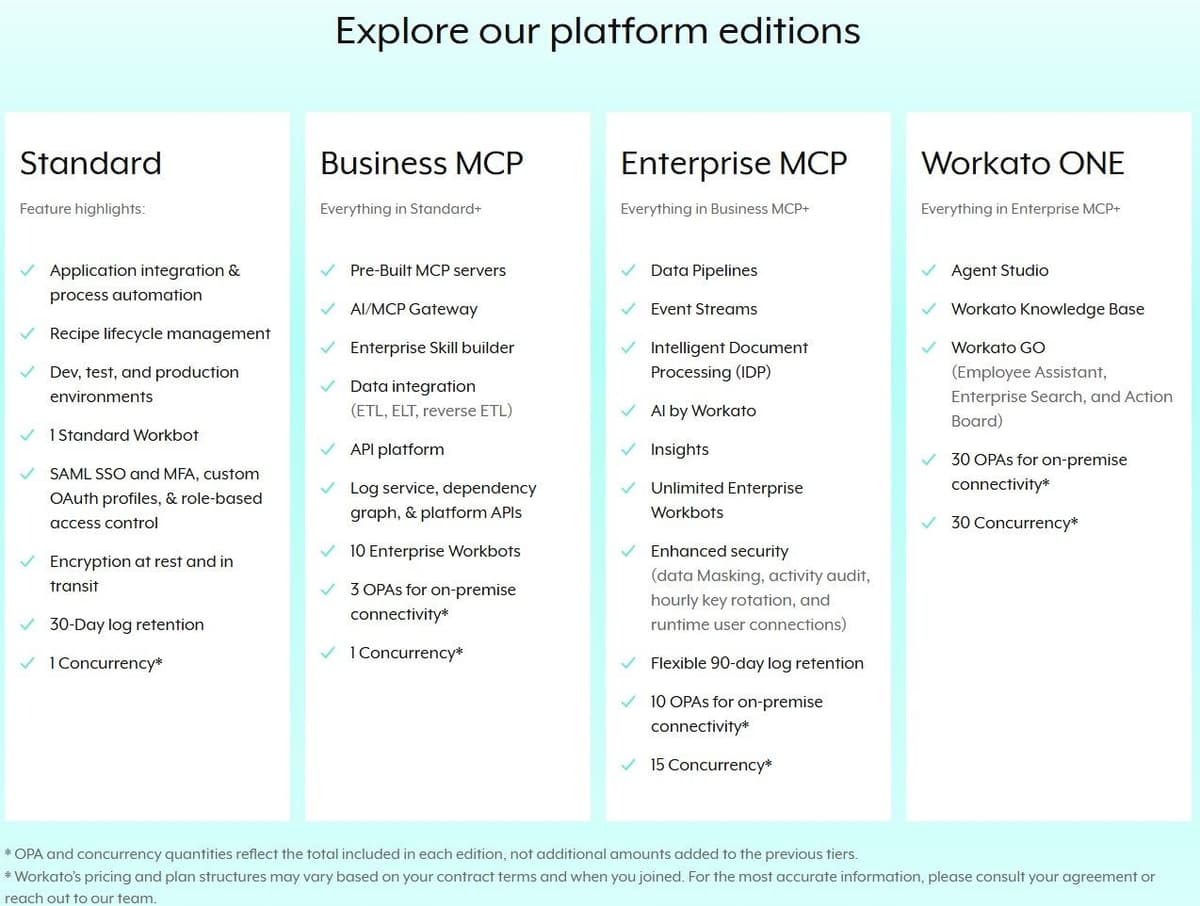
Workato publishes no prices for its sales-led platform editions. The self-service Free and Pro plans do carry list prices in Workato's docs, $75 to $1,275 a month. Free is a one-time grant of 50,000 credits. Pro sells recurring monthly credits at $75, $100, $275, $780 and $1,275 a month for 2,500, 3,500, 10,000, 30,000 and 50,000 credits, billed monthly by credit card. Unused credits expire at the end of the billing month. The sales-led editions are Standard, Business MCP, Enterprise MCP and Workato ONE.
Recipes are metered in Tasks: each successful action step counts, utility connectors included, while triggers and control steps such as IF conditions do not. Some contracts still meter business actions, which count only triggers and action steps in eligible apps. A failed job counts only the operations it completed. On Workato's own figures there are 1,200+ pre-built connectors, plus unlimited workspaces and users, as of September 2026. One wrinkle: customers who joined before February 2024 sit on a separate, older pricing model.
4. Latenode: for custom AI-assisted integrations billed by runtime
Latenode bills workflow runtime in CPU seconds, with no per-operation fees. The first 10,000 CPU seconds each month are free on both plans. Free is $0 a month: 10,000 CPU seconds, 5 active workflows, one execution worker and a 3-minute limit per run. Pay as you go has no base fee and includes the same 10,000 CPU seconds. After that it charges $0.00012 per CPU second from 10,001 to 100,000, $0.00011 from 100,001 to 200,000 and $0.00010 from 200,001 to 300,000, each bracket billing only the time inside it. Higher brackets carry lower rates. Nodes calling paid external providers add PnP tokens at 1 token per dollar of provider usage.
The visual builder has custom JavaScript nodes, webhook triggers, a headless browser for sites without an API, and a built-in database with global variables. An AI Copilot sits in every workflow, next to an agent builder and 335+ LLM models under one subscription. Optional add-ons run $5 to $70 a month, reserved execution workers $10 each. The limit is scope: a workflow automation platform, not an enterprise iPaaS with API management.

5. Boomi: best enterprise iPaaS for data and B2B flows
Boomi sells four separate products: Integration, API Management, Data Hub and Data Integration. Every subscription edition shows a Talk to sales button instead of a price. Boomi bills subscriptions annually, pay-as-you-go monthly. Integration runs Professional, Professional Plus, Enterprise and Enterprise Plus, with enterprise connectors at extra cost, clustered runtime on Enterprise and message queuing on Enterprise Plus.
"Choose the perfect plan for your business. Get the full Enterprise Platform, pick and choose capabilities, or simply pay as you go. ... Try for Free Get started with a 30-day trial of our full platform capabilities."
Source: boomi.com
The Pay-As-You-Go card prices that option at $99 per month plus usage, then lists unlimited usage among what it includes. The page never defines the usage unit or the rate, so read both lines and confirm with Boomi before purchase. The 30-day trial costs $0, no credit card. Boomi's own positioning and count put 1,000+ enterprise applications behind an Agent Control Plane and governed MCP tools. Integration's standard features include email and community support only, with production deployment and no test or development environments.
Boomi's Pay-As-You-Go documentation fills in the usage rate: a flat $0.05 per Boomi Message on top of the $99 base fee, which is charged even in a month with no Messages. A Message is each inbound or outbound document, including responses to request/response calls; internal component-to-component messages do not count. The FAQ also says the plan is currently open only to active trial users, who opt in with a credit card.
6. MuleSoft Anypoint Platform: best iPaaS with API management
As of September 2026 MuleSoft's own pricing page publishes a starting price. Packages start at $2,000 a month, billed annually, each including core capabilities plus an allocation of Mule Credits. The page does not publish how many credits a package includes, or the credit rates. Every package carries a Contact sales button.
Mule Credits are one shared unit spent across integrations, API management, automation and agents. Each usage type draws at its own rate, and the rate falls as usage rises. No rate is published, so you cannot convert credits into runs or API calls from the page. Three buying models are billed annually: Pre-Purchase with no minimum credit purchase, Pre-Commit with a $50,000 minimum annual commitment drawn down monthly, and Unlimited at a custom fixed price. Integration, API management and agents sit on one platform and one credit pool. The page no longer names vCores or the older Anypoint editions, so old core-based quotes will not map.
7. Celigo: best for ecommerce and finance integrations
Celigo does not publish list prices on its pricing page. Pricing follows the endpoints and flows you subscribe to, at a flat rate rather than per task or transaction. Celigo states there are no volume-based charges and no overage fees, and more endpoints go through your Account Manager. The three editions differ by capability. Standard has MFA and role-based access, Professional adds API Builder, Lookup Cache and a sandbox, and Enterprise includes unlimited endpoints. How many endpoints each lower edition includes is not published, so pin that down in any quote.
Every edition carries built-in API management for RESTful, SOAP, GraphQL and WebSocket APIs, an Agent Builder and an MCP Server, and you drive it through CLI, Platform MCP or API. The page links to an Integration Marketplace of prebuilt integration apps but gives no count. Its "#1 rated iPaaS for enterprise automation" line is Celigo's own marketing claim.
The ecommerce and finance fit is Celigo's own positioning: its page lists Ecommerce and Finance among its solution areas and NetSuite, SAP, Shopify, Amazon and Walmart among common applications. Store-side tools for carts, shipping and support are compared in our guide to ecommerce automation tools.
8. SnapLogic: best for legacy and data integration
SnapLogic sells Essential, Professional and Enterprise One packages. It publishes no price figure and no per-endpoint rate. Pricing is customized through sales. The package price follows the data and application endpoints you connect, and it is the same whether the platform runs on GroundPlex or CloudPlex, so deployment does not change the bill. Inside a package, pipelines, data movement and integrations are unlimited, and SnapLogic states ingestion is unlimited.
The unlimited claim covers volume, not capability. Core Snap Packs come with the base packages while premium Snap Packs are sold a la carte, and AgentCreator, API Management, AI Gateway, AutoSync, ELT and Advanced Security are paid upgrades. Every package includes online training, a customer success manager and support. The "agentic integration and applied AI platform" line is SnapLogic's own tagline, and with no published rate only a quote will size the cost.
9. Jitterbit: best for mid-market integration with EDI
Jitterbit publishes no prices. Its pricing page is a feature table with a Request a Quote button, and its products require an annual contract with custom pricing. The iPaaS table gives shape without prices. Standard, Professional and Enterprise list 2-3, 5 and 8 or more connections, 2, 2 and 4 private agents, and 2, 99 and 99 environments. App Builder has four editions allowing 4, 10, 20 and a custom number of apps, with no per-user fees. Jitterbit sells Harmony AI, App Builder AI, iPaaS AI and Harmony EDI as bundles with no published price.
Support response targets run 48 hours on Standard, 24 hours on Professional and 6 hours on Enterprise, with unlimited cases a year. The AI assistants are partly paid extras. The API calls per month row of the table carries only checkmarks, so ask for that allowance in writing.
10. Pipedream: best developer-first platform for existing users
Pipedream no longer sells Workflows plans, and the Basic and Advanced plans are gone from its pricing page. As of October 2026 the page lists only Pipedream Connect plans: Free at $0 for building and testing in development, with no production environment; Startup at $99 a month billed annually, or $150 billed monthly, with 10,000 usage credits and 100 external users included; and Business, custom-priced on an annual contract. Developers comparing code-first options can start with our guide to Pipedream alternatives.
Check the timeline before you build anything more on it. Pipedream's documentation says Pipedream Workflows will shut down on March 31, 2027, and Pipedream is no longer accepting signups or subscriptions for Workflows; existing workflows keep running until that date. Pipedream Connect, which covers its Connect API, MCP Servers and API Proxy, is not affected.
A Workflows credit is one 30-second unit of compute at 256 MB of memory, per workflow segment. Raise the memory and credit use rises in 256 MB steps, so 512 MB doubles the cost of the same run. Steps run Node.js, Python, Go and Bash code, and Pipedream says it integrates 3,000+ apps.
11. Activepieces: best open-source and self-hosted option
Activepieces Free is $0 with 1,000 credits a month for up to 5 users. Plus is $16 a month billed annually, with 10,000 credits a month for up to 5 users. Team is $166 a month on the same annual billing, with 50,000 credits a month for 25 users, and Ultimate is custom-priced. Month-to-month rates are higher, so check the billing toggle before you budget. Overage on Plus and Team costs $0.007 per credit. Every plan runs on Activepieces' cloud or your own servers at the same price, with unlimited automations and every integration.
One credit covers a whole run, however many steps it has. That holds for ordinary steps only. AI steps cost 2 credits on a fast model, 10 on a smart model and 20 on a frontier model. Community Edition is a free self-hosted build on the MIT-licensed core, with unlimited flows and users and no credit system, and Activepieces lists 760+ integrations. That edition leaves out projects, SSO, audit logs and Git Sync, so a governed self-hosted deployment means a paid plan.
12. Merge: best unified API for product integrations
Merge's Launch plan links 3 production Linked Accounts for free. After that it costs $650 a month for up to 10 total production Linked Accounts, with $65 per Linked Account above that. Professional and Enterprise carry no list price. Merge sells both as contract-based pricing, Professional adding custom fields and custom sync frequencies, Enterprise an audit trail plus support and uptime SLAs. The integrations menu lists six unified API categories: accounting, ATS, CRM, file storage, HR and ticketing.
"Link 3 production Linked Accounts for free ... Pay $650/month for up to 10 total production Linked Accounts. $65 per Linked Account after. ... Contact us for volume discounts"
Source: merge.dev
The meter is production Linked Accounts, not API calls or records. Data usage is unlimited on every plan. Launch is capped instead by 100 requests a minute. As of September 2026 the page does not say whether a Linked Account is counted monthly-active or once ever, or whether unlinking stops the charge, so confirm how yours will be counted. Every plan gets access to all production integrations, so the plan sets how many Linked Accounts you may connect, not which connectors you may use. Launch syncs Daily only, with email-only support and 3-day log retention.
How API integration platforms are priced
A handful of meters cover this market. Zapier counts tasks, meaning successful actions. Credits mean different things by vendor: one credit per action on Make, one per run on Activepieces before AI steps, one per 30 seconds of compute on Pipedream Workflows. Workato counts Tasks, the successful action steps in a recipe, or business actions on some contracts. Celigo and SnapLogic price by endpoints and flows, so the bill follows what you connect rather than how much runs. On Merge the unit is the Linked Account, an end customer. Cores have largely gone: MuleSoft now names only packages and Mule Credits.
What a meter excludes matters as much as what it counts. Zapier charges nothing for polling checks or built-in steps such as filters and paths. Make's Router and error handlers consume no credits. Workato skips conditional statements and counts only the operations a failed job completed. Read those rules before modeling a bill: a branchy flow with retries rarely costs what the step count suggests.
Costs sit outside the meter too: annual commitments such as MuleSoft's $50,000 Pre-Commit minimum, premium connectors billed separately by Boomi and SnapLogic, extra environments, seats and support tiers that change by edition.
How to choose an API integration platform
- List the systems and the direction of data first. A two-way sync is a different product from a one-way notification.
- Check the exact connector actions, not the logo. A vendor listing an app may not support the object or the field you need.
- Check which API styles the platform speaks. REST covers most SaaS apps, but an older ERP or finance system may expose only SOAP, and some product APIs use GraphQL. Workato, for one, connects custom applications over REST or SOAP. Where no connector exists, ask whether you can build one from an OpenAPI definition or a Postman collection, as Microsoft's custom connectors allow.
- Decide who builds and maintains the flows. Engineers want code steps, secrets and version control; operations teams want a canvas and templates.
- Pin down deployment and data residency. Self-hosting, private agents and regional hosting are edition-level decisions, not settings you flip later.
- List the security controls your auditors will ask about: single sign-on, role-based access, audit logs and a current SOC 2 report. These often depend on the edition. Celigo Standard has multi-factor authentication and role-based access with SSO as an option, Workato adds data masking and activity audit from its Enterprise MCP edition up, and Boomi's Trust Center lists Boomi Integration and API Management as SOC 1 and SOC 2 compliant.
- Test error handling and retries on a real flow. Break it on purpose, then read what the run log tells you a week later.
- Read what one unit of the meter buys and what it excludes: polling, filters, branches, failed steps, AI calls and code execution time.
- Add environments, premium connectors, seats and support into one annual figure per vendor, then compare those figures, not headline prices.
- Run a two-week pilot on one integration you actually need, and price the rest from the usage it produced.
For a sync between a CRM and an accounting or order system, decide which system owns each record and field, and give both sides one shared customer ID so a retry updates a record instead of duplicating it. Prove the flow end to end on a single invoice, then reconcile closed deals against invoices on a schedule. One user on r/hubspot put it this way: "In every portal I've worked with, the sync degrades over time rather than breaking cleanly, so I don't fully trust it even after months of stability."
Postman for testing an API before you automate it
Postman is an API platform rather than an integration platform. Its Free plan is pitched at individuals building and testing APIs, with an API client, specs, mock servers and the Collection Runner. Use it to try an API's endpoints, authentication and payloads, and to save the working calls in a collection, before you build the flow on an integration platform. Free is $0 a month for one user, Solo $9 a month for one user and Team $19 per user a month, both paid plans billed annually, and Enterprise is priced through sales.
Which platforms work together and which replace each other
An iPaaS and an API management tool usually coexist rather than compete. One consumes other systems' APIs, the other publishes and governs your own. Boomi, Celigo and MuleSoft sell both, which is convenient, though buying from one vendor is not the same as needing both. Our Dell Boomi vs MuleSoft comparison sets two of them side by side.
A unified API such as Merge sits inside your product, behind a feature your customers use. It does not replace the iPaaS running finance and HR flows internally, and the iPaaS does not replace it.
An SMB platform and an enterprise iPaaS rarely both survive a budget review. Pick the one that matches who builds and who audits. Open-source platforms replace a hosted one when self-hosting is a hard requirement, not when it merely sounds cheaper.
A workflow platform such as Latenode, Zapier or Make can call an API directly instead of waiting for a prebuilt connector. A missing logo costs you effort rather than blocking the job. None of these is the overall winner without a scenario attached.
If an AI agent will take the actions, such as creating the invoice or updating the CRM, let it call flows the platform already runs rather than raw APIs, so authentication, retries and the run log stay in one place. Several vendors here expose that layer to agents: Celigo includes an MCP Server on every edition, SnapLogic says its Enterprise MCP turns pipelines into tools agents can call, and Boomi positions governed MCP tools behind its Agent Control Plane. A user on r/AgentsOfAI described the other route: "Handing the model a tool and hoping is how I started, and it broke in many different places."
API management tools that sit beside an integration platform
Azure API Management and IBM API Connect often appear on API integration shortlists, but both publish, secure and govern the APIs your own team exposes rather than move records between apps. Google Cloud's Apigee and Kong, whose gateway is open source under the Apache 2.0 license, compete in the same category.
Azure API Management publishes APIs hosted on Azure, on premises and in other clouds. Its Consumption tier is billed per execution, and the first 1 million API operations per subscription are included. Above that, Microsoft's retail price list sets $0.035 per 10,000 operations in the East US region. The Developer tier carries no SLA, and Microsoft says it is not suitable for production. For a gateway inside your own data center, Microsoft offers the self-hosted gateway for production use on the Premium tier.
IBM API Connect covers the API lifecycle from design and testing to management, with a developer portal and monetization. It runs as a service on AWS, as a single-tenant Reserved Instance on IBM Cloud, or as self-managed software on premises or across clouds. Pay-as-you-Go has no upfront costs, while the Standard tier, sized at 100,000 or more API calls a year, and the Premium tier, at 100 million or more, are sold annually. IBM prices through an estimator or a quote, and Pay-as-you-Go, Standard and Premium come with a 30-day free trial.
SAP Integration Suite for companies built on SAP
SAP Integration Suite is SAP's own integration platform and the natural comparison when SAP runs the core of the business. It comes in Starter, Standard and Enhanced editions, sold by quote and metered in messages: a message larger than 250 kilobytes is charged as one extra message for each further 250 kilobytes or part of it. SAP-to-SAP application integrations built on SAP's prebuilt content are free and unlimited, and SAP counts more than 3,400 prebuilt integrations for SAP, third-party and e-government applications.
Starter caps you at 10 custom integration flows and leaves out B2B libraries, Open Connectors with their 200+ third-party connectors, API management and edge runtimes for a private cloud or on premises. Standard and Enhanced include all of those, and only Enhanced adds the MCP Gateway, which exposes APIs and integrations to AI agents as MCP servers. If most of your flows touch SAP, price it against MuleSoft and Boomi. If SAP is one system among many, the free SAP-to-SAP allowance counts for less than the reach of the connector catalog. Our guide to MCP servers for automation compares the platforms and gateways that do the same for other apps.




